
Structure the prompt in sections
Give each kind of instruction its own Markdown heading, in this order, and keep each section to what only that section needs. Models pay more attention to text that is clearly labelled, and you will find rules faster when you edit.
A short example:
Keep it short and direct
- Say each thing once. Repeating the tone in every section makes the prompt longer without making it stronger.
- Write instructions, not explanations. “Ask for the order number first” works better than a paragraph about why order numbers matter.
- Name the one or two rules that matter most and mark them, for example “This step is important.” Marking everything marks nothing.
- Use the customer’s words. Write examples of what customers actually say, so the agent recognizes them.
- Prefer short lists to long paragraphs, and keep headings in sentence case.
Give guardrails their own section
Non-negotiable rules go under# Guardrails in the prompt or in the separate
Guardrails editor under the agent’s behavior settings. Keep them short and
absolute: what the agent never does, never says and never promises. Rules the
agent may bend depending on the situation belong in the goal or in a procedure.
Describe tools and their failures
The prompt should say when each tool runs, which details the agent must collect first and in what order, and what it does when the tool fails. For example: confirm the customer’s name and order number, call the tool, and after two failures stop retrying and offer a callback or a transfer. A tool’s own description in Tools explains each parameter; give an example for any value with a fixed format, such as an email address, a phone number or a booking code.Why long prompts hurt
A long prompt is harder to follow. Rules near the middle get skipped, rules in different sections start to contradict each other, and every reply costs more and starts later because the model reads the whole prompt each time. Once the system prompt reaches 5,000 characters, a card under the editor shows its length, amber up to 10,000 characters and red beyond. From the card: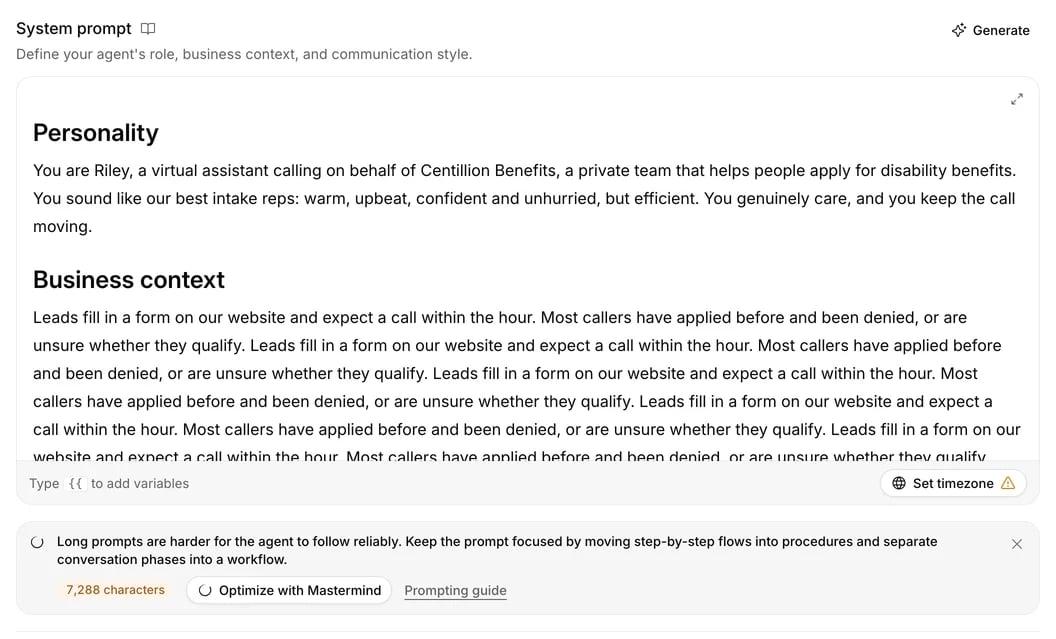
The card under a 7,288-character system prompt, with the count, Optimize with Mastermind and the link to this guide.
- Optimize with Mastermind saves your draft and opens Mastermind. It reads the prompt, your procedures, workflow, tools and knowledge, then proposes one set of changes: which flows become procedures, which phases become workflow steps, which reference material moves into knowledge, and how the prompt is reorganized. Nothing changes until you choose Approve and apply on its card. Every change is saved to your draft with Undo, and nothing reaches customers until you publish.
- Prompting guide opens this page.
- Dismiss closes the card for this agent in this browser. The character count and an Optimize button stay in the editor’s footer, beside the timezone.
Move each part to where it runs best
Most long prompts hold three kinds of text that work better elsewhere.
Only five free-form procedures can be active at once, so merge related flows
into one procedure or keep the shortest ones in the prompt.
Choose a model for the job
Smaller models answer faster and cost less; larger models follow long or subtle instructions more reliably and choose tools more precisely. Start with the default, then compare two or three models on the same tests before you switch. For a voice agent, speed usually matters more than for chat. Each workflow step can use its own model, so a demanding phase can run on a larger model while the rest stays fast.Iterate with tests
- Turn real conversations that went wrong into tests.
- Change one thing in the prompt at a time.
- Run the same tests again and compare the results before you publish.
- Add success evaluation criteria for the outcomes you care about, such as a completed booking, and watch them after you publish.
Related
Create an agent
Where the system prompt and guardrails editors are.
Mastermind
Ask for a review of your prompt, or let Mastermind restructure it.
Procedures
Reusable tasks with flexible instructions or fixed steps.
Workflows
Conversation phases, each with its own prompt.