
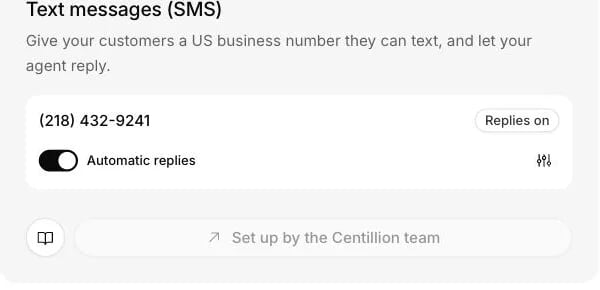
The SMS card on the Channels page shows the business number and its Automatic replies switch.
What it does
- Gives your business a local US number, bought and registered with US carriers by the Centillion team, and assigned to your agent.
- Answers each text in one or two plain sentences, without formatting or emoji.
- Adds the opt-out line US carriers expect to the first text your number sends each customer, and leaves it out after that.
- Honours STOP and START, and puts a customer who texts STOP on your workspace’s do-not-call list.
- Shows whether the carrier reported each reply sent, delivered or failed.
What you need
- Admin rights on the Centillion workspace.
- A plan with integrations: Hobby and up. See plans.
- Your legal business name, your EIN, and a website with a privacy policy, for carrier registration.
Set it up
You do not connect SMS yourself. The card on the Channels page reads Set up by the Centillion team.1
Ask for a number
Contact support to get a number. The Centillion team buys a local US
number for your business.
2
Register with carriers
The team registers the number with US carriers under the A2P 10DLC
program, using your legal business name, your EIN and your website with
its privacy policy. Registration usually takes one to three weeks. Until
it is approved, customers can text the number but replies are not
delivered.
3
Turn on replies
The number is assigned to your agent and appears under Channels with
replies paused, like any new connection. Turn on Automatic replies.
4
Test it
Text the number from your own phone. The first reply ends with the
opt-out line, and the conversation shows up in Recent activity.
Use it every day
Replies are short
The agent answers in one or two plain sentences, without formatting or emoji. Carriers bill a long text as several messages, and a short answer reads better on a phone. Pictures a customer sends are not read. A picture with a message is answered from the words; a picture on its own is marked Needs review for a person.Answering yourself
SMS conversations appear in Helpdesk like any other channel, and a person takes over from the helpdesk inbox. Take over a conversation and your reply goes out as a text from the same number, and the agent stops answering that customer until you hand it back. Replies cannot carry files and can be up to 1,533 characters, which leaves room for the opt-out line on the first text your number sends to each customer.STOP and START
The first text your number sends to each customer ends with “Reply STOP to opt out, HELP for help. Msg & data rates may apply.”, whether the agent or someone on your team writes it. US carriers expect it, and later replies leave it out. A customer who texts STOP, END, QUIT, CANCEL, UNSUBSCRIBE, STOPALL, REVOKE or OPTOUT gets a confirmation from the carrier network and no further texts from the number. The agent does not answer it. Their number also goes on your workspace’s do-not-call list, so no agent calls it either. START or UNSTOP turns messages back on. YES does the same for a customer who opted out; from anyone else it is an ordinary reply, such as confirming a time. Neither takes the number off the do-not-call list.Delivery and errors
Each reply shows whether the carrier reported it sent, delivered or failed. A reply that fails with error 30034 came from a number whose registration is not approved yet. If the carrier refuses one customer’s number (it cannot receive texts, or the customer opted out), only that reply fails. If Twilio refuses the whole number, the connection shows Needs attention. Contact the Centillion team to restore it, since the number is not connected through a sign-in.Limits and good to know
- US numbers only. The number is a local US number, and US carrier rules apply to it.
- Registration first. Replies are not delivered until A2P 10DLC registration is approved, usually one to three weeks.
- No files. Replies, from the agent or your team, cannot carry files.
- Length. Team replies can be up to 1,533 characters. The agent keeps its own answers to one or two sentences.
- Pictures. Pictures customers send are not read.
- Texts only. The number does not answer calls unless voice is set up for it separately.
Questions
Why are customers’ texts arriving but my replies are not delivered?
Most likely the number’s carrier registration is not approved yet. Until it is, replies are not delivered. A reply that fails with error 30034 came from a number in that state. Registration usually takes one to three weeks.Can I connect my own number for texts?
No. SMS is set up by the Centillion team, who buy a local US number for your business, register it with carriers and assign it to your agent. Contact support to get one.Will the same number take phone calls?
Not on its own. Calls are a separate voice setup, which can use the same number. If you keep your current number for calls, share the new number for texts.What happens when a customer texts STOP?
The carrier network confirms it and the number sends that customer nothing more. The agent does not answer, and the number goes on your workspace’s do-not-call list. START or UNSTOP turns texts back on, but does not take the number off the do-not-call list.Why does the first reply end with a line about STOP and HELP?
US carriers expect it. The first text your number sends to each customer carries it, whether the agent or your team writes it, and later replies leave it out.Can the agent read a photo a customer sends?
No. A photo with words is answered from the words. A photo on its own is marked Needs review for a person.Try it
Once your number is live, turn on automatic replies and text it from your own phone. The reply comes back as a text, and the conversation shows up in the dashboard.Start free
Start on the Free plan, or take a seven-day trial of a paid plan. Your agent is live on your site in an afternoon.
Book a demo
Fifteen minutes with the team, on your own use case.
Related
What Centillion is
The product in one page: agents, knowledge, channels and the helpdesk.
Phone
Let the agent answer calls on your numbers too.
Helpdesk
Take over a text conversation and reply from the same number.