Chatbot vs AI agent: what changes for customer support
A chatbot answers from a script and ends the chat. An AI agent works for your business inside its rules. Learn the difference and build an agent.
Guide
Chatbot or AI agent: who answers your customers, and who they work for.
The chatbot vs AI agent question sounds like a vocabulary debate. In practice
it decides what your customers get when they write to you, and what your
business gets out of the conversation. This guide explains the difference, the
risks on each side, and how to set up an agent that works for your business.
A classic support chatbot is a decision tree with a text box in front of it.
Someone on your team maps the questions they expect, writes an answer for each,
and links them with buttons or keywords. When a customer’s words match a
branch, the bot replies. When they do not, it shows a menu again or hands over
a link to a help article.Most chatbots are built to deflect. The goal is to close the conversation
without a person, and success is counted in tickets avoided. That is a fair
product for a queue of simple, repeated questions such as opening hours or a
returns address. It breaks down in three places:
Questions nobody planned for. Every tree is a bet on what customers will
ask. A customer with a slightly different problem falls off the edge.
Anything that needs doing. A bot that can only answer cannot change an
order, check a delivery or book a slot. The customer still has to call.
Moments that decide revenue. A deflection bot has no goal beyond ending
the chat, so it treats a customer about to cancel the same way it treats a
question about parking.
An AI agent reads the customer’s message in their own words, finds the
relevant facts in material you gave it, and writes an answer. It can also act:
call your systems to look up an order, update a cart, open a ticket or hand
the conversation to a person.The useful way to think about an agent is as a representative of your
business. It knows your products, your policies and how you talk to people. It
has a goal you set, such as a resolved problem, a booking, or a customer who
stays. It works inside rules you wrote down. Every promise it makes should be
one you would sign.That changes what you measure. A chatbot is judged on how many conversations
it ended. A representative is judged on what happened for the customer and the
business: was the issue resolved, did the handoff reach the right person, did
the customer come back.
An agent that writes its own answers and takes actions needs more care than a
tree of canned replies. Most problems come from a few causes.No knowledge, confident tone. A language model with no material to draw on
still writes fluent sentences. Give the agent your real content before it
talks to anyone, and check that it says “I don’t know” when the answer is not
there.Rules that live only in a prompt. Instructions such as “never offer a
refund over 50 dollars” are guidance the model follows most of the time. A
rule that must hold every time belongs in the tool itself: what the tool
is allowed to do, which inputs it accepts, and whether the customer must
confirm. Write policy where it is enforced, and keep the prompt for tone and
judgement.Actions without confirmation. Changing an order or an address should need
an explicit yes from the customer. Read the conversation afterwards to see
whether that step held.No way out. Some customers want a person, and some problems need one. Plan
the handoff before launch: who receives it, on which channels, and what the
customer is told while they wait.No test before customers see it. Run simulated conversations against the
agent, including a difficult customer and a customer who tries to get it to
break its rules, before you switch a channel on.
Customers are starting to use personal AI assistants that write, compare and
follow up for them. When one of those reaches your support, it will ask
precisely, keep asking, and read your terms closely. A bot built to end
conversations does poorly against that kind of counterpart. A representative
that knows your policies and holds to them is what you want on your side of
the conversation.
Centillion builds AI agents that answer your customers from
knowledge you control, use the tools you enable, and hand off to your team
through the helpdesk. Start from
creating an agent.
1
Write who it works for
Open Agent → Instructions and replace the role’s template in the
General editor with who the agent works for, who it talks to, what to
do when it does not know something, and how formal to be. Facts about your
products go into knowledge, where you can update them without touching the
instructions.
Agent configuration: the system prompt and first message, with voice and model settings on the right.
2
Add guardrails
In the Guardrails editor on the same page, list the topics the agent
should stay away from, such as competitors, or legal or medical advice.
Guardrails are added to the agent’s prompt; nothing checks a reply against
them afterwards. The separate Guardrails page sets the rate limit and
spam detection.
Guardrails: the rate limit for one visitor and spam detection, with the saved settings on the right.
3
Give it your knowledge
Under Knowledge base → Data sources, add your website, documents,
Q&A and Notion pages. Training runs on its own after every change. See
how to train an AI chatbot on your own data.
4
Let it act
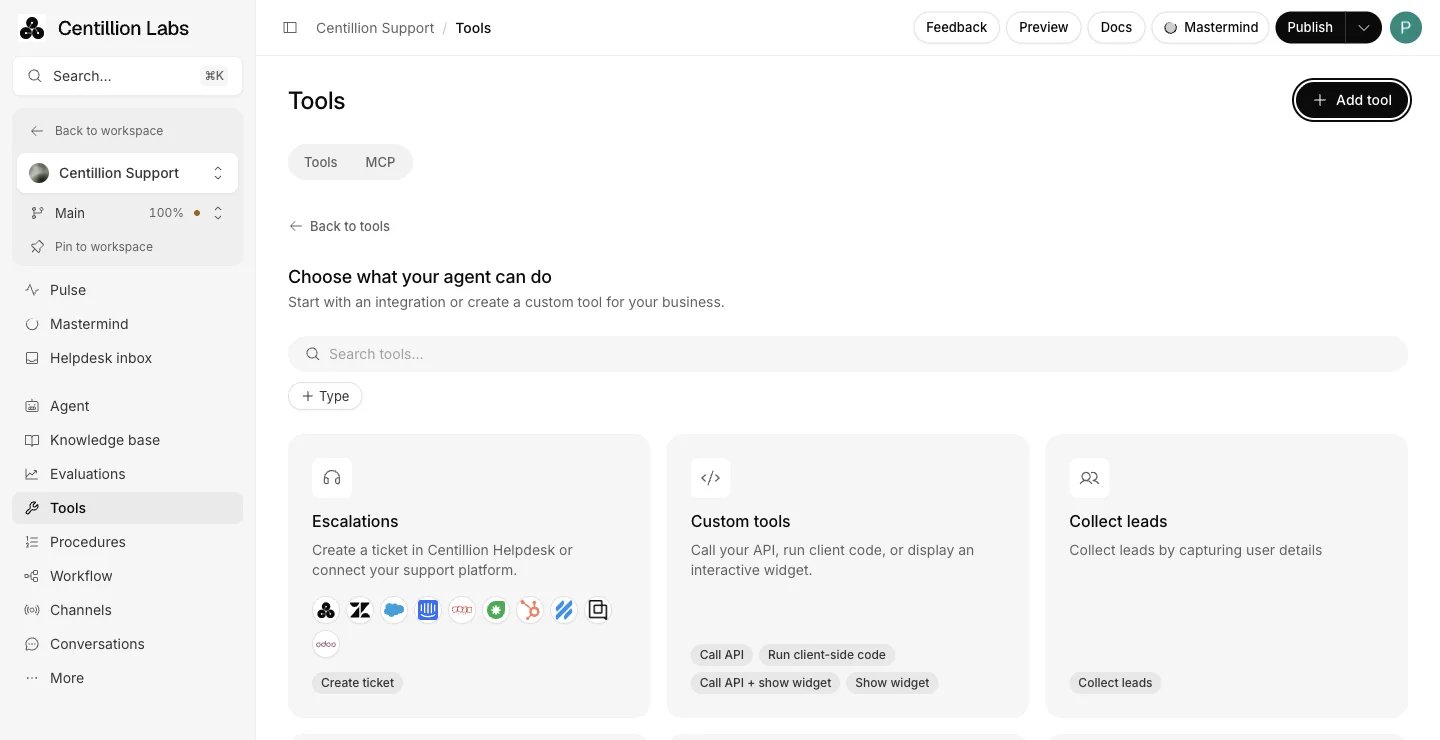
Open Tools, choose Add tool, then New tool → Integration, and
choose what the agent can do:
create a ticket, collect leads, call your API, or use a connected
integration such as Shopify or Stripe. An instruction to look up orders
does not grant that access by itself; the tool does.
The integration catalog of escalations, custom tools, lead collection and integrations.
5
Plan the handoff
Under Tools, Escalations creates a ticket for follow-up, and
Centillion live chat pauses AI replies so a teammate continues the
conversation from the helpdesk inbox. Both need Helpdesk
enabled and the customer’s channel selected.
6
Test, then measure
Under More → Tests, describe a customer and one clear outcome, and
run simulated conversations. After launch, Evaluations in the agent
sidebar checks real
conversations against criteria such as Issue resolved, Accurate handoff or
Goal completed.
For tasks with several steps, such as a return or a booking, write a
Procedure: a trigger, the steps and the tools each step needs.
Every agent has Version control. A version saves the prompts, model, knowledge,
tools, procedures and evaluation criteria together, so you can see which
rules a conversation ran on.
Is an AI agent just a chatbot with a language model?
It uses a language model, and the bigger change is the job it does. A chatbot
picks a reply from a list. An agent reads the question, retrieves the relevant
part of your knowledge, writes an answer, and can call tools you enabled.
It can, when it has nothing to answer from. Give it your real content, tell it
in the instructions to say when it does not know, and test with questions it
should not be able to answer. In Centillion, the agent answers from the six
most relevant passages it finds for each question.
In Centillion, guardrails are instructions added to the agent’s prompt.
Nothing checks a reply against them afterwards. For a rule that must always
hold, enable only the tools the agent needs, and let your own API behind a
custom tool refuse what your policy does not allow. Only use in
procedures keeps a tool out of reach until a procedure calls for it.
Only through tools you enable under Tools. The Shopify tools, for
example, ask the customer to confirm before they create an order, make a
return or exchange, or change a profile or address.
When the customer asks for one, when the agent cannot find the answer, and
for decisions you would not delegate, such as exceptions to your policies.
Set up Escalations or Centillion live chat so those conversations
reach your team.
Create an agent, write two paragraphs about who it works for, and give it your
website. Then ask it the question your customers ask most, and one it should
not be able to answer.
Start free
Start on the Free plan, or take a seven-day trial of a paid plan. Your agent is live on your site in an afternoon.
Book a demo
Fifteen minutes with the team, on your own use case.
Call your API, run code on your site, or show a card in chat.
Last modified on October 29, 2026
⌘I
{"docsConfig":{"theme":"maple","$schema":"https://mintlify.com/docs.json","name":"Centillion","description":"How to build a Centillion AI agent, give it your knowledge, and put it on your website, WhatsApp, Messenger, Instagram, Slack and email.","colors":{"primary":"#0a0a0a","light":"#f5f5f5","dark":"#0a0a0a"},"logo":{"light":"https://mintcdn.com/centillion/YMwlBbzdENjtfSuJ/logo/centillion-labs-logo-horizontal.svg?fit=max\u0026auto=format\u0026n=YMwlBbzdENjtfSuJ\u0026q=85\u0026s=a390a5bdca5c0720e1871afbf09b1f18","dark":"https://mintcdn.com/centillion/YMwlBbzdENjtfSuJ/logo/centillion-labs-logo-horizontal.svg?fit=max\u0026auto=format\u0026n=YMwlBbzdENjtfSuJ\u0026q=85\u0026s=a390a5bdca5c0720e1871afbf09b1f18","href":"https://cntillion.com"},"favicon":"https://mintcdn.com/centillion/OVR3XViKbG9zMitv/favicon.svg?fit=max\u0026auto=format\u0026n=OVR3XViKbG9zMitv\u0026q=85\u0026s=a6656501072b111f976d6229cbbd73ad","appearance":{"default":"light","strict":true},"background":{"color":{"light":"#ffffff","dark":"#0a0a0a"}},"navbar":{"links":[{"href":"https://cntillion.com/pricing","label":"Pricing"},{"href":"https://cntillion.com/support","label":"Contact"}],"primary":{"type":"button","label":"Open Centillion","href":"https://app.cntillion.com"}},"footer":{"links":[{"header":"Centillion","items":[{"label":"Home","href":"https://cntillion.com"},{"label":"Pricing","href":"https://cntillion.com/pricing"},{"label":"Contact","href":"https://cntillion.com/support"},{"label":"Sign in","href":"https://app.cntillion.com/sign-in"}]}]},"search":{"prompt":"Search the Centillion docs"},"seo":{"metatags":{"og:site_name":"Centillion Docs"},"organization":{"name":"Centillion","url":"https://cntillion.com"},"indexing":"navigable"},"fonts":{"family":"Inter"},"metadata":{"timestamp":true},"styling":{"latex":true},"navigation":{"pages":[]}},"deployment":{"deploymentMetadataValue":{"subdomain":"centillion","hasAudioNarration":false,"actualSubdomain":"centillion","customDomains":["cntillion.com"],"gitSource":{"type":"github","owner":"centillion-labs","repo":"conversational-agents-for-cx","deployBranch":"master","contentDirectory":"apps/docs","isPrivate":true,"mountPath":"","label":""},"chroma":{"latestBuiltDeploymentHistoryId":"6ae95d6935b55ff31612f7a7","collectionId":"27832044-5e72-44ea-8577-5c209cbfb879","liveDeploymentHistoryId":"6ae95d6935b55ff31612f7a7","schemaVersion":"v3"},"entitlements":{"AI_CHAT":{"status":"DISABLED"},"WEB_MCP":{"status":"DISABLED"},"NARRATION":{"status":"DISABLED"}},"buildId":"6ae96f717e64ded297ae851c","clientVersion":"0.0.4045","searchFilterCounts":[{"language":"default","tag":"Reach your customers","count":19},{"language":"default","tag":"Build your agent","count":14},{"language":"default","tag":"Guides","count":8},{"language":"default","tag":"Workspace","count":7},{"language":"default","tag":"API documentation","count":6},{"language":"default","tag":"Support","count":6},{"language":"default","tag":"Customer data","count":5},{"language":"default","tag":"Website development","count":2},{"language":"default","tag":"Get started","count":2},{"language":"default","tag":"Helpdesk API","count":1}]},"assistantConfig":{"enableAskAiButton":false,"enableStarterQuestions":false,"enableContextualStarterQuestions":false,"enableAskAiSearchBar":true},"basePath":"/docs","hasChatPermissions":false,"hasWebMcpPermissions":false,"toggles":[{"name":"kill-isr","enabled":true,"variant":{"name":"disabled","enabled":false,"feature_enabled":true},"impressionData":false},{"name":"agent-mintlify-slack","enabled":true,"variant":{"name":"disabled","enabled":false,"feature_enabled":true},"impressionData":false},{"name":"agent-integrations-settings","enabled":true,"variant":{"name":"disabled","enabled":false,"feature_enabled":true},"impressionData":false},{"name":"automations-pr-grouping","enabled":true,"variant":{"name":"disabled","enabled":false,"feature_enabled":true},"impressionData":false},{"name":"custom-prefix","enabled":true,"variant":{"name":"disabled","enabled":false,"feature_enabled":true},"impressionData":false},{"name":"analytics-v7","enabled":true,"variant":{"name":"disabled","enabled":false,"feature_enabled":true},"impressionData":false},{"name":"user-flows-analytics","enabled":true,"variant":{"name":"disabled","enabled":false,"feature_enabled":true},"impressionData":false},{"name":"no-publish-flow","enabled":true,"variant":{"name":"disabled","enabled":false,"feature_enabled":true},"impressionData":false},{"name":"workos-onboarding","enabled":true,"variant":{"name":"disabled","enabled":false,"feature_enabled":true},"impressionData":false},{"name":"llms-txt-v2","enabled":true,"variant":{"name":"disabled","enabled":false,"feature_enabled":true},"impressionData":false},{"name":"snapshot-serving-live","enabled":true,"variant":{"name":"disabled","enabled":false,"feature_enabled":true},"impressionData":false},{"name":"stripTemperatureMiddleware","enabled":true,"variant":{"name":"disabled","enabled":false,"feature_enabled":true},"impressionData":false},{"name":"support-platform-pylon-zendesk","enabled":true,"variant":{"name":"disabled","enabled":false,"feature_enabled":true},"impressionData":false},{"name":"snapshot-serving","enabled":true,"variant":{"name":"disabled","enabled":false,"feature_enabled":true},"impressionData":false},{"name":"instant-rollback","enabled":true,"variant":{"name":"disabled","enabled":false,"feature_enabled":true},"impressionData":false},{"name":"granular-notifications-server","enabled":true,"variant":{"name":"disabled","enabled":false,"feature_enabled":true},"impressionData":false},{"name":"granular-notifications","enabled":true,"variant":{"name":"disabled","enabled":false,"feature_enabled":true},"impressionData":false},{"name":"automations-fable","enabled":true,"variant":{"name":"disabled","enabled":false,"feature_enabled":true},"impressionData":false},{"name":"fixed-ai-action-pricing","enabled":true,"variant":{"name":"disabled","enabled":false,"feature_enabled":true},"impressionData":false},{"name":"automation-resolve-merge-conflict","enabled":true,"variant":{"name":"disabled","enabled":false,"feature_enabled":true},"impressionData":false},{"name":"scoped-publishing","enabled":true,"variant":{"name":"disabled","enabled":false,"feature_enabled":true},"impressionData":false},{"name":"mintql","enabled":true,"variant":{"name":"disabled","enabled":false,"feature_enabled":true},"impressionData":false},{"name":"page-level-analytics","enabled":true,"variant":{"name":"disabled","enabled":false,"feature_enabled":true},"impressionData":false},{"name":"editor-version-history-v2","enabled":true,"variant":{"name":"disabled","enabled":false,"feature_enabled":true},"impressionData":false},{"name":"billing-page-v2","enabled":true,"variant":{"name":"disabled","enabled":false,"feature_enabled":true},"impressionData":false},{"name":"full-page-search","enabled":true,"variant":{"name":"disabled","enabled":false,"feature_enabled":true},"impressionData":false},{"name":"workspace-projects","enabled":true,"variant":{"name":"disabled","enabled":false,"feature_enabled":true},"impressionData":false},{"name":"assistant-v5","enabled":true,"variant":{"name":"disabled","enabled":false,"feature_enabled":true},"impressionData":false},{"name":"byok-sep-25","enabled":true,"variant":{"name":"disabled","enabled":false,"feature_enabled":true},"impressionData":false},{"name":"fork-pr-previews","enabled":true,"variant":{"name":"disabled","enabled":false,"feature_enabled":true},"impressionData":false},{"name":"revalidation-jwt","enabled":true,"variant":{"name":"disabled","enabled":false,"feature_enabled":true},"impressionData":false},{"name":"vite-origin","enabled":true,"variant":{"name":"disabled","enabled":false,"feature_enabled":true},"impressionData":false},{"name":"billing-updated-9-15","enabled":true,"variant":{"name":"disabled","enabled":false,"feature_enabled":true},"impressionData":false},{"name":"workos-sso-scim","enabled":true,"variant":{"name":"disabled","enabled":false,"feature_enabled":true},"impressionData":false},{"name":"hobby-abuse-scan","enabled":true,"variant":{"name":"disabled","enabled":false,"feature_enabled":true},"impressionData":false},{"name":"dashboard-inbox","enabled":true,"variant":{"name":"disabled","enabled":false,"feature_enabled":true},"impressionData":false},{"name":"workos-signup","enabled":true,"variant":{"name":"disabled","enabled":false,"feature_enabled":true},"impressionData":false},{"name":"turbopuffer-dual-write","enabled":true,"variant":{"name":"disabled","enabled":false,"feature_enabled":true},"impressionData":false},{"name":"workos-enabled","enabled":true,"variant":{"name":"disabled","enabled":false,"feature_enabled":true},"impressionData":false},{"name":"approve-review-flow","enabled":true,"variant":{"name":"disabled","enabled":false,"feature_enabled":true},"impressionData":false},{"name":"sso-setup-deadline-banner","enabled":true,"variant":{"name":"disabled","enabled":false,"feature_enabled":true},"impressionData":false}],"googleFontsInlined":false},"customCss":[{"filePath":"style.css","content":":root{--bg-subtle:#f6f6f6;--ink:#0a0a0a;--ink-2:#353535;--ink-3:#626262;--ink-4:#a1a1a1;--ink-5:#c7c7c7;--amber:#db8831;--amber-text:#9f5f1c;--amber-tint:#fbf4ec;--radius-lg:16px;--radius-xl:24px;--radius-pill:9999px;--glow-lavender:#ebeaf7;--glow-pink:#f2e4e2;--glow-peach:#f5e6dd;--glow-sky:#e6ecf4;--glow-mint:#e9f4ef}#page-title{font-size:40px;font-weight:500;line-height:46px;color:var(--ink);letter-spacing:-.02em}#content>h2,#content>h3,#content>h4{font-size:20px;font-weight:500;line-height:26px;color:var(--ink);letter-spacing:-.01em}#content>h3,#content>h4{font-size:18px;line-height:24px}#content>h4{font-size:16px;line-height:22px;letter-spacing:0}#header .eyebrow,#search-bar-entry,#search-bar-entry-mobile{font-size:14px;font-weight:400;line-height:20px;color:var(--ink-3)}#search-bar-entry,#search-bar-entry-mobile{height:36px;padding:0 16px;color:var(--ink-4);background-color:var(--bg-subtle);border-radius:var(--radius-pill);box-shadow:none}#search-bar-entry svg,#search-bar-entry-mobile svg{color:var(--ink-4)}#search-bar-entry>span{font-size:12px;font-weight:400;line-height:16px;color:var(--ink-4)}#search-bar-entry-mobile:focus-visible,#search-bar-entry:focus-visible{outline:2px solid var(--ink);outline-offset:2px}#content .card{background-color:var(--bg-subtle);border:0;border-radius:var(--radius-lg);box-shadow:none}#content .card [data-component-part=card-content-container]{padding:20px}#content .card [data-component-part=card-icon] svg{background-color:var(--ink-3)}#content .card [data-component-part=card-content-container]>a>div.absolute{color:var(--ink-5)}#content .card [data-component-part=card-title]{font-size:16px;font-weight:500;line-height:22px;color:var(--ink)}#content .card [data-component-part=card-content]{font-size:14px;font-weight:400;line-height:20px;color:var(--ink-3)}#content .card [data-component-part=card-content]>span{color:inherit}#content-area:has(.centillion-hero)>#header{display:none}.centillion-hero{display:flex;flex-direction:column;gap:20px;padding:28px;margin-bottom:24px;background-color:var(--bg-subtle);background-image:radial-gradient(38% 80% at 96% 0%,var(--glow-lavender) 0%,transparent 100%),radial-gradient(30% 70% at 84% 48%,var(--glow-pink) 0%,transparent 100%),radial-gradient(34% 70% at 90% 100%,var(--glow-peach) 0%,transparent 100%),radial-gradient(28% 64% at 66% 58%,var(--glow-sky) 0%,transparent 100%),radial-gradient(26% 56% at 62% 0%,var(--glow-mint) 0%,transparent 100%);border-radius:var(--radius-xl)}.centillion-hero .centillion-hero-eyebrow{margin:0;font-size:14px;font-weight:400;line-height:20px;color:var(--ink-3)}.centillion-hero .centillion-hero-title{max-width:720px;margin:0;font-size:40px;font-weight:500;line-height:46px;color:var(--ink);letter-spacing:-.02em;text-wrap:balance}.centillion-hero .centillion-muted{color:var(--ink-3)}#content .callout{padding:16px 20px;font-size:14px;line-height:20px;border:0;border-radius:var(--radius-lg)}#content .callout[data-callout-type=warning]{background-color:var(--amber-tint)}#content .callout[data-callout-type=warning] [data-component-part=callout-icon] svg{color:var(--amber)}#content .callout[data-callout-type=warning] [data-component-part=callout-content]{color:var(--amber-text)}#content .callout[data-callout-type=note]{background-color:var(--bg-subtle)}#content .callout[data-callout-type=note] [data-component-part=callout-icon] svg{color:var(--ink-3)}#content .callout[data-callout-type=note] [data-component-part=callout-content]{color:var(--ink-2)}"}],"page":{"pagePath":"guides/chatbot-vs-ai-agent","slug":"/guides/chatbot-vs-ai-agent","pageMetadata":{"title":"Chatbot vs AI agent: what changes for customer support","description":"A chatbot answers from a script and ends the chat. An AI agent works for your business inside its rules. Learn the difference and build an agent.","sidebarTitle":"Chatbot vs AI agent","keywords":["chatbot vs AI agent","AI agent for customer service","AI customer service representative","customer support automation"],"href":"/guides/chatbot-vs-ai-agent"},"description":{"compiledSource":"\"use strict\";\nconst {jsx: _jsx} = arguments[0];\nconst {useMDXComponents: _provideComponents} = arguments[0];\nfunction _createMdxContent(props) {\n const _components = {\n p: \"p\",\n ..._provideComponents(),\n ...props.components\n };\n return _jsx(_components.p, {\n children: \"A chatbot answers from a script and ends the chat. An AI agent works for your business inside its rules. Learn the difference and build an agent.\"\n });\n}\nfunction MDXContent(props = {}) {\n const {wrapper: MDXLayout} = {\n ..._provideComponents(),\n ...props.components\n };\n return MDXLayout ? _jsx(MDXLayout, {\n ...props,\n children: _jsx(_createMdxContent, {\n ...props\n })\n }) : _createMdxContent(props);\n}\nreturn {\n default: MDXContent\n};\n","frontmatter":{},"scope":{}},"pageType":"default","mdx":{"mdxSource":{"compiledSource":"\"use strict\";const{Fragment:_Fragment,jsx:_jsx,jsxs:_jsxs}=arguments[0];const{useMDXComponents:_provideComponents}=arguments[0];function _createMdxContent(props){const _components={a:`a`,li:`li`,p:`p`,strong:`strong`,tbody:`tbody`,td:`td`,th:`th`,thead:`thead`,tr:`tr`,ul:`ul`,..._provideComponents(),...props.components},{Card,CardGroup,Frame,Heading,OptimizedImage,Step,Steps,Table}=_components;if(!Card)_missingMdxReference(`Card`,true);if(!CardGroup)_missingMdxReference(`CardGroup`,true);if(!Frame)_missingMdxReference(`Frame`,true);if(!Heading)_missingMdxReference(`Heading`,true);if(!OptimizedImage)_missingMdxReference(`OptimizedImage`,true);if(!Step)_missingMdxReference(`Step`,true);if(!Steps)_missingMdxReference(`Steps`,true);if(!Table)_missingMdxReference(`Table`,true);return _jsxs(_Fragment,{children:[_jsxs(`div`,{className:`centillion-hero`,children:[_jsx(`p`,{className:`centillion-hero-eyebrow`,children:`Guide`}),_jsxs(`div`,{className:`centillion-hero-title`,role:`heading`,\"aria-level\":`1`,children:[`Chatbot `,_jsx(`span`,{className:`centillion-muted`,children:`or`}),` AI agent`,_jsx(`span`,{className:`centillion-muted`,children:`: who answers your customers, and`}),` who `,_jsx(`span`,{className:`centillion-muted`,children:`they`}),` work for.`]})]}),`\n`,_jsx(_components.p,{children:`The chatbot vs AI agent question sounds like a vocabulary debate. In practice\nit decides what your customers get when they write to you, and what your\nbusiness gets out of the conversation. This guide explains the difference, the\nrisks on each side, and how to set up an agent that works for your business.`}),`\n`,_jsx(Heading,{level:`2`,id:`what-a-chatbot-is`,children:`What a chatbot is`}),`\n`,_jsx(_components.p,{children:`A classic support chatbot is a decision tree with a text box in front of it.\nSomeone on your team maps the questions they expect, writes an answer for each,\nand links them with buttons or keywords. When a customer’s words match a\nbranch, the bot replies. When they do not, it shows a menu again or hands over\na link to a help article.`}),`\n`,_jsx(_components.p,{children:`Most chatbots are built to deflect. The goal is to close the conversation\nwithout a person, and success is counted in tickets avoided. That is a fair\nproduct for a queue of simple, repeated questions such as opening hours or a\nreturns address. It breaks down in three places:`}),`\n`,_jsxs(_components.ul,{children:[`\n`,_jsxs(_components.li,{children:[_jsx(_components.strong,{children:`Questions nobody planned for.`}),` Every tree is a bet on what customers will\nask. A customer with a slightly different problem falls off the edge.`]}),`\n`,_jsxs(_components.li,{children:[_jsx(_components.strong,{children:`Anything that needs doing.`}),` A bot that can only answer cannot change an\norder, check a delivery or book a slot. The customer still has to call.`]}),`\n`,_jsxs(_components.li,{children:[_jsx(_components.strong,{children:`Moments that decide revenue.`}),` A deflection bot has no goal beyond ending\nthe chat, so it treats a customer about to cancel the same way it treats a\nquestion about parking.`]}),`\n`]}),`\n`,_jsx(Heading,{level:`2`,id:`what-an-ai-agent-is`,children:`What an AI agent is`}),`\n`,_jsx(_components.p,{children:`An AI agent reads the customer’s message in their own words, finds the\nrelevant facts in material you gave it, and writes an answer. It can also act:\ncall your systems to look up an order, update a cart, open a ticket or hand\nthe conversation to a person.`}),`\n`,_jsx(_components.p,{children:`The useful way to think about an agent is as a representative of your\nbusiness. It knows your products, your policies and how you talk to people. It\nhas a goal you set, such as a resolved problem, a booking, or a customer who\nstays. It works inside rules you wrote down. Every promise it makes should be\none you would sign.`}),`\n`,_jsx(_components.p,{children:`That changes what you measure. A chatbot is judged on how many conversations\nit ended. A representative is judged on what happened for the customer and the\nbusiness: was the issue resolved, did the handoff reach the right person, did\nthe customer come back.`}),`\n`,_jsx(Heading,{level:`2`,id:`the-differences-that-matter`,children:`The differences that matter`}),`\n`,_jsxs(Table,{children:[_jsx(_components.thead,{children:_jsxs(_components.tr,{children:[_jsx(_components.th,{}),_jsx(_components.th,{children:`Chatbot`}),_jsx(_components.th,{children:`AI agent`})]})}),_jsxs(_components.tbody,{children:[_jsxs(_components.tr,{children:[_jsx(_components.td,{children:`Understands`}),_jsx(_components.td,{children:`Keywords and buttons you mapped`}),_jsx(_components.td,{children:`The customer’s own words`})]}),_jsxs(_components.tr,{children:[_jsx(_components.td,{children:`Answers from`}),_jsx(_components.td,{children:`Replies written in advance`}),_jsx(_components.td,{children:`Your knowledge, retrieved for each question`})]}),_jsxs(_components.tr,{children:[_jsx(_components.td,{children:`Can act`}),_jsx(_components.td,{children:`Rarely, through fixed flows`}),_jsx(_components.td,{children:`Calls the tools you enable`})]}),_jsxs(_components.tr,{children:[_jsx(_components.td,{children:`Goal`}),_jsx(_components.td,{children:`End the conversation`}),_jsx(_components.td,{children:`The outcome you define`})]}),_jsxs(_components.tr,{children:[_jsx(_components.td,{children:`When stuck`}),_jsx(_components.td,{children:`Loops or shows a menu`}),_jsx(_components.td,{children:`Says it does not know and hands off`})]}),_jsxs(_components.tr,{children:[_jsx(_components.td,{children:`You check it by`}),_jsx(_components.td,{children:`Counting deflected chats`}),_jsx(_components.td,{children:`Reading outcomes and conversations`})]})]})]}),`\n`,_jsx(Heading,{level:`2`,id:`what-to-watch-for`,children:`What to watch for`}),`\n`,_jsx(_components.p,{children:`An agent that writes its own answers and takes actions needs more care than a\ntree of canned replies. Most problems come from a few causes.`}),`\n`,_jsxs(_components.p,{children:[_jsx(_components.strong,{children:`No knowledge, confident tone.`}),` A language model with no material to draw on\nstill writes fluent sentences. Give the agent your real content before it\ntalks to anyone, and check that it says “I don’t know” when the answer is not\nthere.`]}),`\n`,_jsxs(_components.p,{children:[_jsx(_components.strong,{children:`Rules that live only in a prompt.`}),` Instructions such as “never offer a\nrefund over 50 dollars” are guidance the model follows most of the time. A\nrule that must hold every time belongs in the tool itself: what the tool\nis allowed to do, which inputs it accepts, and whether the customer must\nconfirm. Write policy where it is enforced, and keep the prompt for tone and\njudgement.`]}),`\n`,_jsxs(_components.p,{children:[_jsx(_components.strong,{children:`Actions without confirmation.`}),` Changing an order or an address should need\nan explicit yes from the customer. Read the conversation afterwards to see\nwhether that step held.`]}),`\n`,_jsxs(_components.p,{children:[_jsx(_components.strong,{children:`No way out.`}),` Some customers want a person, and some problems need one. Plan\nthe handoff before launch: who receives it, on which channels, and what the\ncustomer is told while they wait.`]}),`\n`,_jsxs(_components.p,{children:[_jsx(_components.strong,{children:`No test before customers see it.`}),` Run simulated conversations against the\nagent, including a difficult customer and a customer who tries to get it to\nbreak its rules, before you switch a channel on.`]}),`\n`,_jsx(Heading,{level:`2`,id:`the-other-side-is-getting-agents-too`,children:`The other side is getting agents too`}),`\n`,_jsx(_components.p,{children:`Customers are starting to use personal AI assistants that write, compare and\nfollow up for them. When one of those reaches your support, it will ask\nprecisely, keep asking, and read your terms closely. A bot built to end\nconversations does poorly against that kind of counterpart. A representative\nthat knows your policies and holds to them is what you want on your side of\nthe conversation.`}),`\n`,_jsx(Heading,{level:`2`,id:`build-an-agent-with-centillion`,children:`Build an agent with Centillion`}),`\n`,_jsxs(_components.p,{children:[_jsx(_components.a,{href:`/introduction`,children:`Centillion`}),` builds AI agents that answer your customers from\nknowledge you control, use the tools you enable, and hand off to your team\nthrough the helpdesk. Start from\n`,_jsx(_components.a,{href:`/agents/create-an-agent`,children:`creating an agent`}),`.`]}),`\n`,_jsxs(Steps,{children:[_jsxs(Step,{title:`Write who it works for`,children:[_jsxs(_components.p,{children:[`Open `,_jsx(_components.strong,{children:`Agent → Instructions`}),` and replace the role’s template in the\n`,_jsx(_components.strong,{children:`General`}),` editor with who the agent works for, who it talks to, what to\ndo when it does not know something, and how formal to be. Facts about your\nproducts go into knowledge, where you can update them without touching the\ninstructions.`]}),_jsx(Frame,{caption:`Agent configuration: the system prompt and first message, with voice and model settings on the right.`,children:_jsx(OptimizedImage,{src:`https://mintcdn.com/centillion/n9koGqutqlVBNAYF/images/agents/create-agent-02-instructions-editor.webp?fit=max\u0026auto=format\u0026n=n9koGqutqlVBNAYF\u0026q=85\u0026s=fb3e63f98578ad87bf6d2d8e97953842`,alt:`Agent configuration with the system prompt editor, Call and Chat first-message tabs, and voice and model settings`,\"data-og-width\":`1440`,width:`1440`,\"data-og-height\":`1240`,height:`1240`,\"data-path\":`images/agents/create-agent-02-instructions-editor.webp`,\"data-optimize\":`true`,\"data-opv\":`3`,srcset:`https://mintcdn.com/centillion/n9koGqutqlVBNAYF/images/agents/create-agent-02-instructions-editor.webp?w=280\u0026fit=max\u0026auto=format\u0026n=n9koGqutqlVBNAYF\u0026q=85\u0026s=0e4c2b7d6797669b1c2dbd4e5c77cbf1 280w, https://mintcdn.com/centillion/n9koGqutqlVBNAYF/images/agents/create-agent-02-instructions-editor.webp?w=560\u0026fit=max\u0026auto=format\u0026n=n9koGqutqlVBNAYF\u0026q=85\u0026s=ee464a8e8acd402490e3a255f939d0b9 560w, https://mintcdn.com/centillion/n9koGqutqlVBNAYF/images/agents/create-agent-02-instructions-editor.webp?w=840\u0026fit=max\u0026auto=format\u0026n=n9koGqutqlVBNAYF\u0026q=85\u0026s=edf3ed24f3eaee6c4a6c77beb93cd228 840w, https://mintcdn.com/centillion/n9koGqutqlVBNAYF/images/agents/create-agent-02-instructions-editor.webp?w=1100\u0026fit=max\u0026auto=format\u0026n=n9koGqutqlVBNAYF\u0026q=85\u0026s=8e1361a01a9bd5e0de2158f0c7ceebcb 1100w, https://mintcdn.com/centillion/n9koGqutqlVBNAYF/images/agents/create-agent-02-instructions-editor.webp?w=1650\u0026fit=max\u0026auto=format\u0026n=n9koGqutqlVBNAYF\u0026q=85\u0026s=4c456adf3826689ea3fc89a8c5159b41 1650w, https://mintcdn.com/centillion/n9koGqutqlVBNAYF/images/agents/create-agent-02-instructions-editor.webp?w=2500\u0026fit=max\u0026auto=format\u0026n=n9koGqutqlVBNAYF\u0026q=85\u0026s=530c04bd22e0b9a332e52111613bb451 2500w`})})]}),_jsxs(Step,{title:`Add guardrails`,children:[_jsxs(_components.p,{children:[`In the `,_jsx(_components.strong,{children:`Guardrails`}),` editor on the same page, list the topics the agent\nshould stay away from, such as competitors, or legal or medical advice.\nGuardrails are added to the agent’s prompt; nothing checks a reply against\nthem afterwards. The separate `,_jsx(_components.strong,{children:`Guardrails`}),` page sets the rate limit and\nspam detection.`]}),_jsx(Frame,{caption:`Guardrails: the rate limit for one visitor and spam detection, with the saved settings on the right.`,children:_jsx(OptimizedImage,{src:`https://mintcdn.com/centillion/iOhd2RAouod3JP9I/images/agents/guardrails-01.webp?fit=max\u0026auto=format\u0026n=iOhd2RAouod3JP9I\u0026q=85\u0026s=60062445b5d7ee827227399cd28fe355`,alt:`Guardrails page with the rate limit set to 20 messages every 240 seconds and the spam detection switch`,\"data-og-width\":`1568`,width:`1568`,\"data-og-height\":`980`,height:`980`,\"data-path\":`images/agents/guardrails-01.webp`,\"data-optimize\":`true`,\"data-opv\":`3`,srcset:`https://mintcdn.com/centillion/iOhd2RAouod3JP9I/images/agents/guardrails-01.webp?w=280\u0026fit=max\u0026auto=format\u0026n=iOhd2RAouod3JP9I\u0026q=85\u0026s=7296874b0507963b5b8475c9260e6dff 280w, https://mintcdn.com/centillion/iOhd2RAouod3JP9I/images/agents/guardrails-01.webp?w=560\u0026fit=max\u0026auto=format\u0026n=iOhd2RAouod3JP9I\u0026q=85\u0026s=bf904588fb9c01206bfd9cec8fd21e89 560w, https://mintcdn.com/centillion/iOhd2RAouod3JP9I/images/agents/guardrails-01.webp?w=840\u0026fit=max\u0026auto=format\u0026n=iOhd2RAouod3JP9I\u0026q=85\u0026s=6728a9da368dc84bb1f65f3193f80b85 840w, https://mintcdn.com/centillion/iOhd2RAouod3JP9I/images/agents/guardrails-01.webp?w=1100\u0026fit=max\u0026auto=format\u0026n=iOhd2RAouod3JP9I\u0026q=85\u0026s=885a0106b70cee68ab35706acb5549e8 1100w, https://mintcdn.com/centillion/iOhd2RAouod3JP9I/images/agents/guardrails-01.webp?w=1650\u0026fit=max\u0026auto=format\u0026n=iOhd2RAouod3JP9I\u0026q=85\u0026s=92bf37ef721fc8ecfcfd120c390d8a7c 1650w, https://mintcdn.com/centillion/iOhd2RAouod3JP9I/images/agents/guardrails-01.webp?w=2500\u0026fit=max\u0026auto=format\u0026n=iOhd2RAouod3JP9I\u0026q=85\u0026s=d9c1748117945bc9af97435296cafcf4 2500w`})})]}),_jsx(Step,{title:`Give it your knowledge`,children:_jsxs(_components.p,{children:[`Under `,_jsx(_components.strong,{children:`Knowledge base → Data sources`}),`, add your website, documents,\nQ\u0026A and Notion pages. Training runs on its own after every change. See\n`,_jsx(_components.a,{href:`/guides/train-ai-agent-on-website`,children:`how to train an AI chatbot on your own data`}),`.`]})}),_jsxs(Step,{title:`Let it act`,children:[_jsxs(_components.p,{children:[`Open `,_jsx(_components.strong,{children:`Tools`}),`, choose `,_jsx(_components.strong,{children:`Add tool`}),`, then `,_jsx(_components.strong,{children:`New tool → Integration`}),`, and\nchoose what the agent can do:\ncreate a ticket, collect leads, call your API, or use a connected\nintegration such as Shopify or Stripe. An instruction to look up orders\ndoes not grant that access by itself; the tool does.`]}),_jsx(Frame,{caption:`The integration catalog of escalations, custom tools, lead collection and integrations.`,children:_jsx(OptimizedImage,{src:`https://mintcdn.com/centillion/WLpDA0mJ1ryQ1IZ5/images/agents/custom-actions-02-catalog.webp?fit=max\u0026auto=format\u0026n=WLpDA0mJ1ryQ1IZ5\u0026q=85\u0026s=569de53cd2c0d87b9df9b3964df59e35`,alt:`Integration catalog with the tool search box, a type filter and the Escalations, Custom tools and Collect leads cards`,\"data-og-width\":`1440`,width:`1440`,\"data-og-height\":`740`,height:`740`,\"data-path\":`images/agents/custom-actions-02-catalog.webp`,\"data-optimize\":`true`,\"data-opv\":`3`,srcset:`https://mintcdn.com/centillion/WLpDA0mJ1ryQ1IZ5/images/agents/custom-actions-02-catalog.webp?w=280\u0026fit=max\u0026auto=format\u0026n=WLpDA0mJ1ryQ1IZ5\u0026q=85\u0026s=fc525b11222a7b85147c73e8bc8bf84c 280w, https://mintcdn.com/centillion/WLpDA0mJ1ryQ1IZ5/images/agents/custom-actions-02-catalog.webp?w=560\u0026fit=max\u0026auto=format\u0026n=WLpDA0mJ1ryQ1IZ5\u0026q=85\u0026s=708aeedfedacdbc7fca10afaa5986329 560w, https://mintcdn.com/centillion/WLpDA0mJ1ryQ1IZ5/images/agents/custom-actions-02-catalog.webp?w=840\u0026fit=max\u0026auto=format\u0026n=WLpDA0mJ1ryQ1IZ5\u0026q=85\u0026s=8c48bf768343019005767c8f35555d10 840w, https://mintcdn.com/centillion/WLpDA0mJ1ryQ1IZ5/images/agents/custom-actions-02-catalog.webp?w=1100\u0026fit=max\u0026auto=format\u0026n=WLpDA0mJ1ryQ1IZ5\u0026q=85\u0026s=d3f1be902e2b77caaa06bcb8a394d61a 1100w, https://mintcdn.com/centillion/WLpDA0mJ1ryQ1IZ5/images/agents/custom-actions-02-catalog.webp?w=1650\u0026fit=max\u0026auto=format\u0026n=WLpDA0mJ1ryQ1IZ5\u0026q=85\u0026s=a78dfeaf054970e221ea45cb97ae57b0 1650w, https://mintcdn.com/centillion/WLpDA0mJ1ryQ1IZ5/images/agents/custom-actions-02-catalog.webp?w=2500\u0026fit=max\u0026auto=format\u0026n=WLpDA0mJ1ryQ1IZ5\u0026q=85\u0026s=fc4f84b20e559bb17136f1590f738101 2500w`})})]}),_jsx(Step,{title:`Plan the handoff`,children:_jsxs(_components.p,{children:[`Under `,_jsx(_components.strong,{children:`Tools`}),`, `,_jsx(_components.strong,{children:`Escalations`}),` creates a ticket for follow-up, and\n`,_jsx(_components.strong,{children:`Centillion live chat`}),` pauses AI replies so a teammate continues the\nconversation from the `,_jsx(_components.a,{href:`/helpdesk`,children:`helpdesk inbox`}),`. Both need Helpdesk\nenabled and the customer’s channel selected.`]})}),_jsx(Step,{title:`Test, then measure`,children:_jsxs(_components.p,{children:[`Under `,_jsx(_components.strong,{children:`More → Tests`}),`, describe a customer and one clear outcome, and\nrun simulated conversations. After launch, `,_jsx(_components.strong,{children:`Evaluations`}),` in the agent\nsidebar checks real\nconversations against criteria such as Issue resolved, Accurate handoff or\nGoal completed.`]})})]}),`\n`,_jsxs(_components.p,{children:[`For tasks with several steps, such as a return or a booking, write a\n`,_jsx(_components.strong,{children:`Procedure`}),`: a trigger, the steps and the tools each step needs.\nEvery agent has `,_jsx(_components.strong,{children:`Version control`}),`. A version saves the prompts, model, knowledge,\ntools, procedures and evaluation criteria together, so you can see which\nrules a conversation ran on.`]}),`\n`,_jsx(Heading,{level:`2`,id:`questions`,children:`Questions`}),`\n`,_jsx(Heading,{level:`3`,id:`is-an-ai-agent-just-a-chatbot-with-a-language-model`,children:`Is an AI agent just a chatbot with a language model?`}),`\n`,_jsx(_components.p,{children:`It uses a language model, and the bigger change is the job it does. A chatbot\npicks a reply from a list. An agent reads the question, retrieves the relevant\npart of your knowledge, writes an answer, and can call tools you enabled.`}),`\n`,_jsx(Heading,{level:`3`,id:`will-an-ai-agent-make-things-up`,children:`Will an AI agent make things up?`}),`\n`,_jsx(_components.p,{children:`It can, when it has nothing to answer from. Give it your real content, tell it\nin the instructions to say when it does not know, and test with questions it\nshould not be able to answer. In Centillion, the agent answers from the six\nmost relevant passages it finds for each question.`}),`\n`,_jsx(Heading,{level:`3`,id:`do-guardrails-block-forbidden-replies`,children:`Do guardrails block forbidden replies?`}),`\n`,_jsxs(_components.p,{children:[`In Centillion, guardrails are instructions added to the agent’s prompt.\nNothing checks a reply against them afterwards. For a rule that must always\nhold, enable only the tools the agent needs, and let your own API behind a\ncustom tool refuse what your policy does not allow. `,_jsx(_components.strong,{children:`Only use in\nprocedures`}),` keeps a tool out of reach until a procedure calls for it.`]}),`\n`,_jsx(Heading,{level:`3`,id:`can-the-agent-change-orders-or-accounts`,children:`Can the agent change orders or accounts?`}),`\n`,_jsxs(_components.p,{children:[`Only through tools you enable under `,_jsx(_components.strong,{children:`Tools`}),`. The Shopify tools, for\nexample, ask the customer to confirm before they create an order, make a\nreturn or exchange, or change a profile or address.`]}),`\n`,_jsx(Heading,{level:`3`,id:`when-should-i-keep-a-person-in-the-loop`,children:`When should I keep a person in the loop?`}),`\n`,_jsxs(_components.p,{children:[`When the customer asks for one, when the agent cannot find the answer, and\nfor decisions you would not delegate, such as exceptions to your policies.\nSet up `,_jsx(_components.strong,{children:`Escalations`}),` or `,_jsx(_components.strong,{children:`Centillion live chat`}),` so those conversations\nreach your team.`]}),`\n`,_jsx(Heading,{level:`2`,id:`try-it`,children:`Try it`}),`\n`,_jsx(_components.p,{children:`Create an agent, write two paragraphs about who it works for, and give it your\nwebsite. Then ask it the question your customers ask most, and one it should\nnot be able to answer.`}),`\n`,_jsxs(CardGroup,{cols:2,children:[_jsx(Card,{title:`Start free`,icon:`rocket`,href:`https://app.cntillion.com/sign-up?utm_source=docs\u0026utm_medium=article\u0026utm_campaign=guides-chatbot-vs-ai-agent`,children:_jsx(_components.p,{children:`Start on the Free plan, or take a seven-day trial of a paid plan. Your agent is live on your site in an afternoon.`})}),_jsx(Card,{title:`Book a demo`,icon:`calendar`,href:`https://cal.com/patrick-turricelli-smgfks/15min?utm_source=docs\u0026utm_medium=article\u0026utm_campaign=guides-chatbot-vs-ai-agent`,children:_jsx(_components.p,{children:`Fifteen minutes with the team, on your own use case.`})})]}),`\n`,_jsx(_components.p,{children:`Or ask the assistant on this page.`}),`\n`,_jsx(Heading,{level:`2`,id:`related`,children:`Related`}),`\n`,_jsxs(CardGroup,{cols:3,children:[_jsx(Card,{title:`Creating an agent`,icon:`robot`,href:`/agents/create-an-agent`,children:_jsx(_components.p,{children:`Instructions, guardrails, the model and Compare.`})}),_jsx(Card,{title:`Train an agent on your data`,icon:`book-open`,href:`/guides/train-ai-agent-on-website`,children:_jsx(_components.p,{children:`How retrieval works, and why answers go wrong.`})}),_jsx(Card,{title:`Custom tools`,icon:`bolt`,href:`/agents/custom-actions`,children:_jsx(_components.p,{children:`Call your API, run code on your site, or show a card in chat.`})})]})]})}function MDXContent(props={}){const{wrapper:MDXLayout}={..._provideComponents(),...props.components};return MDXLayout?_jsx(MDXLayout,{...props,children:_jsx(_createMdxContent,{...props})}):_createMdxContent(props)}return{default:MDXContent};function _missingMdxReference(id,component){throw new Error(`Expected `+(component?`component`:`object`)+\" `\"+id+\"` to be defined: you likely forgot to import, pass, or provide it.\")}","frontmatter":{},"scope":{"config":{},"pageMetadata":{"title":"Chatbot vs AI agent: what changes for customer support","description":"A chatbot answers from a script and ends the chat. An AI agent works for your business inside its rules. Learn the difference and build an agent.","sidebarTitle":"Chatbot vs AI agent","keywords":["chatbot vs AI agent","AI agent for customer service","AI customer service representative","customer support automation"],"href":"/guides/chatbot-vs-ai-agent"}}},"mdxSourceWithNoJs":null},"mdxExtracts":{"tableOfContents":[{"title":"What a chatbot is","slug":"what-a-chatbot-is","depth":2,"children":[]},{"title":"What an AI agent is","slug":"what-an-ai-agent-is","depth":2,"children":[]},{"title":"The differences that matter","slug":"the-differences-that-matter","depth":2,"children":[]},{"title":"What to watch for","slug":"what-to-watch-for","depth":2,"children":[]},{"title":"The other side is getting agents too","slug":"the-other-side-is-getting-agents-too","depth":2,"children":[]},{"title":"Build an agent with Centillion","slug":"build-an-agent-with-centillion","depth":2,"children":[]},{"title":"Questions","slug":"questions","depth":2,"children":[{"title":"Is an AI agent just a chatbot with a language model?","slug":"is-an-ai-agent-just-a-chatbot-with-a-language-model","depth":3,"children":[]},{"title":"Will an AI agent make things up?","slug":"will-an-ai-agent-make-things-up","depth":3,"children":[]},{"title":"Do guardrails block forbidden replies?","slug":"do-guardrails-block-forbidden-replies","depth":3,"children":[]},{"title":"Can the agent change orders or accounts?","slug":"can-the-agent-change-orders-or-accounts","depth":3,"children":[]},{"title":"When should I keep a person in the loop?","slug":"when-should-i-keep-a-person-in-the-loop","depth":3,"children":[]}]},{"title":"Try it","slug":"try-it","depth":2,"children":[]},{"title":"Related","slug":"related","depth":2,"children":[]}],"codeExamples":{}},"jsLinks":[],"subdomain":"centillion","siteName":"Centillion","title":"Chatbot vs AI agent: what changes for customer support - Centillion","navMaps":{"firstHrefInVersion":{},"firstHrefInLanguage":{}},"lastModified":"2026-11-01T20:34:06.813Z","gitLastModified":"2026-10-29T23:10:01.000Z","originalFileLocation":"guides/chatbot-vs-ai-agent.mdx"},"headHtml":"\u003cscript data-mint-head>(function(){var d=document.documentElement,p=\"light\";if(!p){try{p=localStorage.getItem(\"isDarkMode\")}catch(e){}if(p==='true')p='dark';else if(p==='false')p='light';if(p!=='light'\u0026\u0026p!=='dark'\u0026\u0026p!=='system')p=\"light\"}var r=p==='system'?(matchMedia(\"(prefers-color-scheme: dark)\").matches?'dark':'light'):p;d.classList.remove(r==='dark'?'light':'dark');d.classList.add(r);d.setAttribute(\"data-theme-preference\",p)})();\u003c/script>\u003cmeta data-mint-head name=\"description\" content=\"A chatbot answers from a script and ends the chat. An AI agent works for your business inside its rules. Learn the difference and build an agent.\">\u003cmeta data-mint-head name=\"application-name\" content=\"Centillion\">\u003cmeta data-mint-head name=\"generator\" content=\"Mintlify\">\u003clink data-mint-head rel=\"icon\" type=\"image/png\" sizes=\"192x192\" href=\"/docs/mintlify-assets/_mintlify/favicons/centillion/BF_fLDJvZi3ny4fj/_generated/favicon/android-chrome-192x192.png\" media=\"(prefers-color-scheme: light)\">\u003clink data-mint-head rel=\"apple-touch-icon\" type=\"image/png\" sizes=\"180x180\" href=\"/docs/mintlify-assets/_mintlify/favicons/centillion/BF_fLDJvZi3ny4fj/_generated/favicon/apple-touch-icon.png\">\u003clink data-mint-head rel=\"icon\" type=\"image/png\" sizes=\"16x16\" href=\"/docs/mintlify-assets/_mintlify/favicons/centillion/BF_fLDJvZi3ny4fj/_generated/favicon/favicon-16x16.png\" media=\"(prefers-color-scheme: light)\">\u003clink data-mint-head rel=\"icon\" type=\"image/png\" sizes=\"32x32\" href=\"/docs/mintlify-assets/_mintlify/favicons/centillion/BF_fLDJvZi3ny4fj/_generated/favicon/favicon-32x32.png\" media=\"(prefers-color-scheme: light)\">\u003clink data-mint-head rel=\"shortcut icon\" type=\"image/x-icon\" href=\"/docs/mintlify-assets/_mintlify/favicons/centillion/BF_fLDJvZi3ny4fj/_generated/favicon/favicon.ico\" media=\"(prefers-color-scheme: light)\">\u003clink data-mint-head rel=\"icon\" type=\"image/png\" sizes=\"192x192\" href=\"/docs/mintlify-assets/_mintlify/favicons/centillion/BF_fLDJvZi3ny4fj/_generated/favicon-dark/android-chrome-192x192.png\" media=\"(prefers-color-scheme: dark)\">\u003clink data-mint-head rel=\"icon\" type=\"image/png\" sizes=\"16x16\" href=\"/docs/mintlify-assets/_mintlify/favicons/centillion/BF_fLDJvZi3ny4fj/_generated/favicon-dark/favicon-16x16.png\" media=\"(prefers-color-scheme: dark)\">\u003clink data-mint-head rel=\"icon\" type=\"image/png\" sizes=\"32x32\" href=\"/docs/mintlify-assets/_mintlify/favicons/centillion/BF_fLDJvZi3ny4fj/_generated/favicon-dark/favicon-32x32.png\" media=\"(prefers-color-scheme: dark)\">\u003clink data-mint-head rel=\"shortcut icon\" type=\"image/x-icon\" href=\"/docs/mintlify-assets/_mintlify/favicons/centillion/BF_fLDJvZi3ny4fj/_generated/favicon-dark/favicon.ico\" media=\"(prefers-color-scheme: dark)\">\u003cmeta data-mint-head property=\"og:title\" content=\"Chatbot vs AI agent: what changes for customer support - Centillion\">\u003cmeta data-mint-head property=\"og:description\" content=\"A chatbot answers from a script and ends the chat. An AI agent works for your business inside its rules. Learn the difference and build an agent.\">\u003cmeta data-mint-head property=\"og:site_name\" content=\"Centillion Docs\">\u003cmeta data-mint-head property=\"og:url\" content=\"https://cntillion.com/docs/guides/chatbot-vs-ai-agent\">\u003cmeta data-mint-head property=\"og:type\" content=\"website\">\u003cmeta data-mint-head property=\"og:image\" content=\"https://centillion.mintlify.app/_mintlify/api/og/v2?division=Guides\u0026amp;title=Chatbot+vs+AI+agent%3A+what+changes+for+customer+support\u0026amp;description=A+chatbot+answers+from+a+script+and+ends+the+chat.+An+AI+agent+works+for+your+business+inside+its+rules.+Learn+the+difference+and+build+an+agent.\u0026amp;theme=a486c6eed2424799fd7a38ab\u0026amp;signature=8d4f72ab458333a3d8a457133ce0d90f41acfcb5d5704ba0c192f3333c9e8aa7\">\u003cmeta data-mint-head property=\"og:image:width\" content=\"1200\">\u003cmeta data-mint-head property=\"og:image:height\" content=\"630\">\u003cmeta data-mint-head name=\"twitter:card\" content=\"summary_large_image\">\u003cmeta data-mint-head name=\"twitter:title\" content=\"Chatbot vs AI agent: what changes for customer support - Centillion\">\u003cmeta data-mint-head name=\"twitter:description\" content=\"A chatbot answers from a script and ends the chat. An AI agent works for your business inside its rules. Learn the difference and build an agent.\">\u003cmeta data-mint-head name=\"twitter:image\" content=\"https://centillion.mintlify.app/_mintlify/api/og/v2?division=Guides\u0026amp;title=Chatbot+vs+AI+agent%3A+what+changes+for+customer+support\u0026amp;description=A+chatbot+answers+from+a+script+and+ends+the+chat.+An+AI+agent+works+for+your+business+inside+its+rules.+Learn+the+difference+and+build+an+agent.\u0026amp;theme=a486c6eed2424799fd7a38ab\u0026amp;signature=8d4f72ab458333a3d8a457133ce0d90f41acfcb5d5704ba0c192f3333c9e8aa7\">\u003cmeta data-mint-head name=\"twitter:image:width\" content=\"1200\">\u003cmeta data-mint-head name=\"twitter:image:height\" content=\"630\">\u003cmeta data-mint-head name=\"msapplication-config\" content=\"/docs/mintlify-assets/_mintlify/favicons/centillion/BF_fLDJvZi3ny4fj/_generated/favicon/browserconfig.xml\">\u003cmeta data-mint-head name=\"apple-mobile-web-app-title\" content=\"Centillion\">\u003cmeta data-mint-head name=\"msapplication-TileColor\" content=\"#0a0a0a\">\u003clink data-mint-head rel=\"canonical\" href=\"https://cntillion.com/docs/guides/chatbot-vs-ai-agent\">\u003clink data-mint-head rel=\"alternate\" type=\"application/xml\" href=\"/docs/sitemap.xml\">\u003clink data-mint-head rel=\"alternate\" type=\"text/markdown\" href=\"/docs/guides/chatbot-vs-ai-agent.md\">\u003cscript data-mint-head type=\"application/ld+json\">{\"@context\":\"https://schema.org\",\"@graph\":[{\"@type\":\"Organization\",\"@id\":\"https://cntillion.com/#organization\",\"name\":\"Centillion\",\"url\":\"https://cntillion.com\",\"logo\":{\"@type\":\"ImageObject\",\"url\":\"https://mintcdn.com/centillion/YMwlBbzdENjtfSuJ/logo/centillion-labs-logo-horizontal.svg?fit=max\u0026auto=format\u0026n=YMwlBbzdENjtfSuJ\u0026q=85\u0026s=a390a5bdca5c0720e1871afbf09b1f18\"}},{\"@type\":\"WebSite\",\"@id\":\"https://cntillion.com/docs#website\",\"name\":\"Centillion\",\"url\":\"https://cntillion.com/docs\",\"publisher\":{\"@id\":\"https://cntillion.com/#organization\"}},{\"@type\":\"WebPage\",\"@id\":\"https://cntillion.com/docs/guides/chatbot-vs-ai-agent#webpage\",\"url\":\"https://cntillion.com/docs/guides/chatbot-vs-ai-agent\",\"name\":\"Chatbot vs AI agent: what changes for customer support\",\"description\":\"A chatbot answers from a script and ends the chat. An AI agent works for your business inside its rules. Learn the difference and build an agent.\",\"dateModified\":\"2026-10-29T23:10:01.000Z\",\"isPartOf\":{\"@id\":\"https://cntillion.com/docs#website\"},\"breadcrumb\":{\"@id\":\"https://cntillion.com/docs/guides/chatbot-vs-ai-agent#breadcrumb\"}},{\"@type\":\"BreadcrumbList\",\"@id\":\"https://cntillion.com/docs/guides/chatbot-vs-ai-agent#breadcrumb\",\"itemListElement\":[{\"@type\":\"ListItem\",\"position\":1,\"name\":\"Guides\",\"item\":\"https://cntillion.com/docs/guides/overview\"},{\"@type\":\"ListItem\",\"position\":2,\"name\":\"Chatbot vs AI agent: what changes for customer support\",\"item\":\"https://cntillion.com/docs/guides/chatbot-vs-ai-agent\"}]},{\"@type\":[\"Article\",\"TechArticle\"],\"@id\":\"https://cntillion.com/docs/guides/chatbot-vs-ai-agent#article\",\"headline\":\"Chatbot vs AI agent: what changes for customer support\",\"name\":\"Chatbot vs AI agent: what changes for customer support\",\"description\":\"A chatbot answers from a script and ends the chat. An AI agent works for your business inside its rules. Learn the difference and build an agent.\",\"url\":\"https://cntillion.com/docs/guides/chatbot-vs-ai-agent\",\"mainEntityOfPage\":{\"@id\":\"https://cntillion.com/docs/guides/chatbot-vs-ai-agent#webpage\"},\"dateModified\":\"2026-10-29T23:10:01.000Z\",\"keywords\":\"chatbot vs AI agent, AI agent for customer service, AI customer service representative, customer support automation\",\"publisher\":{\"@id\":\"https://cntillion.com/#organization\"},\"isPartOf\":{\"@id\":\"https://cntillion.com/docs#website\"}}]}\u003c/script>\u003cscript data-mint-head type=\"application/ld+json\">{\"@context\":\"https://schema.org\",\"@type\":\"WebSite\",\"name\":\"Centillion\",\"creator\":{\"@type\":\"Organization\",\"name\":\"Mintlify\",\"url\":\"https://mintlify.com\"}}\u003c/script>","siteName":"Centillion","nav":{"global":null,"groups":[{"group":"Get started","pages":[{"title":"What Centillion is","href":"/introduction"},{"title":"Quickstart","href":"/quickstart"}]},{"group":"Build your agent","pages":[{"title":"Build an AI customer support agent","sidebarTitle":"Creating an agent","href":"/agents/create-an-agent"},{"title":"Manage an AI agent in plain language","sidebarTitle":"Mastermind","href":"/agents/mastermind"},{"title":"Train an AI agent on your website and docs","sidebarTitle":"Adding knowledge","href":"/agents/knowledge"},{"title":"Training and publishing","href":"/agents/training-and-publishing"},{"title":"Releases, shared tools and workflows","href":"/agents/releases-and-workflows"},{"title":"Personalization","href":"/agents/personalization"},{"title":"Disclosure requirements","href":"/agents/disclosure-requirements"},{"title":"Procedures","href":"/agents/procedures"},{"title":"Signatures, texts and waiting in workflows","sidebarTitle":"Signatures and texts","href":"/agents/signatures-and-texts"},{"title":"Test an AI agent with simulated customers","sidebarTitle":"Tests","href":"/agents/tests"},{"title":"Agent dashboards, Pulse, topics and sentiment","sidebarTitle":"Dashboards","href":"/analytics"},{"title":"AI agent custom tools: call your API","sidebarTitle":"Custom tools","href":"/agents/custom-actions"},{"title":"System tools: end calls, transfer and more","sidebarTitle":"System tools","href":"/agents/system-tools"},{"title":"AI chatbot lead capture forms and data","sidebarTitle":"Collect data","href":"/agents/collect-data"}]},{"group":"Reach your customers","pages":[{"title":"AI chat widget for your website","sidebarTitle":"Installing the chat on your website","href":"/channels/website"},{"title":"UTM tracking","href":"/channels/utm-tracking"},{"title":"Shopify AI customer support chatbot","sidebarTitle":"Shopify","href":"/channels/shopify"},{"title":"iOS and Android SDKs","href":"/channels/mobile-sdk"},{"title":"Connecting a channel","href":"/channels/overview"},{"title":"WhatsApp AI agent for customer support","sidebarTitle":"WhatsApp","href":"/channels/whatsapp"},{"title":"AI text message support for US businesses","sidebarTitle":"Text messages (SMS)","href":"/channels/sms"},{"title":"Phone numbers for your AI agent","sidebarTitle":"Phone numbers","href":"/channels/phone"},{"title":"Existing Centillion Labs numbers","href":"/channels/phone-numbers-from-centillion"},{"title":"Outbound AI calls","href":"/channels/outbound-calls"},{"title":"Facebook Messenger AI chatbot for business","sidebarTitle":"Messenger","href":"/channels/messenger"},{"title":"Instagram DM automation with AI","sidebarTitle":"Instagram","href":"/channels/instagram"},{"title":"AI assistant in Slack for support teams","sidebarTitle":"Slack","href":"/channels/slack"},{"title":"Salesforce","href":"/channels/salesforce"},{"title":"Connect an AI agent to Zapier","sidebarTitle":"Zapier","href":"/channels/zapier"},{"title":"AI email support agent","sidebarTitle":"Email","href":"/channels/email"},{"title":"Email addresses and domains","href":"/channels/email-settings"},{"title":"Set up email forwarding","href":"/channels/email-forwarding"},{"title":"Authenticate an email domain","href":"/channels/email-dns"}]},{"group":"Website development","pages":[{"title":"Event listeners","href":"/developer-guides/event-listeners"},{"title":"Webhooks","href":"/developer-guides/webhooks"}]},{"group":"Customer data","pages":[{"title":"Import contacts CSV to your AI agent","sidebarTitle":"Contacts","href":"/customer-data/contacts"},{"title":"Sync AI agents with HubSpot or Salesforce","sidebarTitle":"Connecting HubSpot, Salesforce or Intercom","href":"/customer-data/crm-integrations"},{"title":"AI support agent with Stripe billing","sidebarTitle":"Stripe billing","href":"/customer-data/stripe"},{"title":"Verify logged-in users in AI chat widget","sidebarTitle":"Identity verification","href":"/customer-data/identity-verification"},{"title":"Churn reasons","href":"/customer-data/churn-reasons"}]},{"group":"Win customers back","pages":[{"title":"Outbound calls and campaigns","sidebarTitle":"Outbound campaigns","href":"/campaigns"}]},{"group":"Support","pages":[{"title":"AI helpdesk with human handoff","sidebarTitle":"Helpdesk","href":"/helpdesk"},{"title":"Helpdesk email settings","href":"/helpdesk/email-settings"},{"title":"Product issues in Notion","href":"/helpdesk/product-issues"},{"title":"Zendesk email handoff","href":"/helpdesk/zendesk-email"},{"title":"Centillion on your phone","href":"/mobile"},{"title":"My agent is not answering","href":"/troubleshooting"}]},{"group":"Workspace","pages":[{"title":"Workspaces","href":"/workspaces/overview"},{"title":"Conversations","href":"/workspaces/conversations"},{"title":"Voices","href":"/workspaces/voices"},{"title":"Workspace settings","href":"/workspaces/settings"},{"title":"Members and roles","href":"/workspaces/members"},{"title":"Workspace usage","href":"/workspaces/usage"},{"title":"Plans and billing","href":"/workspaces/billing"}]},{"group":"Guides","pages":[{"title":"Guides to AI customer conversations","sidebarTitle":"All guides","href":"/guides/overview"},{"title":"AI outbound calling: consent, hours and disclosure","sidebarTitle":"AI outbound calling","href":"/guides/ai-outbound-calling"},{"title":"Answering WhatsApp customers with an AI agent","sidebarTitle":"WhatsApp AI agent","href":"/guides/whatsapp-ai-agent"},{"title":"AI phone answering on your own Twilio number","description":"What an AI receptionist should do on a call, what callers expect, and when to pass the call to a person. Learn the basics, then put an agent on your number.","sidebarTitle":"AI phone answering","href":"/guides/ai-phone-answering"},{"title":"Chatbot vs AI agent: what changes for customer support","sidebarTitle":"Chatbot vs AI agent","href":"/guides/chatbot-vs-ai-agent"},{"title":"Shopify customer service automation: orders and returns","description":"What Shopify shoppers ask, which answers an AI agent can give from live store data, and where a person stays in charge. Set it up on your store.","sidebarTitle":"Shopify support","href":"/guides/shopify-ai-support"},{"title":"How to train an AI chatbot on your own data","sidebarTitle":"Train on your data","href":"/guides/train-ai-agent-on-website"},{"title":"WhatsApp win-back campaigns: a practical guide","sidebarTitle":"WhatsApp win-back","href":"/guides/whatsapp-win-back-campaigns"}]},{"group":"API documentation","pages":[{"title":"API reference","href":"/api-reference/introduction"},{"title":"Developer API","href":"/api-reference/developer-api"},{"title":"Real-time monitoring","href":"/api-reference/realtime-monitoring"},{"title":"Contacts and campaign enrollment","href":"/api-reference/contacts-and-enrollments"},{"title":"Batch calling API","href":"/api-reference/batch-calls"},{"title":"Agent testing API","href":"/api-reference/agent-testing"}]},{"group":"Helpdesk API","pages":[{"title":"Create a Helpdesk ticket","openapi":"POST /api/v2/agents/{agentId}/helpdesk/tickets","href":"/api-reference/endpoint/create-helpdesk-ticket"}]},{"group":"Developer guides","pages":[{"title":"Chat bubble controls","href":"/developer-guides/chat-bubble-control"}]}]},"basePath":"","title":"Chatbot vs AI agent: what changes for customer support - Centillion","buildId":"dpl_Acry4NrQAgjcikyFgVE2eJ7XQCAv","deploymentId":"dpl_Acry4NrQAgjcikyFgVE2eJ7XQCAv","dynamics":["07c022d89b","a74be98ba7"],"chunks":["Frame-D9VvKFqQ.js","DynamicMarkdown-BCpKo5ib.js","zoom-image-lightbox-DBRtNxbY.js","lightbox-handle-r17bVUz3.js"]}