
whatsapp_user_id column. See
WhatsApp batch calls for setup. WhatsApp
messages opens template campaigns instead. You can also manage batches through
the batch calling API.
Campaigns with a playbook also support these goals:
- Win back. The agent asks what made the customer stop, listens, and makes the case your playbook makes, once. If the customer is not interested, it accepts that the first time.
- Why they left. The agent asks why the customer stopped using your service, and sells nothing.
- Use the agent’s workflow. Published instructions, tools and workflow control the conversation. This is the goal used for phone and WhatsApp voice batches.
Before the first call
Connect an outbound-capable number under Channels → Phone, then select it in the batch form. Imported numbers use your connected carrier’s destination permissions. Existing Centillion Labs numbers still require carrier business verification. There is no per-agent country approval form or separate business-name setup for a batch. Choose the voice and language on Agent, and write the opening under First message → Call. Publish the branch before using it in a batch. A recipient’sfirst_message value replaces that opening for their call.
Settings → Advanced contains conversational behavior, maximum conversation
duration and recording retention. Settings → Security → Limits
contains daily and concurrent call limits. Edit shared retention and call
limits on Main.
Conversational behavior also controls turn eagerness, the prompt
after silence and an optional waiting phrase for slow responses. Silence prompts
and silence hang-up can be disabled independently. Save the card, then publish
the branch before starting a batch. See Conversational behavior
for ranges and voice compatibility.
Conversation audio is saved automatically. There is no recording switch.
Caller opt-out still prevents audio from being saved. The recording retention period is in days; use -1 for
unlimited retention.
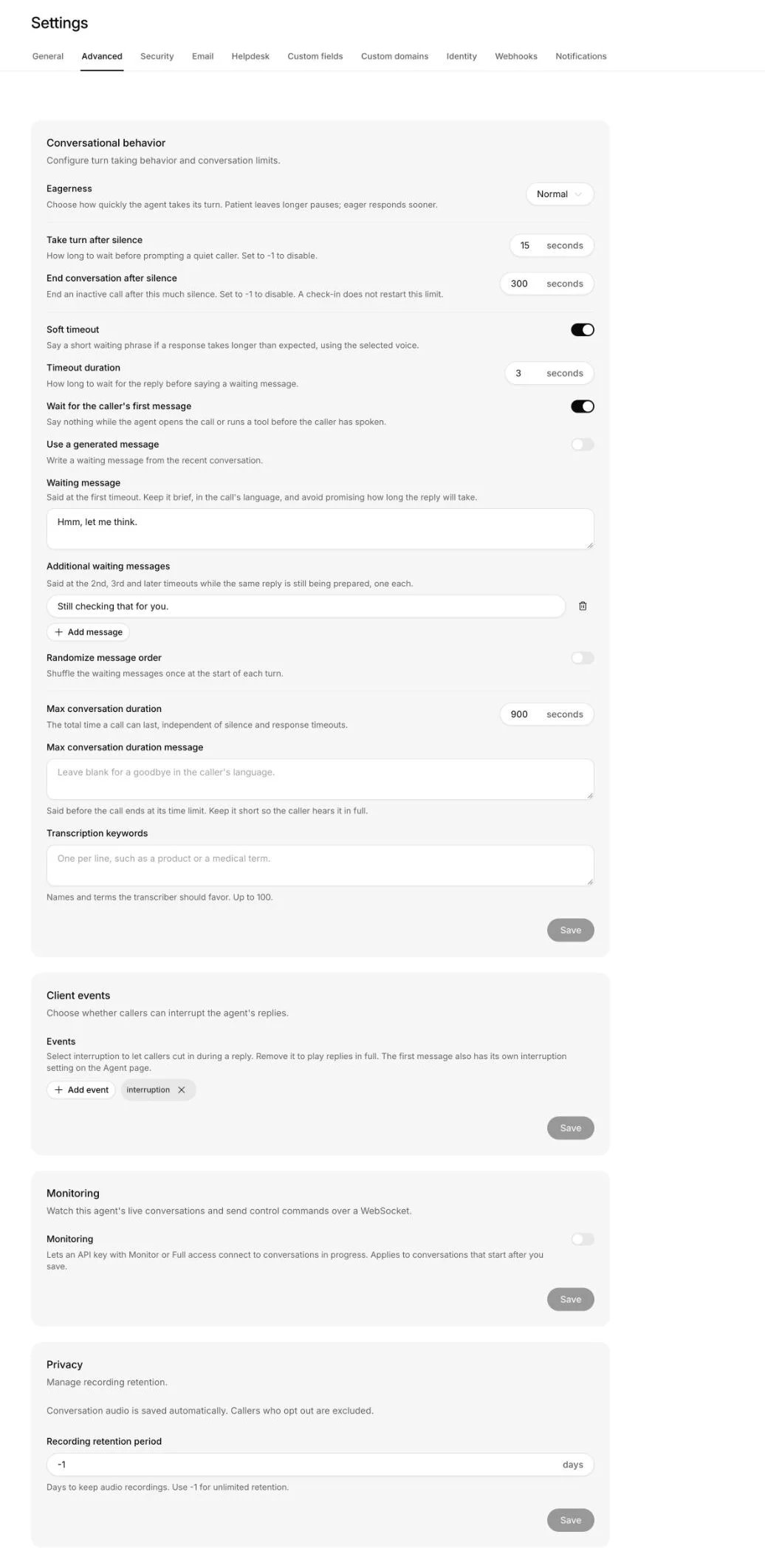
Advanced contains turn timing, silence controls, waiting messages, call duration, Client events and Monitoring.
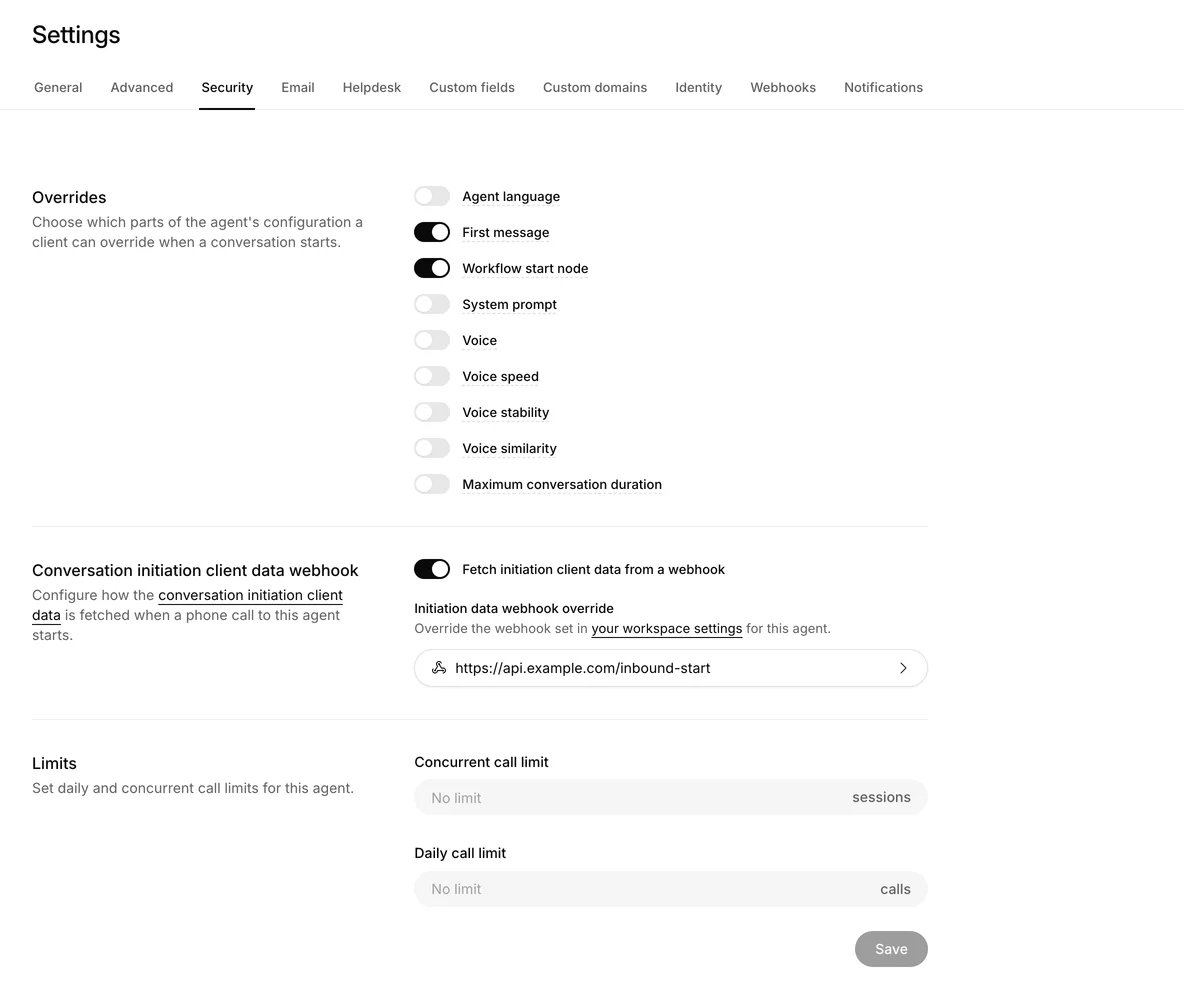
Security contains the conversation overrides, the initiation webhook and daily and concurrent call limits.
Reuse an agent for inbound and outbound calls
One agent handles both directions. Use{{system.direction}} in its system
prompt for what differs, and a first_message column to change the opening on a
batch. A workflow opening takes precedence over the agent’s First message.
Batch recipients supply their own variables and skip the initiation webhook.
See Personalization
for the full precedence and live-data options, and
Give inbound callers their own start
to send callers who ring in to their own workflow step.
Your responsibilities
Your workspace is responsible for following the laws and rules that apply to its calls. Centillion does not check them for you:- Consent. Have each person’s consent to be called before you call them.
- Disclosures. Say what your calls have to say, such as your business name, that the caller is an AI, and that the call is recorded or transcribed. Beyond the recording sentence on a batch call, calls do not open with a fixed notice (see What the customer hears).
- Do-not-call rules. Check the do-not-call registries that apply to you. Centillion keeps calls off your workspace’s own do-not-call list only.
- Calling hours. Call only when the rules allow in each customer’s local time.
- Call frequency. Keep to the limits on how often one number is called, across all your batches and campaigns.
- Opt-outs. Give people a way to stop your calls during the call, where the law asks for one. For example, tell your agent in its instructions to end the call with the End conversation tool when someone asks not to be called again. Centillion adds that person’s number to your do-not-call list once the call’s outcome is saved.
When calls are placed
A batch starts immediately or at the date, time and timezone you choose. Available concurrency and carrier capacity determine when each recipient is called. Centillion does not hold calls to calling hours or public holidays, and any number with its country code can be called, where the carrier behind your calling number allows that destination. A batch calls at any hour until its list is done, so schedule it, or pause it, to fit the calling hours where your recipients are. A batch makes one call attempt per recipient. Busy, unanswered and failed calls remain in the results until you choose Retry. A carrier rate-limit refusal can return to the queue because it did not ring the recipient. Calls count against the agent’s daily and concurrent-call limits under Settings → Security → Limits. The maximum conversation duration under Settings → Advanced ends the call. A contact cannot have overlapping calls, and a new call waits until the previous answered call’s outcome has been saved. A voice campaign keeps to its quiet hours in each contact’s time zone and retries automatically. Like a batch, it is not held to calling hours or a limit per number, so set both to the rules that apply to you.Consent and the do-not-call list
Calls don’t check consent records. To keep your own, an owner records each consent under Contacts → Call permissions: the number, when the person gave consent, how (a web form, a signed document or a recorded call), the exact words they agreed to, what the consent covers and where the proof is kept. Withdrawing a consent keeps it on record. The do-not-call list holds the numbers no agent or campaign of the workspace calls. A number goes on it when the person asks on a call not to be contacted again, texts STOP, or sends STOP on WhatsApp. Anyone in the workspace can also add a number by hand under Contacts → Call permissions. Numbers are never taken off the list: deleting the contact or the agent leaves them on it, and so does a later START. Voice campaigns leave these numbers out of their audience. The list is about calls, so it does not stop WhatsApp messages.What the customer hears
Batch calls begin with the agent’s First message, or the recipient’sfirst_message override, using the selected branch’s Interruptible setting.
If both are blank, the agent waits for the person to speak, and opens the call
itself if they stay silent for three seconds.
When the agent records calls, one fixed sentence comes first: “This call is
recorded and transcribed, and our service providers process it.” There is no
other batch opening configured elsewhere. The agent then follows
its published instructions, tools and workflow. Include the identification and
consent disclosures your calls require in that message and your instructions.
See Disclosure requirements.
Voice campaign calls open without a fixed notice: the agent greets the person
and says its name. Put anything every call must say, such as your business
name, that the caller is an AI or that the call is recorded, in the agent’s
instructions or the campaign’s playbook. If the person asks who is calling,
whether it is an AI or how to stop the calls, the agent answers plainly and
truthfully.
On a voice campaign, the agent checks that it is speaking to the right person,
and only once they confirm does it say why it is calling and ask whether it is
a good moment. If it is someone else, it does not say why it called, says
goodbye and ends the call, and it promises nothing about future calls.
A wrong person is not an opt-out. Their number stays off the do-not-call list
unless they ask not to be called again. When they say the number is wrong,
that they do not know the customer, or only that they are not the customer, it
is saved on the contact as a wrong number, and calls to that number for that
contact are refused, so a campaign skips the contact, on calls and on WhatsApp
alike. Change the contact’s number to reach them again. If the number was right after all, clear Wrong
number on the contact. Someone answering the customer’s own phone for them,
such as a relative, leaves the number callable.
When the number is wrong and the person asks not to be called, the number goes
on the do-not-call list, which refuses it for every contact. The call is still
recorded as wrong_person, so the contact is not marked do-not-call and no
campaign counts it as their opt-out: they never asked, so their other numbers
stay callable. Someone answering the customer’s own phone who asks not to be
called opts the customer out, the same as the customer asking.
Enable Voicemail detection in the agent’s Tools screen to recognize
voicemail and end the call. Under Customize, leave Voicemail message
blank to hang up silently, or enter a message to play after the greeting.
The message supports dynamic variables and is saved with the agent version.
Keep it general because a shared voicemail is not private. The call is
recorded as voicemail even when the agent plays a message.
If the customer asks not to be called again, the agent confirms that they will
not be, says goodbye and ends the call, and the number goes on the do-not-call
list once the call has been read.
After the agent says goodbye, the call hangs up as soon as the person says
goodbye back, and a few seconds later if nobody speaks or the person only
says “Thank you!” or “You too!”, even when the person stays on the line. If
the person says anything else, the call goes on. If the person goes quiet in
the middle of the call, the agent asks once whether they are still there, and
hangs up if they still say nothing. While a workflow step still waits for a
detail from the person, such as a callback number, a goodbye does not end the
call: the agent asks for it, starting with “Before you go,” and a person who
has gone quiet is asked whether they are still there first.
What is saved
Each call keeps its transcript, like any other conversation. The contact gets these attributes, shown on the contact under Contacts:
The outcome and the reason are read from the whole transcript after the call
ends. Nothing the customer says during the call can set them directly. A
request not to be called is read from what the person said, never from what
the agent said it would do.