Let your Centillion agent call your API, run a function on your website or app, show interactive cards and book Cal.com meetings. Set up a tool.
Tools let your agent do things during a conversation instead of only
answering from its knowledge. This page covers the AI agent custom tools API
calls, website and app functions, and interactive cards, plus the built-in
tools that sit in the same catalog under Tools.
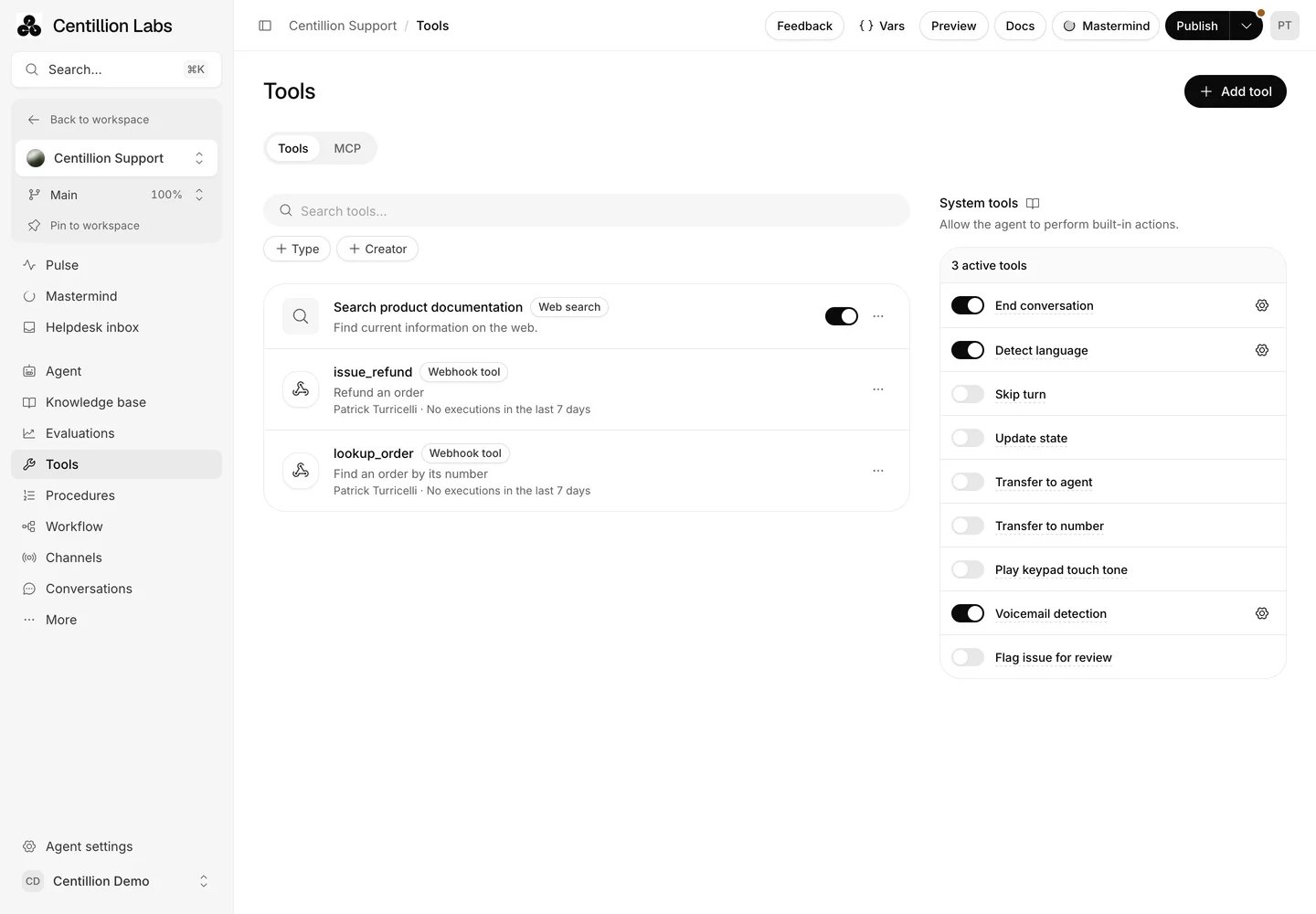
An agent's Tools page lists its attached tools beside built-in capabilities. MCP servers have their own tab.
Open Tools in the agent sidebar. The Tools tab lists the agent’s
attached tools and configured actions; MCP lists its connected servers.
Search by name or description and filter by type or creator.Add tool opens a searchable picker beside the button. Select an existing
workspace tool to attach it, or choose New tool and select Webhook,
Client, Code, or Integration. A new tool is saved in the workspace
and attached to the agent together. In MCP, choose Add server, then
select a saved server or New custom MCP server.Click an attached tool to edit its configuration without leaving the agent.
The editor includes typed parameters, dynamic variables, response assignments,
mock responses, voice execution settings, JSON editing, testing and logs for
the supported tool type. Saved MCP servers can discover tools and select
which ones the agent may use. Tool admins can also manage sharing.These definitions are shared. Editing one updates the shared tool wherever it
is used. Remove from agent only removes this agent’s attachment; the tool
remains in the workspace library. Configured actions keep their enable switch,
channel settings and Customize control.
System tools contains nine built-in actions, such as ending a call and
transferring it to a person. They need no API or code. See
System tools for what each one does and how to set it up.
Call API sends a request to your HTTPS endpoint and gives the JSON
response to the agent. The response can be up to 20 KB, and you choose which
of its fields the agent sees, up to 200.
Run client-side code calls a function registered on your website through
the JavaScript embed, or in your app through the iOS or Android SDK. A website
function has 20 seconds to finish; an app handler has 25.
Call API + show widget and Show widget show an interactive card in
chat, built as a React component, with your API’s data or the details the
agent collected.
The same catalog holds built-in tools: Cal.com bookings, Stripe billing,
Shopify, Twilio, escalations, live chat handoffs and Slack alerts.
Your plan sets how many tools can be enabled per agent: none on Free, five
on Hobby, eight on Standard and twelve on Pro.
A paid plan with room for another enabled tool. Saving a draft does not
enable it or consume credits. See plan limits.
Message credits: each model request in a tool’s tool loop consumes credits
at the selected model’s rate.
The Owner or Member role. Viewers can read tools, and see placeholders in
place of encrypted values. See workspace roles.
For Call API, an HTTPS endpoint that returns JSON. For website functions,
the JavaScript embed on your site. For app functions, the iOS or Android SDK.
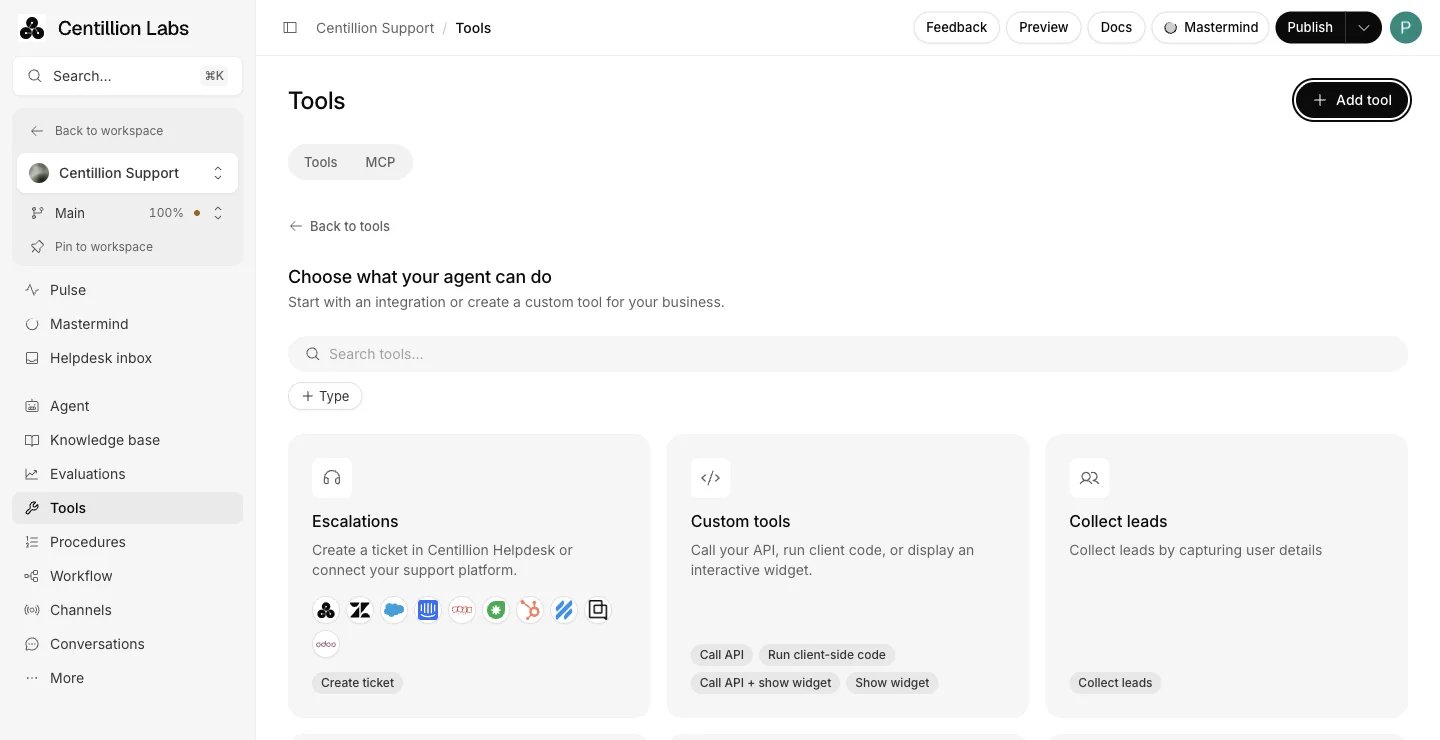
Open Tools, then Add tool, New tool, Integration, and choose
Custom tools. Give
the tool a name and explain when the agent should use it. Turn on Only
use in procedures if a procedure should control when it runs.
The integration catalog includes Escalations, Custom tools and Collect leads.
2
Choose a type
Pick Call API, Run client-side code, Call API + show widget or
Show widget. The builder shows only the steps your type needs.
3
Add inputs
Add named, typed inputs for the information the agent should collect.
Describe each input so the agent knows what to ask the customer.
4
Connect the request, function or widget
For an API, enter the URL and request, then choose Test response. For a
website function, continue to Client setup and copy the code. For a
widget, add one from the gallery or the code editor.
5
Choose data access
Keep Full data access, or choose Limited data access and select the
fields the agent may see.
6
Pick channels and save
Turn on the channels where the tool runs. Choose Save to keep a new
tool as a draft, or Save & enable when it is ready. Publish the
branch to use the saved configuration in new customer conversations.
Type
Behavior
Call API
Calls your HTTPS endpoint and gives the JSON response to the agent.
Run client-side code
Calls a function registered on your website through the JavaScript embed, or in your app through the iOS or Android SDK.
Call API + show widget
Calls your endpoint and shows the returned data in an interactive card.
Show widget
Shows a card using inputs collected from the conversation, without calling an API.
Enter an HTTPS URL, then use Add variable to insert an input such as
{{order_id}}. Query parameters also appear in the parameter editor. GET
requests have no body; other request bodies must be JSON. An input in the URL
path can’t point the request at another path on your API: a value that makes a
whole path segment . or .., or that contains / or \, is refused before
the request is sent. Put values like these in a query parameter instead.Put API keys in a header or a query parameter, never in the body. Centillion
encrypts header values and any parameter value with text other than an input
like {{order_id}}. After you save, the builder shows a placeholder in their
place, and Viewers see a placeholder for the body too.Requests identify themselves as Centillion/1.0 (+https://cntillion.com) in
the User-Agent header, so your firewall can allow them. A User-Agent header
you add yourself replaces it.Test response takes separate sample input values. The result shows the HTTP
status, duration, response size, headers and body. Continue becomes
available after a successful response with valid JSON no larger than 20 KB.
Changing the request or its test inputs clears the previous result, so run the
test again before continuing.You can instead provide an example JSON response within the same size limit.
The builder shows an error for an invalid or oversized example. An example helps
configure the tool; at execution time the real endpoint is called.
The response table shows each field’s name, sample value and size. Limited
data access adds a checkbox per field, a select-all checkbox and a preview of
the filtered response and its size. Unselected fields are removed before the
response reaches the agent or its widget.You can select nested fields, fields across array items, empty objects and
arrays, or a response containing a single value. Sizes count UTF-8 bytes, so a
non-ASCII character can take more than one byte. Deselecting every field sends
no response data to the agent. Saved fields missing from a later sample remain
selected until you remove them.If no response is available, follow the setup button back to the API or test
step. Save and continue accepts your access settings for this editing
session. Skip restores the last accepted settings, including restrictions
already saved on the tool. The final Save or Save & enable persists
the changes.
Choose Run client-side code and keep Wait for response on when the agent
needs the function’s result. Add the parameters in Inputs, then continue to
Client setup. Copy embed code installs the JavaScript embed, and Copy
code gives a registration template with your exact tool name. Replace the
example with your website’s function.Client tools run functions you register on the host website. Code pasted into
the dashboard never runs. The template queues registration even when the embed
is still loading. For a tool named get_weather with a location input:
Register all your tools in one registerTools call; each call replaces the
previous registrations. Tool names must match exactly, including case. Use the
current embed snippet from the builder to receive user context. Its version
number, embed.js?v=10 today, bypasses older cached loaders.Each function receives args, the typed inputs the agent collected, and user,
the visitor context:
Field
Available when
anon_user_id, centillion_anon_id
Every invocation. Internal anonymous visitor identifiers.
user_id
The server verifies the customer’s signed identity.
user_hash
The identity was verified with a user ID and HMAC hash. JWTs are never exposed to tool handlers.
user_metadata
Your website supplied metadata in centillionSettings or an identify call. This data is not identity verification.
To pass metadata alongside your existing signed identity, call
window.centillion("identify", { user_id, user_hash, user_metadata: { company: "Acme" } }).
window.Centillion("identify", ...) also works once the widget has loaded; before
that, only the lowercase window.centillion queues the call. Generate the signature on
your server, as identity verification
describes. Without valid verification, the handler receives anonymous IDs and
any website metadata, without a customer ID or hash. logout and shutdown
clear the metadata as well as the identity.Return { status: "success", data: result } on success, where data can be a
JSON value, object or array. Return { status: "error", error: "A useful message" }
on failure. Thrown errors are also returned to the agent. Keep the complete
response below 20 KB and finish within 20 seconds.With waiting off, the agent receives a dispatch acknowledgment, which does not
confirm that the function finished. A missing function or a timeout returns an
error. Test website functions on the page that loads your embed: they cannot run
in Playground, tool preview or Compare, and the builder preview sends you to
your website instead.Event listeners observe website and server
tools with tool-call and tool-result. Match the call’s id to the
result’s toolCallId. A website function can finish after the AI replies when
Wait for response is off; its result event still arrives when it finishes.
In a native app, register a handler whose name exactly matches the tool name
with the SDK’s tool method. The SDK runs the handler when the agent calls the
tool and sends back its JSON result, which must be smaller than 20 KB. A call
with no registered handler returns an error to the agent. With Wait for
response on, the handler has 25 seconds to answer; after that the agent tells
the customer the tool could not be completed.
Add a widget from its gallery or code editor. Export a default React component
that accepts data. For API widgets, data is the filtered response. For
widget-only tools, it contains the collected inputs. The preview runs your
component, including its buttons and state changes.
Widgets run in an isolated frame and support React imports. A declared widget
function can be called with callFunction(name, values). It makes an HTTPS
request from the browser, so the endpoint must allow CORS. Keep API secrets on
your server, out of widget code.
Configured channels have switches. Expand Unconfigured channels for links
to connect a channel or open its setup guide. API tools can run on supported
messaging channels; client functions and widgets need a browser channel or the
iOS or Android SDK. Upgrading a plan does not make an incompatible channel
available.Salesforce and Zendesk show a plan lock unless your workspace has the required
entitlement; the upgrade link opens the plans. Channel availability also depends
on whether that channel has a working deployment.Save & enable needs at least one selected channel that is configured,
compatible with the tool type and available on your plan. Saving an existing
enabled tool keeps it enabled. Test the tool in the channel where customers
will use it before relying on it in a live flow.
Create reusable tools from Tools in the workspace sidebar: webhook, client,
code and MCP tools. To reuse one in an agent, open Tools → Add tool, search
by name, description or tool ID, filter by type or creator, and select the tool
to attach it; tools already attached show a check mark, and you can add several
before closing the picker. MCP servers are added the same way from the MCP
tab with Add server. The picker shows the tools you have permission to use,
and Owners and Members can add them.Attached tools appear on the Tools tab with their type, such as Webhook
tool. The … menu edits the tool (or views it, without edit access), copies
its ID, opens it in the workspace library, or chooses Remove from agent,
which detaches the tool from the selected branch draft and keeps it in the
workspace. A tool a teammate attached without sharing it with you still runs in
conversations: the Tools tab says how many there are, and the creator or a
workspace Owner can give you access. See
shared tools and workflows.
Individual custom tools keep their configuration and enabled state in published
versions. Disabling or removing one from your draft does not change those
versions. Publish the change for new conversations. Archiving a workspace tool
stops its execution in every version.
Select Cal.com in the integration catalog (Tools → Add tool → New tool → Integration) to let customers book a
meeting inside chat. Enter the public event URL, such as
https://cal.com/your-name/demo, and give the tool a name. Personal, team and
organization event links work without connecting a Cal.com account or entering
an API key.Describe when the agent should offer a booking, or turn on Only use in
procedures to restrict it to an activated procedure. Reset restores the
default booking instructions. With those instructions, a request without dates
searches from today through 28 days ahead; a specified date window can span up
to 31 days. Choose 12-hour time format if you prefer 1:00 PM to 13:00.Enable the tool on Chat bubble, Help page or Center Stage, the
three browser channels Cal.com tools support, then choose Save & enable.The customer chooses a day, time and time zone in the calendar, enters their name
and email, and selects Confirm booking. The form also supports phone number,
notes, guests and a reschedule reason, using the event’s visible field settings
when available. Events requiring other custom fields may reject the booking.
Availability is checked again before submission, so a time that someone else
booked cannot be confirmed from an old calendar.
The builder preview and Playground use live Cal.com availability. Selecting
Confirm booking there creates a real appointment, just as it does in a
customer conversation.
Meeting booked means Cal.com accepted the booking. Booking requested
means it is awaiting the host’s approval. If the result is uncertain, check the
confirmation email before trying again; the same calendar blocks another
submission while that booking is unresolved.
Stripe billing has four built-in tools for invoices,
subscriptions, subscription management and customer information. Connect Stripe
and link verified customer contacts, then select Stripe in
the integration catalog (Tools → Add tool → New tool → Integration). The subscription tool has plan, quantity, proration and
cancellation settings. Stripe tools run in Chat bubble only; customers confirm
changes in Stripe’s hosted portal.
The Shopify integration has its own tool builder for
products, carts, orders, returns, exchanges and customer accounts. Connect the
store first, then select Shopify under Tools. These tools need no
custom API request or registered website function. Free orders must be
restricted to a procedure. New-order exchanges require Helpdesk and an
administrator’s approval in Channels → Shopify before a replacement is
created.
With Twilio connected, select Twilio in
the integration catalog (Tools → Add tool → New tool → Integration) and choose what the tool does:
Tool
What the agent can do
Send message
Text the customer by SMS, or MMS with media links
Get message
Look up one message by its SID
List messages
List recent messages, newest first
Delete message
Delete a message from your Twilio records, once the customer confirms
Get call
Look up one call by its SID
List calls
List recent calls, newest first
Get messages for number
List the messages to and from a number
Get calls for number
List the calls to and from a number
Under Phone numbers, choose whose numbers the tool can use:
The customer’s own number (the default). The tool only works for a
verified customer whose contact has a phone number in international format,
such as +14155550123. Texts go to that number, and lookups only return that
number’s messages and calls. Anonymous visitors are refused.
Any number. The agent uses any number the conversation names. Anyone who
can chat with the agent could then read another person’s messages or text a
stranger, so use it only for an agent your customers cannot reach.
Send message also needs the number texts are sent from, chosen from the
numbers in your Twilio account that can send SMS, and a limit of 1 to 10 texts
per conversation (3 by default). A retried request never texts twice.Twilio tools run in the Chat bubble, on the Help page and through the API.
They do not run during phone calls, on messaging channels such as WhatsApp, or
in the Playground, so a test never texts anyone. Disconnecting Twilio turns them
off.
Open Tools, choose Transfer to phone number, and enter the number of
the person or team who should receive the call. Add when the agent should
transfer, its message before connecting, and what it should say if the
transfer fails. Choose the channels, save the tool, and publish the agent.The Set up in Tools button on Pulse’s Transfer to human card opens
this setup directly. The card shows recorded handoffs for the selected period,
including live chat and ticket escalations. To send callers to different
destinations on different conditions, use
Transfer to number. For transfers
inside a workflow, see
phone transfer steps.
The catalog includes Escalations for follow-up tickets and Centillion live
chat for handing the conversation to a teammate, so a person takes over from
the helpdesk inbox. Configure these built-in tools from their own
cards and enable Centillion Helpdesk in their setup. Each has its own channel
selection and Only use in procedures setting. A procedure that uses live
chat needs the tool enabled on that channel and Helpdesk turned on. See
Centillion live chat.For Salesforce support, choose Salesforce in
Create ticket to create a case or escalate the existing native case.
Salesforce live chat has its own builder for Chat bubble, Help page and
Center Stage handoffs to Salesforce Enhanced Chat. Connect Salesforce and enable
Helpdesk before enabling these tools.To alert your team without handing the conversation off, use the Slack
tool. It posts a summary and a link to the conversation in a Slack channel,
and the agent keeps helping the customer. An agent has one Slack tool, which
posts to one channel. See Conversation
notifications.
Collect leads, Collect data and custom form submissions can start a Zapier
workflow. Open Channels → Zapier, connect your agent, and select the Form
Submission trigger in Zapier. Map contact and custom fields into your CRM,
spreadsheet or another destination. See Zapier for the
complete setup and a Google Docs example.
API responses, website function results and app results must each stay under
20 KB.
Limited data access selects up to 200 fields.
Website functions finish within 20 seconds; app handlers answer within 25
seconds when Wait for response is on.
Website functions cannot run in Playground, tool preview or Compare.
Cal.com tools run on Chat bubble, Help page and Center Stage. Stripe tools
run in Chat bubble only. Twilio tools run in the Chat bubble, on the Help
page and through the API.
Enabled tools per agent: Free none, Hobby five, Standard eight, Pro twelve.
In a header or a query parameter, never in the body. Centillion encrypts header
values and parameter values that are more than a plain input reference, and the
builder shows a placeholder after you save.
With Full data access, the whole response. With Limited data access,
only the fields you selected, up to 200. Unselected fields are removed before the
response reaches the agent or its widget.
The channel may not be configured, may not support the tool type, or may need
a plan your workspace does not have. Client functions and widgets need a browser
channel or a mobile SDK, and upgrading does not change that.
Published versions keep each tool’s saved configuration and enabled state.
Disabling or removing a tool from your draft changes new conversations after
you publish. Archiving a workspace tool stops its execution in every version.
How the agent, its knowledge and its channels fit together.
Collect data
Ask for structured details in chat and send each submission on.
Zapier
Start a Zap from each lead or form submission.
Last modified on November 1, 2026
⌘I
{"docsConfig":{"theme":"maple","$schema":"https://mintlify.com/docs.json","name":"Centillion","description":"How to build a Centillion AI agent, give it your knowledge, and put it on your website, WhatsApp, Messenger, Instagram, Slack and email.","colors":{"primary":"#0a0a0a","light":"#f5f5f5","dark":"#0a0a0a"},"logo":{"light":"https://mintcdn.com/centillion/YMwlBbzdENjtfSuJ/logo/centillion-labs-logo-horizontal.svg?fit=max\u0026auto=format\u0026n=YMwlBbzdENjtfSuJ\u0026q=85\u0026s=a390a5bdca5c0720e1871afbf09b1f18","dark":"https://mintcdn.com/centillion/YMwlBbzdENjtfSuJ/logo/centillion-labs-logo-horizontal.svg?fit=max\u0026auto=format\u0026n=YMwlBbzdENjtfSuJ\u0026q=85\u0026s=a390a5bdca5c0720e1871afbf09b1f18","href":"https://cntillion.com"},"favicon":"https://mintcdn.com/centillion/OVR3XViKbG9zMitv/favicon.svg?fit=max\u0026auto=format\u0026n=OVR3XViKbG9zMitv\u0026q=85\u0026s=a6656501072b111f976d6229cbbd73ad","appearance":{"default":"light","strict":true},"background":{"color":{"light":"#ffffff","dark":"#0a0a0a"}},"navbar":{"links":[{"href":"https://cntillion.com/pricing","label":"Pricing"},{"href":"https://cntillion.com/support","label":"Contact"}],"primary":{"type":"button","label":"Open Centillion","href":"https://app.cntillion.com"}},"footer":{"links":[{"header":"Centillion","items":[{"label":"Home","href":"https://cntillion.com"},{"label":"Pricing","href":"https://cntillion.com/pricing"},{"label":"Contact","href":"https://cntillion.com/support"},{"label":"Sign in","href":"https://app.cntillion.com/sign-in"}]}]},"search":{"prompt":"Search the Centillion docs"},"seo":{"metatags":{"og:site_name":"Centillion Docs"},"organization":{"name":"Centillion","url":"https://cntillion.com"},"indexing":"navigable"},"fonts":{"family":"Inter"},"metadata":{"timestamp":true},"styling":{"latex":true},"navigation":{"pages":[]}},"deployment":{"deploymentMetadataValue":{"subdomain":"centillion","hasAudioNarration":false,"actualSubdomain":"centillion","customDomains":["cntillion.com"],"gitSource":{"type":"github","owner":"centillion-labs","repo":"conversational-agents-for-cx","deployBranch":"master","contentDirectory":"apps/docs","isPrivate":true,"mountPath":"","label":""},"chroma":{"latestBuiltDeploymentHistoryId":"6ae95d6935b55ff31612f7a7","collectionId":"27832044-5e72-44ea-8577-5c209cbfb879","liveDeploymentHistoryId":"6ae95d6935b55ff31612f7a7","schemaVersion":"v3"},"entitlements":{"AI_CHAT":{"status":"DISABLED"},"WEB_MCP":{"status":"DISABLED"},"NARRATION":{"status":"DISABLED"}},"buildId":"6ae96f717e64ded297ae851c","clientVersion":"0.0.4045","searchFilterCounts":[{"language":"default","tag":"Reach your customers","count":19},{"language":"default","tag":"Build your agent","count":14},{"language":"default","tag":"Guides","count":8},{"language":"default","tag":"Workspace","count":7},{"language":"default","tag":"API documentation","count":6},{"language":"default","tag":"Support","count":6},{"language":"default","tag":"Customer data","count":5},{"language":"default","tag":"Website development","count":2},{"language":"default","tag":"Get started","count":2},{"language":"default","tag":"Helpdesk API","count":1}]},"assistantConfig":{"enableAskAiButton":false,"enableStarterQuestions":false,"enableContextualStarterQuestions":false,"enableAskAiSearchBar":true},"basePath":"/docs","hasChatPermissions":false,"hasWebMcpPermissions":false,"toggles":[{"name":"kill-isr","enabled":true,"variant":{"name":"disabled","enabled":false,"feature_enabled":true},"impressionData":false},{"name":"agent-mintlify-slack","enabled":true,"variant":{"name":"disabled","enabled":false,"feature_enabled":true},"impressionData":false},{"name":"agent-integrations-settings","enabled":true,"variant":{"name":"disabled","enabled":false,"feature_enabled":true},"impressionData":false},{"name":"automations-pr-grouping","enabled":true,"variant":{"name":"disabled","enabled":false,"feature_enabled":true},"impressionData":false},{"name":"custom-prefix","enabled":true,"variant":{"name":"disabled","enabled":false,"feature_enabled":true},"impressionData":false},{"name":"analytics-v7","enabled":true,"variant":{"name":"disabled","enabled":false,"feature_enabled":true},"impressionData":false},{"name":"user-flows-analytics","enabled":true,"variant":{"name":"disabled","enabled":false,"feature_enabled":true},"impressionData":false},{"name":"no-publish-flow","enabled":true,"variant":{"name":"disabled","enabled":false,"feature_enabled":true},"impressionData":false},{"name":"workos-onboarding","enabled":true,"variant":{"name":"disabled","enabled":false,"feature_enabled":true},"impressionData":false},{"name":"llms-txt-v2","enabled":true,"variant":{"name":"disabled","enabled":false,"feature_enabled":true},"impressionData":false},{"name":"snapshot-serving-live","enabled":true,"variant":{"name":"disabled","enabled":false,"feature_enabled":true},"impressionData":false},{"name":"stripTemperatureMiddleware","enabled":true,"variant":{"name":"disabled","enabled":false,"feature_enabled":true},"impressionData":false},{"name":"support-platform-pylon-zendesk","enabled":true,"variant":{"name":"disabled","enabled":false,"feature_enabled":true},"impressionData":false},{"name":"snapshot-serving","enabled":true,"variant":{"name":"disabled","enabled":false,"feature_enabled":true},"impressionData":false},{"name":"instant-rollback","enabled":true,"variant":{"name":"disabled","enabled":false,"feature_enabled":true},"impressionData":false},{"name":"granular-notifications-server","enabled":true,"variant":{"name":"disabled","enabled":false,"feature_enabled":true},"impressionData":false},{"name":"granular-notifications","enabled":true,"variant":{"name":"disabled","enabled":false,"feature_enabled":true},"impressionData":false},{"name":"automations-fable","enabled":true,"variant":{"name":"disabled","enabled":false,"feature_enabled":true},"impressionData":false},{"name":"fixed-ai-action-pricing","enabled":true,"variant":{"name":"disabled","enabled":false,"feature_enabled":true},"impressionData":false},{"name":"automation-resolve-merge-conflict","enabled":true,"variant":{"name":"disabled","enabled":false,"feature_enabled":true},"impressionData":false},{"name":"scoped-publishing","enabled":true,"variant":{"name":"disabled","enabled":false,"feature_enabled":true},"impressionData":false},{"name":"mintql","enabled":true,"variant":{"name":"disabled","enabled":false,"feature_enabled":true},"impressionData":false},{"name":"page-level-analytics","enabled":true,"variant":{"name":"disabled","enabled":false,"feature_enabled":true},"impressionData":false},{"name":"editor-version-history-v2","enabled":true,"variant":{"name":"disabled","enabled":false,"feature_enabled":true},"impressionData":false},{"name":"billing-page-v2","enabled":true,"variant":{"name":"disabled","enabled":false,"feature_enabled":true},"impressionData":false},{"name":"full-page-search","enabled":true,"variant":{"name":"disabled","enabled":false,"feature_enabled":true},"impressionData":false},{"name":"workspace-projects","enabled":true,"variant":{"name":"disabled","enabled":false,"feature_enabled":true},"impressionData":false},{"name":"assistant-v5","enabled":true,"variant":{"name":"disabled","enabled":false,"feature_enabled":true},"impressionData":false},{"name":"byok-sep-25","enabled":true,"variant":{"name":"disabled","enabled":false,"feature_enabled":true},"impressionData":false},{"name":"fork-pr-previews","enabled":true,"variant":{"name":"disabled","enabled":false,"feature_enabled":true},"impressionData":false},{"name":"revalidation-jwt","enabled":true,"variant":{"name":"disabled","enabled":false,"feature_enabled":true},"impressionData":false},{"name":"vite-origin","enabled":true,"variant":{"name":"disabled","enabled":false,"feature_enabled":true},"impressionData":false},{"name":"billing-updated-9-15","enabled":true,"variant":{"name":"disabled","enabled":false,"feature_enabled":true},"impressionData":false},{"name":"workos-sso-scim","enabled":true,"variant":{"name":"disabled","enabled":false,"feature_enabled":true},"impressionData":false},{"name":"hobby-abuse-scan","enabled":true,"variant":{"name":"disabled","enabled":false,"feature_enabled":true},"impressionData":false},{"name":"dashboard-inbox","enabled":true,"variant":{"name":"disabled","enabled":false,"feature_enabled":true},"impressionData":false},{"name":"workos-signup","enabled":true,"variant":{"name":"disabled","enabled":false,"feature_enabled":true},"impressionData":false},{"name":"turbopuffer-dual-write","enabled":true,"variant":{"name":"disabled","enabled":false,"feature_enabled":true},"impressionData":false},{"name":"workos-enabled","enabled":true,"variant":{"name":"disabled","enabled":false,"feature_enabled":true},"impressionData":false},{"name":"approve-review-flow","enabled":true,"variant":{"name":"disabled","enabled":false,"feature_enabled":true},"impressionData":false},{"name":"sso-setup-deadline-banner","enabled":true,"variant":{"name":"disabled","enabled":false,"feature_enabled":true},"impressionData":false}],"googleFontsInlined":false},"customCss":[{"filePath":"style.css","content":":root{--bg-subtle:#f6f6f6;--ink:#0a0a0a;--ink-2:#353535;--ink-3:#626262;--ink-4:#a1a1a1;--ink-5:#c7c7c7;--amber:#db8831;--amber-text:#9f5f1c;--amber-tint:#fbf4ec;--radius-lg:16px;--radius-xl:24px;--radius-pill:9999px;--glow-lavender:#ebeaf7;--glow-pink:#f2e4e2;--glow-peach:#f5e6dd;--glow-sky:#e6ecf4;--glow-mint:#e9f4ef}#page-title{font-size:40px;font-weight:500;line-height:46px;color:var(--ink);letter-spacing:-.02em}#content>h2,#content>h3,#content>h4{font-size:20px;font-weight:500;line-height:26px;color:var(--ink);letter-spacing:-.01em}#content>h3,#content>h4{font-size:18px;line-height:24px}#content>h4{font-size:16px;line-height:22px;letter-spacing:0}#header .eyebrow,#search-bar-entry,#search-bar-entry-mobile{font-size:14px;font-weight:400;line-height:20px;color:var(--ink-3)}#search-bar-entry,#search-bar-entry-mobile{height:36px;padding:0 16px;color:var(--ink-4);background-color:var(--bg-subtle);border-radius:var(--radius-pill);box-shadow:none}#search-bar-entry svg,#search-bar-entry-mobile svg{color:var(--ink-4)}#search-bar-entry>span{font-size:12px;font-weight:400;line-height:16px;color:var(--ink-4)}#search-bar-entry-mobile:focus-visible,#search-bar-entry:focus-visible{outline:2px solid var(--ink);outline-offset:2px}#content .card{background-color:var(--bg-subtle);border:0;border-radius:var(--radius-lg);box-shadow:none}#content .card [data-component-part=card-content-container]{padding:20px}#content .card [data-component-part=card-icon] svg{background-color:var(--ink-3)}#content .card [data-component-part=card-content-container]>a>div.absolute{color:var(--ink-5)}#content .card [data-component-part=card-title]{font-size:16px;font-weight:500;line-height:22px;color:var(--ink)}#content .card [data-component-part=card-content]{font-size:14px;font-weight:400;line-height:20px;color:var(--ink-3)}#content .card [data-component-part=card-content]>span{color:inherit}#content-area:has(.centillion-hero)>#header{display:none}.centillion-hero{display:flex;flex-direction:column;gap:20px;padding:28px;margin-bottom:24px;background-color:var(--bg-subtle);background-image:radial-gradient(38% 80% at 96% 0%,var(--glow-lavender) 0%,transparent 100%),radial-gradient(30% 70% at 84% 48%,var(--glow-pink) 0%,transparent 100%),radial-gradient(34% 70% at 90% 100%,var(--glow-peach) 0%,transparent 100%),radial-gradient(28% 64% at 66% 58%,var(--glow-sky) 0%,transparent 100%),radial-gradient(26% 56% at 62% 0%,var(--glow-mint) 0%,transparent 100%);border-radius:var(--radius-xl)}.centillion-hero .centillion-hero-eyebrow{margin:0;font-size:14px;font-weight:400;line-height:20px;color:var(--ink-3)}.centillion-hero .centillion-hero-title{max-width:720px;margin:0;font-size:40px;font-weight:500;line-height:46px;color:var(--ink);letter-spacing:-.02em;text-wrap:balance}.centillion-hero .centillion-muted{color:var(--ink-3)}#content .callout{padding:16px 20px;font-size:14px;line-height:20px;border:0;border-radius:var(--radius-lg)}#content .callout[data-callout-type=warning]{background-color:var(--amber-tint)}#content .callout[data-callout-type=warning] [data-component-part=callout-icon] svg{color:var(--amber)}#content .callout[data-callout-type=warning] [data-component-part=callout-content]{color:var(--amber-text)}#content .callout[data-callout-type=note]{background-color:var(--bg-subtle)}#content .callout[data-callout-type=note] [data-component-part=callout-icon] svg{color:var(--ink-3)}#content .callout[data-callout-type=note] [data-component-part=callout-content]{color:var(--ink-2)}"}],"page":{"pagePath":"agents/custom-actions","slug":"/agents/custom-actions","pageMetadata":{"title":"AI agent custom tools: call your API","description":"Let your Centillion agent call your API, run a function on your website or app, show interactive cards and book Cal.com meetings. Set up a tool.","sidebarTitle":"Custom tools","keywords":["AI agent custom tools","AI agent custom actions API","AI chatbot call your API","interactive cards in chat","Cal.com booking in chat"],"href":"/agents/custom-actions"},"description":{"compiledSource":"\"use strict\";\nconst {jsx: _jsx} = arguments[0];\nconst {useMDXComponents: _provideComponents} = arguments[0];\nfunction _createMdxContent(props) {\n const _components = {\n p: \"p\",\n ..._provideComponents(),\n ...props.components\n };\n return _jsx(_components.p, {\n children: \"Let your Centillion agent call your API, run a function on your website or app, show interactive cards and book Cal.com meetings. Set up a tool.\"\n });\n}\nfunction MDXContent(props = {}) {\n const {wrapper: MDXLayout} = {\n ..._provideComponents(),\n ...props.components\n };\n return MDXLayout ? _jsx(MDXLayout, {\n ...props,\n children: _jsx(_createMdxContent, {\n ...props\n })\n }) : _createMdxContent(props);\n}\nreturn {\n default: MDXContent\n};\n","frontmatter":{},"scope":{}},"pageType":"default","mdx":{"mdxSource":{"compiledSource":"\"use strict\";const{Fragment:_Fragment,jsx:_jsx,jsxs:_jsxs}=arguments[0];const{useMDXComponents:_provideComponents}=arguments[0];function _createMdxContent(props){const _components={a:`a`,code:`code`,li:`li`,p:`p`,pre:`pre`,span:`span`,strong:`strong`,tbody:`tbody`,td:`td`,th:`th`,thead:`thead`,tr:`tr`,ul:`ul`,..._provideComponents(),...props.components},{Card,CardGroup,CodeBlock,Frame,Heading,OptimizedImage,Step,Steps,Table,Warning}=_components;if(!Card)_missingMdxReference(`Card`,true);if(!CardGroup)_missingMdxReference(`CardGroup`,true);if(!CodeBlock)_missingMdxReference(`CodeBlock`,true);if(!Frame)_missingMdxReference(`Frame`,true);if(!Heading)_missingMdxReference(`Heading`,true);if(!OptimizedImage)_missingMdxReference(`OptimizedImage`,true);if(!Step)_missingMdxReference(`Step`,true);if(!Steps)_missingMdxReference(`Steps`,true);if(!Table)_missingMdxReference(`Table`,true);if(!Warning)_missingMdxReference(`Warning`,true);return _jsxs(_Fragment,{children:[_jsxs(_components.p,{children:[`Tools let your agent do things during a conversation instead of only\nanswering from its knowledge. This page covers the AI agent custom tools API\ncalls, website and app functions, and interactive cards, plus the built-in\ntools that sit in the same catalog under `,_jsx(_components.strong,{children:`Tools`}),`.`]}),`\n`,_jsx(Frame,{caption:`An agent's Tools page lists its attached tools beside built-in capabilities. MCP servers have their own tab.`,children:_jsx(OptimizedImage,{src:`https://mintcdn.com/centillion/n9koGqutqlVBNAYF/images/agents/custom-actions-01-actions-page.webp?fit=max\u0026auto=format\u0026n=n9koGqutqlVBNAYF\u0026q=85\u0026s=17017ab1068ee8e4f24b55216b387a43`,alt:`Agent Tools page with Tools and MCP tabs, search, type and creator filters, attached tools and the System tools panel`,\"data-og-width\":`1440`,width:`1440`,\"data-og-height\":`1000`,height:`1000`,\"data-path\":`images/agents/custom-actions-01-actions-page.webp`,\"data-optimize\":`true`,\"data-opv\":`3`,srcset:`https://mintcdn.com/centillion/n9koGqutqlVBNAYF/images/agents/custom-actions-01-actions-page.webp?w=280\u0026fit=max\u0026auto=format\u0026n=n9koGqutqlVBNAYF\u0026q=85\u0026s=17574369e52ca7dfd35d08d692b3f858 280w, https://mintcdn.com/centillion/n9koGqutqlVBNAYF/images/agents/custom-actions-01-actions-page.webp?w=560\u0026fit=max\u0026auto=format\u0026n=n9koGqutqlVBNAYF\u0026q=85\u0026s=c00a56e530e16ff710d6ad92744b3e76 560w, https://mintcdn.com/centillion/n9koGqutqlVBNAYF/images/agents/custom-actions-01-actions-page.webp?w=840\u0026fit=max\u0026auto=format\u0026n=n9koGqutqlVBNAYF\u0026q=85\u0026s=411b4dc94280a43d522e7382c18ce082 840w, https://mintcdn.com/centillion/n9koGqutqlVBNAYF/images/agents/custom-actions-01-actions-page.webp?w=1100\u0026fit=max\u0026auto=format\u0026n=n9koGqutqlVBNAYF\u0026q=85\u0026s=331910ad6d55042da5eeb6ee120b72b7 1100w, https://mintcdn.com/centillion/n9koGqutqlVBNAYF/images/agents/custom-actions-01-actions-page.webp?w=1650\u0026fit=max\u0026auto=format\u0026n=n9koGqutqlVBNAYF\u0026q=85\u0026s=4df9128e2e3dca775d6e7132bffa4edb 1650w, https://mintcdn.com/centillion/n9koGqutqlVBNAYF/images/agents/custom-actions-01-actions-page.webp?w=2500\u0026fit=max\u0026auto=format\u0026n=n9koGqutqlVBNAYF\u0026q=85\u0026s=77de356ea43c05e521a63f85d2d41455 2500w`})}),`\n`,_jsx(Heading,{level:`2`,id:`manage-an-agent’s-tools`,children:`Manage an agent’s tools`}),`\n`,_jsxs(_components.p,{children:[`Open `,_jsx(_components.strong,{children:`Tools`}),` in the agent sidebar. The `,_jsx(_components.strong,{children:`Tools`}),` tab lists the agent’s\nattached tools and configured actions; `,_jsx(_components.strong,{children:`MCP`}),` lists its connected servers.\nSearch by name or description and filter by type or creator.`]}),`\n`,_jsxs(_components.p,{children:[_jsx(_components.strong,{children:`Add tool`}),` opens a searchable picker beside the button. Select an existing\nworkspace tool to attach it, or choose `,_jsx(_components.strong,{children:`New tool`}),` and select `,_jsx(_components.strong,{children:`Webhook`}),`,\n`,_jsx(_components.strong,{children:`Client`}),`, `,_jsx(_components.strong,{children:`Code`}),`, or `,_jsx(_components.strong,{children:`Integration`}),`. A new tool is saved in the workspace\nand attached to the agent together. In `,_jsx(_components.strong,{children:`MCP`}),`, choose `,_jsx(_components.strong,{children:`Add server`}),`, then\nselect a saved server or `,_jsx(_components.strong,{children:`New custom MCP server`}),`.`]}),`\n`,_jsx(_components.p,{children:`Click an attached tool to edit its configuration without leaving the agent.\nThe editor includes typed parameters, dynamic variables, response assignments,\nmock responses, voice execution settings, JSON editing, testing and logs for\nthe supported tool type. Saved MCP servers can discover tools and select\nwhich ones the agent may use. Tool admins can also manage sharing.`}),`\n`,_jsxs(_components.p,{children:[`These definitions are shared. Editing one updates the shared tool wherever it\nis used. `,_jsx(_components.strong,{children:`Remove from agent`}),` only removes this agent’s attachment; the tool\nremains in the workspace library. Configured actions keep their enable switch,\nchannel settings and `,_jsx(_components.strong,{children:`Customize`}),` control.`]}),`\n`,_jsx(Heading,{level:`2`,id:`system-tools`,children:`System tools`}),`\n`,_jsxs(_components.p,{children:[_jsx(_components.strong,{children:`System tools`}),` contains nine built-in actions, such as ending a call and\ntransferring it to a person. They need no API or code. See\n`,_jsx(_components.a,{href:`/agents/system-tools`,children:`System tools`}),` for what each one does and how to set it up.`]}),`\n`,_jsx(Heading,{level:`2`,id:`what-it-does`,children:`What it does`}),`\n`,_jsxs(_components.ul,{children:[`\n`,_jsxs(_components.li,{children:[_jsx(_components.strong,{children:`Call API`}),` sends a request to your HTTPS endpoint and gives the JSON\nresponse to the agent. The response can be up to 20 KB, and you choose which\nof its fields the agent sees, up to 200.`]}),`\n`,_jsxs(_components.li,{children:[_jsx(_components.strong,{children:`Run client-side code`}),` calls a function registered on your website through\nthe JavaScript embed, or in your app through the iOS or Android SDK. A website\nfunction has 20 seconds to finish; an app handler has 25.`]}),`\n`,_jsxs(_components.li,{children:[_jsx(_components.strong,{children:`Call API + show widget`}),` and `,_jsx(_components.strong,{children:`Show widget`}),` show an interactive card in\nchat, built as a React component, with your API’s data or the details the\nagent collected.`]}),`\n`,_jsx(_components.li,{children:`The same catalog holds built-in tools: Cal.com bookings, Stripe billing,\nShopify, Twilio, escalations, live chat handoffs and Slack alerts.`}),`\n`,_jsx(_components.li,{children:`Your plan sets how many tools can be enabled per agent: none on Free, five\non Hobby, eight on Standard and twelve on Pro.`}),`\n`]}),`\n`,_jsx(Heading,{level:`2`,id:`what-you-need`,children:`What you need`}),`\n`,_jsxs(_components.ul,{children:[`\n`,_jsxs(_components.li,{children:[`A paid plan with room for another enabled tool. Saving a draft does not\nenable it or consume credits. See `,_jsx(_components.a,{href:`/workspaces/billing`,children:`plan limits`}),`.`]}),`\n`,_jsx(_components.li,{children:`Message credits: each model request in a tool’s tool loop consumes credits\nat the selected model’s rate.`}),`\n`,_jsxs(_components.li,{children:[`The Owner or Member role. Viewers can read tools, and see placeholders in\nplace of encrypted values. See `,_jsx(_components.a,{href:`/workspaces/members`,children:`workspace roles`}),`.`]}),`\n`,_jsxs(_components.li,{children:[`For `,_jsx(_components.strong,{children:`Call API`}),`, an HTTPS endpoint that returns JSON. For website functions,\nthe JavaScript embed on your site. For app functions, the iOS or Android SDK.`]}),`\n`]}),`\n`,_jsxs(_components.p,{children:[`If you are new to the product, start with `,_jsx(_components.a,{href:`/introduction`,children:`what Centillion is`}),`.`]}),`\n`,_jsx(Heading,{level:`2`,id:`set-it-up`,children:`Set it up`}),`\n`,_jsxs(Steps,{children:[_jsxs(Step,{title:`Open the catalog`,children:[_jsxs(_components.p,{children:[`Open `,_jsx(_components.strong,{children:`Tools`}),`, then `,_jsx(_components.strong,{children:`Add tool`}),`, `,_jsx(_components.strong,{children:`New tool`}),`, `,_jsx(_components.strong,{children:`Integration`}),`, and choose\n`,_jsx(_components.strong,{children:`Custom tools`}),`. Give\nthe tool a name and explain when the agent should use it. Turn on `,_jsx(_components.strong,{children:`Only\nuse in procedures`}),` if a procedure should control when it runs.`]}),_jsx(Frame,{caption:`The integration catalog includes Escalations, Custom tools and Collect leads.`,children:_jsx(OptimizedImage,{src:`https://mintcdn.com/centillion/WLpDA0mJ1ryQ1IZ5/images/agents/custom-actions-02-catalog.webp?fit=max\u0026auto=format\u0026n=WLpDA0mJ1ryQ1IZ5\u0026q=85\u0026s=569de53cd2c0d87b9df9b3964df59e35`,alt:`Integration catalog with search and the Escalations, Custom tools and Collect leads cards`,\"data-og-width\":`1440`,width:`1440`,\"data-og-height\":`740`,height:`740`,\"data-path\":`images/agents/custom-actions-02-catalog.webp`,\"data-optimize\":`true`,\"data-opv\":`3`,srcset:`https://mintcdn.com/centillion/WLpDA0mJ1ryQ1IZ5/images/agents/custom-actions-02-catalog.webp?w=280\u0026fit=max\u0026auto=format\u0026n=WLpDA0mJ1ryQ1IZ5\u0026q=85\u0026s=fc525b11222a7b85147c73e8bc8bf84c 280w, https://mintcdn.com/centillion/WLpDA0mJ1ryQ1IZ5/images/agents/custom-actions-02-catalog.webp?w=560\u0026fit=max\u0026auto=format\u0026n=WLpDA0mJ1ryQ1IZ5\u0026q=85\u0026s=708aeedfedacdbc7fca10afaa5986329 560w, https://mintcdn.com/centillion/WLpDA0mJ1ryQ1IZ5/images/agents/custom-actions-02-catalog.webp?w=840\u0026fit=max\u0026auto=format\u0026n=WLpDA0mJ1ryQ1IZ5\u0026q=85\u0026s=8c48bf768343019005767c8f35555d10 840w, https://mintcdn.com/centillion/WLpDA0mJ1ryQ1IZ5/images/agents/custom-actions-02-catalog.webp?w=1100\u0026fit=max\u0026auto=format\u0026n=WLpDA0mJ1ryQ1IZ5\u0026q=85\u0026s=d3f1be902e2b77caaa06bcb8a394d61a 1100w, https://mintcdn.com/centillion/WLpDA0mJ1ryQ1IZ5/images/agents/custom-actions-02-catalog.webp?w=1650\u0026fit=max\u0026auto=format\u0026n=WLpDA0mJ1ryQ1IZ5\u0026q=85\u0026s=a78dfeaf054970e221ea45cb97ae57b0 1650w, https://mintcdn.com/centillion/WLpDA0mJ1ryQ1IZ5/images/agents/custom-actions-02-catalog.webp?w=2500\u0026fit=max\u0026auto=format\u0026n=WLpDA0mJ1ryQ1IZ5\u0026q=85\u0026s=fc4f84b20e559bb17136f1590f738101 2500w`})})]}),_jsx(Step,{title:`Choose a type`,children:_jsxs(_components.p,{children:[`Pick `,_jsx(_components.strong,{children:`Call API`}),`, `,_jsx(_components.strong,{children:`Run client-side code`}),`, `,_jsx(_components.strong,{children:`Call API + show widget`}),` or\n`,_jsx(_components.strong,{children:`Show widget`}),`. The builder shows only the steps your type needs.`]})}),_jsx(Step,{title:`Add inputs`,children:_jsx(_components.p,{children:`Add named, typed inputs for the information the agent should collect.\nDescribe each input so the agent knows what to ask the customer.`})}),_jsx(Step,{title:`Connect the request, function or widget`,children:_jsxs(_components.p,{children:[`For an API, enter the URL and request, then choose `,_jsx(_components.strong,{children:`Test response`}),`. For a\nwebsite function, continue to `,_jsx(_components.strong,{children:`Client setup`}),` and copy the code. For a\nwidget, add one from the gallery or the code editor.`]})}),_jsx(Step,{title:`Choose data access`,children:_jsxs(_components.p,{children:[`Keep `,_jsx(_components.strong,{children:`Full data access`}),`, or choose `,_jsx(_components.strong,{children:`Limited data access`}),` and select the\nfields the agent may see.`]})}),_jsx(Step,{title:`Pick channels and save`,children:_jsxs(_components.p,{children:[`Turn on the channels where the tool runs. Choose `,_jsx(_components.strong,{children:`Save`}),` to keep a new\ntool as a draft, or `,_jsx(_components.strong,{children:`Save \u0026 enable`}),` when it is ready. `,_jsx(_components.strong,{children:`Publish`}),` the\nbranch to use the saved configuration in new customer conversations.`]})})]}),`\n`,_jsxs(Table,{children:[_jsx(_components.thead,{children:_jsxs(_components.tr,{children:[_jsx(_components.th,{children:`Type`}),_jsx(_components.th,{children:`Behavior`})]})}),_jsxs(_components.tbody,{children:[_jsxs(_components.tr,{children:[_jsx(_components.td,{children:`Call API`}),_jsx(_components.td,{children:`Calls your HTTPS endpoint and gives the JSON response to the agent.`})]}),_jsxs(_components.tr,{children:[_jsx(_components.td,{children:`Run client-side code`}),_jsx(_components.td,{children:`Calls a function registered on your website through the JavaScript embed, or in your app through the iOS or Android SDK.`})]}),_jsxs(_components.tr,{children:[_jsx(_components.td,{children:`Call API + show widget`}),_jsx(_components.td,{children:`Calls your endpoint and shows the returned data in an interactive card.`})]}),_jsxs(_components.tr,{children:[_jsx(_components.td,{children:`Show widget`}),_jsx(_components.td,{children:`Shows a card using inputs collected from the conversation, without calling an API.`})]})]})]}),`\n`,_jsx(Heading,{level:`2`,id:`use-it-every-day`,children:`Use it every day`}),`\n`,_jsx(Heading,{level:`3`,id:`api-requests-and-secrets`,children:`API requests and secrets`}),`\n`,_jsxs(_components.p,{children:[`Enter an HTTPS URL, then use `,_jsx(_components.strong,{children:`Add variable`}),` to insert an input such as\n`,_jsx(_components.code,{children:`{{order_id}}`}),`. Query parameters also appear in the parameter editor. GET\nrequests have no body; other request bodies must be JSON. An input in the URL\npath can’t point the request at another path on your API: a value that makes a\nwhole path segment `,_jsx(_components.code,{children:`.`}),` or `,_jsx(_components.code,{children:`..`}),`, or that contains `,_jsx(_components.code,{children:`/`}),` or `,_jsx(_components.code,{children:`\\\\`}),`, is refused before\nthe request is sent. Put values like these in a query parameter instead.`]}),`\n`,_jsxs(_components.p,{children:[`Put API keys in a header or a query parameter, never in the body. Centillion\nencrypts header values and any parameter value with text other than an input\nlike `,_jsx(_components.code,{children:`{{order_id}}`}),`. After you save, the builder shows a placeholder in their\nplace, and Viewers see a placeholder for the body too.`]}),`\n`,_jsxs(_components.p,{children:[`Requests identify themselves as `,_jsx(_components.code,{children:`Centillion/1.0 (+https://cntillion.com)`}),` in\nthe `,_jsx(_components.code,{children:`User-Agent`}),` header, so your firewall can allow them. A `,_jsx(_components.code,{children:`User-Agent`}),` header\nyou add yourself replaces it.`]}),`\n`,_jsxs(_components.p,{children:[_jsx(_components.strong,{children:`Test response`}),` takes separate sample input values. The result shows the HTTP\nstatus, duration, response size, headers and body. `,_jsx(_components.strong,{children:`Continue`}),` becomes\navailable after a successful response with valid JSON no larger than 20 KB.\nChanging the request or its test inputs clears the previous result, so run the\ntest again before continuing.`]}),`\n`,_jsx(_components.p,{children:`You can instead provide an example JSON response within the same size limit.\nThe builder shows an error for an invalid or oversized example. An example helps\nconfigure the tool; at execution time the real endpoint is called.`}),`\n`,_jsx(Heading,{level:`3`,id:`data-access`,children:`Data access`}),`\n`,_jsxs(_components.p,{children:[`The response table shows each field’s name, sample value and size. `,_jsx(_components.strong,{children:`Limited\ndata access`}),` adds a checkbox per field, a select-all checkbox and a preview of\nthe filtered response and its size. Unselected fields are removed before the\nresponse reaches the agent or its widget.`]}),`\n`,_jsx(_components.p,{children:`You can select nested fields, fields across array items, empty objects and\narrays, or a response containing a single value. Sizes count UTF-8 bytes, so a\nnon-ASCII character can take more than one byte. Deselecting every field sends\nno response data to the agent. Saved fields missing from a later sample remain\nselected until you remove them.`}),`\n`,_jsxs(_components.p,{children:[`If no response is available, follow the setup button back to the API or test\nstep. `,_jsx(_components.strong,{children:`Save and continue`}),` accepts your access settings for this editing\nsession. `,_jsx(_components.strong,{children:`Skip`}),` restores the last accepted settings, including restrictions\nalready saved on the tool. The final `,_jsx(_components.strong,{children:`Save`}),` or `,_jsx(_components.strong,{children:`Save \u0026 enable`}),` persists\nthe changes.`]}),`\n`,_jsx(Heading,{level:`3`,id:`website-functions`,children:`Website functions`}),`\n`,_jsxs(_components.p,{children:[`Choose `,_jsx(_components.strong,{children:`Run client-side code`}),` and keep `,_jsx(_components.strong,{children:`Wait for response`}),` on when the agent\nneeds the function’s result. Add the parameters in `,_jsx(_components.strong,{children:`Inputs`}),`, then continue to\n`,_jsx(_components.strong,{children:`Client setup`}),`. `,_jsx(_components.strong,{children:`Copy embed code`}),` installs the JavaScript embed, and `,_jsx(_components.strong,{children:`Copy\ncode`}),` gives a registration template with your exact tool name. Replace the\nexample with your website’s function.`]}),`\n`,_jsxs(_components.p,{children:[`Client tools run functions you register on the host website. Code pasted into\nthe dashboard never runs. The template queues registration even when the embed\nis still loading. For a tool named `,_jsx(_components.code,{children:`get_weather`}),` with a `,_jsx(_components.code,{children:`location`}),` input:`]}),`\n`,_jsx(CodeBlock,{filename:``,numberOfLines:`23`,language:`html`,children:_jsx(_components.pre,{className:`shiki shiki-themes github-light-default dark-plus`,style:{backgroundColor:`#ffffff`,\"--shiki-dark-bg\":`#0B0C0E`,color:`#1f2328`,\"--shiki-dark\":`#D4D4D4`},language:`html`,children:_jsxs(_components.code,{language:`html`,numberOfLines:`23`,children:[_jsxs(_components.span,{className:`line`,children:[_jsx(_components.span,{style:{color:`#1F2328`,\"--shiki-dark\":`#808080`},children:`\u003c`}),_jsx(_components.span,{style:{color:`#116329`,\"--shiki-dark\":`#569CD6`},children:`script`}),_jsx(_components.span,{style:{color:`#1F2328`,\"--shiki-dark\":`#808080`},children:`>`})]}),`\n`,_jsxs(_components.span,{className:`line`,children:[_jsx(_components.span,{style:{color:`#1F2328`,\"--shiki-dark\":`#9CDCFE`},children:` window`}),_jsx(_components.span,{style:{color:`#1F2328`,\"--shiki-dark\":`#D4D4D4`},children:`.`}),_jsx(_components.span,{style:{color:`#1F2328`,\"--shiki-dark\":`#9CDCFE`},children:`centillion`}),_jsx(_components.span,{style:{color:`#CF222E`,\"--shiki-dark\":`#D4D4D4`},children:` =`}),_jsx(_components.span,{style:{color:`#1F2328`,\"--shiki-dark\":`#9CDCFE`},children:` window`}),_jsx(_components.span,{style:{color:`#1F2328`,\"--shiki-dark\":`#D4D4D4`},children:`.`}),_jsx(_components.span,{style:{color:`#1F2328`,\"--shiki-dark\":`#9CDCFE`},children:`centillion`}),_jsx(_components.span,{style:{color:`#CF222E`,\"--shiki-dark\":`#D4D4D4`},children:` ||`}),_jsx(_components.span,{style:{color:`#CF222E`,\"--shiki-dark\":`#569CD6`},children:` function`}),_jsx(_components.span,{style:{color:`#1F2328`,\"--shiki-dark\":`#D4D4D4`},children:` () {`})]}),`\n`,_jsxs(_components.span,{className:`line`,children:[_jsx(_components.span,{style:{color:`#1F2328`,\"--shiki-dark\":`#D4D4D4`},children:` (`}),_jsx(_components.span,{style:{color:`#1F2328`,\"--shiki-dark\":`#9CDCFE`},children:`window`}),_jsx(_components.span,{style:{color:`#1F2328`,\"--shiki-dark\":`#D4D4D4`},children:`.`}),_jsx(_components.span,{style:{color:`#1F2328`,\"--shiki-dark\":`#9CDCFE`},children:`centillion`}),_jsx(_components.span,{style:{color:`#1F2328`,\"--shiki-dark\":`#D4D4D4`},children:`.`}),_jsx(_components.span,{style:{color:`#1F2328`,\"--shiki-dark\":`#9CDCFE`},children:`q`}),_jsx(_components.span,{style:{color:`#CF222E`,\"--shiki-dark\":`#D4D4D4`},children:` =`}),_jsx(_components.span,{style:{color:`#1F2328`,\"--shiki-dark\":`#9CDCFE`},children:` window`}),_jsx(_components.span,{style:{color:`#1F2328`,\"--shiki-dark\":`#D4D4D4`},children:`.`}),_jsx(_components.span,{style:{color:`#1F2328`,\"--shiki-dark\":`#9CDCFE`},children:`centillion`}),_jsx(_components.span,{style:{color:`#1F2328`,\"--shiki-dark\":`#D4D4D4`},children:`.`}),_jsx(_components.span,{style:{color:`#1F2328`,\"--shiki-dark\":`#9CDCFE`},children:`q`}),_jsx(_components.span,{style:{color:`#CF222E`,\"--shiki-dark\":`#D4D4D4`},children:` ||`}),_jsx(_components.span,{style:{color:`#1F2328`,\"--shiki-dark\":`#D4D4D4`},children:` []).`}),_jsx(_components.span,{style:{color:`#8250DF`,\"--shiki-dark\":`#DCDCAA`},children:`push`}),_jsx(_components.span,{style:{color:`#1F2328`,\"--shiki-dark\":`#D4D4D4`},children:`(`}),_jsx(_components.span,{style:{color:`#0550AE`,\"--shiki-dark\":`#569CD6`},children:`arguments`}),_jsx(_components.span,{style:{color:`#1F2328`,\"--shiki-dark\":`#D4D4D4`},children:`);`})]}),`\n`,_jsx(_components.span,{className:`line`,children:_jsx(_components.span,{style:{color:`#1F2328`,\"--shiki-dark\":`#D4D4D4`},children:` };`})}),`\n`,_jsxs(_components.span,{className:`line`,children:[_jsx(_components.span,{style:{color:`#1F2328`,\"--shiki-dark\":`#9CDCFE`},children:` window`}),_jsx(_components.span,{style:{color:`#1F2328`,\"--shiki-dark\":`#D4D4D4`},children:`.`}),_jsx(_components.span,{style:{color:`#8250DF`,\"--shiki-dark\":`#DCDCAA`},children:`centillion`}),_jsx(_components.span,{style:{color:`#1F2328`,\"--shiki-dark\":`#D4D4D4`},children:`(`}),_jsx(_components.span,{style:{color:`#0A3069`,\"--shiki-dark\":`#CE9178`},children:`\"registerTools\"`}),_jsx(_components.span,{style:{color:`#1F2328`,\"--shiki-dark\":`#D4D4D4`},children:`, {`})]}),`\n`,_jsxs(_components.span,{className:`line`,children:[_jsx(_components.span,{style:{color:`#8250DF`,\"--shiki-dark\":`#DCDCAA`},children:` get_weather`}),_jsx(_components.span,{style:{color:`#1F2328`,\"--shiki-dark\":`#9CDCFE`},children:`:`}),_jsx(_components.span,{style:{color:`#CF222E`,\"--shiki-dark\":`#569CD6`},children:` async`}),_jsx(_components.span,{style:{color:`#1F2328`,\"--shiki-dark\":`#D4D4D4`},children:` (`}),_jsx(_components.span,{style:{color:`#953800`,\"--shiki-dark\":`#9CDCFE`},children:`args`}),_jsx(_components.span,{style:{color:`#1F2328`,\"--shiki-dark\":`#D4D4D4`},children:`, `}),_jsx(_components.span,{style:{color:`#953800`,\"--shiki-dark\":`#9CDCFE`},children:`user`}),_jsx(_components.span,{style:{color:`#1F2328`,\"--shiki-dark\":`#D4D4D4`},children:`) `}),_jsx(_components.span,{style:{color:`#CF222E`,\"--shiki-dark\":`#569CD6`},children:`=>`}),_jsx(_components.span,{style:{color:`#1F2328`,\"--shiki-dark\":`#D4D4D4`},children:` {`})]}),`\n`,_jsxs(_components.span,{className:`line`,children:[_jsx(_components.span,{style:{color:`#CF222E`,\"--shiki-dark\":`#C586C0`},children:` try`}),_jsx(_components.span,{style:{color:`#1F2328`,\"--shiki-dark\":`#D4D4D4`},children:` {`})]}),`\n`,_jsxs(_components.span,{className:`line`,children:[_jsx(_components.span,{style:{color:`#CF222E`,\"--shiki-dark\":`#569CD6`},children:` const`}),_jsx(_components.span,{style:{color:`#0550AE`,\"--shiki-dark\":`#4FC1FF`},children:` response`}),_jsx(_components.span,{style:{color:`#CF222E`,\"--shiki-dark\":`#D4D4D4`},children:` =`}),_jsx(_components.span,{style:{color:`#CF222E`,\"--shiki-dark\":`#C586C0`},children:` await`}),_jsx(_components.span,{style:{color:`#8250DF`,\"--shiki-dark\":`#DCDCAA`},children:` fetch`}),_jsx(_components.span,{style:{color:`#1F2328`,\"--shiki-dark\":`#D4D4D4`},children:`(`})]}),`\n`,_jsxs(_components.span,{className:`line`,children:[_jsx(_components.span,{style:{color:`#0A3069`,\"--shiki-dark\":`#CE9178`},children:` \"/api/weather?location=\"`}),_jsx(_components.span,{style:{color:`#CF222E`,\"--shiki-dark\":`#D4D4D4`},children:` +`}),_jsx(_components.span,{style:{color:`#8250DF`,\"--shiki-dark\":`#DCDCAA`},children:` encodeURIComponent`}),_jsx(_components.span,{style:{color:`#1F2328`,\"--shiki-dark\":`#D4D4D4`},children:`(`}),_jsx(_components.span,{style:{color:`#1F2328`,\"--shiki-dark\":`#9CDCFE`},children:`args`}),_jsx(_components.span,{style:{color:`#1F2328`,\"--shiki-dark\":`#D4D4D4`},children:`.`}),_jsx(_components.span,{style:{color:`#1F2328`,\"--shiki-dark\":`#9CDCFE`},children:`location`}),_jsx(_components.span,{style:{color:`#1F2328`,\"--shiki-dark\":`#D4D4D4`},children:`)`})]}),`\n`,_jsx(_components.span,{className:`line`,children:_jsx(_components.span,{style:{color:`#1F2328`,\"--shiki-dark\":`#D4D4D4`},children:` );`})}),`\n`,_jsxs(_components.span,{className:`line`,children:[_jsx(_components.span,{style:{color:`#CF222E`,\"--shiki-dark\":`#C586C0`},children:` if`}),_jsx(_components.span,{style:{color:`#1F2328`,\"--shiki-dark\":`#D4D4D4`},children:` (`}),_jsx(_components.span,{style:{color:`#CF222E`,\"--shiki-dark\":`#D4D4D4`},children:`!`}),_jsx(_components.span,{style:{color:`#1F2328`,\"--shiki-dark\":`#9CDCFE`},children:`response`}),_jsx(_components.span,{style:{color:`#1F2328`,\"--shiki-dark\":`#D4D4D4`},children:`.`}),_jsx(_components.span,{style:{color:`#1F2328`,\"--shiki-dark\":`#9CDCFE`},children:`ok`}),_jsx(_components.span,{style:{color:`#1F2328`,\"--shiki-dark\":`#D4D4D4`},children:`) `}),_jsx(_components.span,{style:{color:`#CF222E`,\"--shiki-dark\":`#C586C0`},children:`throw`}),_jsx(_components.span,{style:{color:`#CF222E`,\"--shiki-dark\":`#569CD6`},children:` new`}),_jsx(_components.span,{style:{color:`#8250DF`,\"--shiki-dark\":`#DCDCAA`},children:` Error`}),_jsx(_components.span,{style:{color:`#1F2328`,\"--shiki-dark\":`#D4D4D4`},children:`(`}),_jsx(_components.span,{style:{color:`#0A3069`,\"--shiki-dark\":`#CE9178`},children:`\"Weather data is unavailable\"`}),_jsx(_components.span,{style:{color:`#1F2328`,\"--shiki-dark\":`#D4D4D4`},children:`);`})]}),`\n`,_jsxs(_components.span,{className:`line`,children:[_jsx(_components.span,{style:{color:`#CF222E`,\"--shiki-dark\":`#C586C0`},children:` return`}),_jsx(_components.span,{style:{color:`#1F2328`,\"--shiki-dark\":`#D4D4D4`},children:` { `}),_jsx(_components.span,{style:{color:`#1F2328`,\"--shiki-dark\":`#9CDCFE`},children:`status:`}),_jsx(_components.span,{style:{color:`#0A3069`,\"--shiki-dark\":`#CE9178`},children:` \"success\"`}),_jsx(_components.span,{style:{color:`#1F2328`,\"--shiki-dark\":`#D4D4D4`},children:`, `}),_jsx(_components.span,{style:{color:`#1F2328`,\"--shiki-dark\":`#9CDCFE`},children:`data:`}),_jsx(_components.span,{style:{color:`#CF222E`,\"--shiki-dark\":`#C586C0`},children:` await`}),_jsx(_components.span,{style:{color:`#1F2328`,\"--shiki-dark\":`#9CDCFE`},children:` response`}),_jsx(_components.span,{style:{color:`#1F2328`,\"--shiki-dark\":`#D4D4D4`},children:`.`}),_jsx(_components.span,{style:{color:`#8250DF`,\"--shiki-dark\":`#DCDCAA`},children:`json`}),_jsx(_components.span,{style:{color:`#1F2328`,\"--shiki-dark\":`#D4D4D4`},children:`() };`})]}),`\n`,_jsxs(_components.span,{className:`line`,children:[_jsx(_components.span,{style:{color:`#1F2328`,\"--shiki-dark\":`#D4D4D4`},children:` } `}),_jsx(_components.span,{style:{color:`#CF222E`,\"--shiki-dark\":`#C586C0`},children:`catch`}),_jsx(_components.span,{style:{color:`#1F2328`,\"--shiki-dark\":`#D4D4D4`},children:` (`}),_jsx(_components.span,{style:{color:`#1F2328`,\"--shiki-dark\":`#9CDCFE`},children:`error`}),_jsx(_components.span,{style:{color:`#1F2328`,\"--shiki-dark\":`#D4D4D4`},children:`) {`})]}),`\n`,_jsxs(_components.span,{className:`line`,children:[_jsx(_components.span,{style:{color:`#CF222E`,\"--shiki-dark\":`#C586C0`},children:` return`}),_jsx(_components.span,{style:{color:`#1F2328`,\"--shiki-dark\":`#D4D4D4`},children:` { `}),_jsx(_components.span,{style:{color:`#1F2328`,\"--shiki-dark\":`#9CDCFE`},children:`status:`}),_jsx(_components.span,{style:{color:`#0A3069`,\"--shiki-dark\":`#CE9178`},children:` \"error\"`}),_jsx(_components.span,{style:{color:`#1F2328`,\"--shiki-dark\":`#D4D4D4`},children:`, `}),_jsx(_components.span,{style:{color:`#1F2328`,\"--shiki-dark\":`#9CDCFE`},children:`error:`}),_jsx(_components.span,{style:{color:`#1F2328`,\"--shiki-dark\":`#9CDCFE`},children:` error`}),_jsx(_components.span,{style:{color:`#1F2328`,\"--shiki-dark\":`#D4D4D4`},children:`?.`}),_jsx(_components.span,{style:{color:`#1F2328`,\"--shiki-dark\":`#9CDCFE`},children:`message`}),_jsx(_components.span,{style:{color:`#CF222E`,\"--shiki-dark\":`#D4D4D4`},children:` ||`}),_jsx(_components.span,{style:{color:`#0A3069`,\"--shiki-dark\":`#CE9178`},children:` \"Action failed\"`}),_jsx(_components.span,{style:{color:`#1F2328`,\"--shiki-dark\":`#D4D4D4`},children:` };`})]}),`\n`,_jsx(_components.span,{className:`line`,children:_jsx(_components.span,{style:{color:`#1F2328`,\"--shiki-dark\":`#D4D4D4`},children:` }`})}),`\n`,_jsx(_components.span,{className:`line`,children:_jsx(_components.span,{style:{color:`#1F2328`,\"--shiki-dark\":`#D4D4D4`},children:` }`})}),`\n`,_jsx(_components.span,{className:`line`,children:_jsx(_components.span,{style:{color:`#1F2328`,\"--shiki-dark\":`#D4D4D4`},children:` });`})}),`\n`,_jsxs(_components.span,{className:`line`,children:[_jsx(_components.span,{style:{color:`#1F2328`,\"--shiki-dark\":`#808080`},children:`\u003c/`}),_jsx(_components.span,{style:{color:`#116329`,\"--shiki-dark\":`#569CD6`},children:`script`}),_jsx(_components.span,{style:{color:`#1F2328`,\"--shiki-dark\":`#808080`},children:`>`})]}),`\n`,_jsxs(_components.span,{className:`line`,children:[_jsx(_components.span,{style:{color:`#1F2328`,\"--shiki-dark\":`#808080`},children:`\u003c`}),_jsx(_components.span,{style:{color:`#116329`,\"--shiki-dark\":`#569CD6`},children:`script`})]}),`\n`,_jsxs(_components.span,{className:`line`,children:[_jsx(_components.span,{style:{color:`#0550AE`,\"--shiki-dark\":`#9CDCFE`},children:` src`}),_jsx(_components.span,{style:{color:`#1F2328`,\"--shiki-dark\":`#D4D4D4`},children:`=`}),_jsx(_components.span,{style:{color:`#0A3069`,\"--shiki-dark\":`#CE9178`},children:`\"https://app.cntillion.com/embed.js?v=10\"`})]}),`\n`,_jsxs(_components.span,{className:`line`,children:[_jsx(_components.span,{style:{color:`#0550AE`,\"--shiki-dark\":`#9CDCFE`},children:` data-centillion-agent`}),_jsx(_components.span,{style:{color:`#1F2328`,\"--shiki-dark\":`#D4D4D4`},children:`=`}),_jsx(_components.span,{style:{color:`#0A3069`,\"--shiki-dark\":`#CE9178`},children:`\"YOUR_AGENT_ID\"`})]}),`\n`,_jsx(_components.span,{className:`line`,children:_jsx(_components.span,{style:{color:`#0550AE`,\"--shiki-dark\":`#9CDCFE`},children:` defer`})}),`\n`,_jsxs(_components.span,{className:`line`,children:[_jsx(_components.span,{style:{color:`#1F2328`,\"--shiki-dark\":`#808080`},children:`>\u003c/`}),_jsx(_components.span,{style:{color:`#116329`,\"--shiki-dark\":`#569CD6`},children:`script`}),_jsx(_components.span,{style:{color:`#1F2328`,\"--shiki-dark\":`#808080`},children:`>`})]}),`\n`]})})}),`\n`,_jsxs(_components.p,{children:[`Register all your tools in one `,_jsx(_components.code,{children:`registerTools`}),` call; each call replaces the\nprevious registrations. Tool names must match exactly, including case. Use the\ncurrent embed snippet from the builder to receive user context. Its version\nnumber, `,_jsx(_components.code,{children:`embed.js?v=10`}),` today, bypasses older cached loaders.`]}),`\n`,_jsxs(_components.p,{children:[`Each function receives `,_jsx(_components.code,{children:`args`}),`, the typed inputs the agent collected, and `,_jsx(_components.code,{children:`user`}),`,\nthe visitor context:`]}),`\n`,_jsxs(Table,{children:[_jsx(_components.thead,{children:_jsxs(_components.tr,{children:[_jsx(_components.th,{children:`Field`}),_jsx(_components.th,{children:`Available when`})]})}),_jsxs(_components.tbody,{children:[_jsxs(_components.tr,{children:[_jsxs(_components.td,{children:[_jsx(_components.code,{children:`anon_user_id`}),`, `,_jsx(_components.code,{children:`centillion_anon_id`})]}),_jsx(_components.td,{children:`Every invocation. Internal anonymous visitor identifiers.`})]}),_jsxs(_components.tr,{children:[_jsx(_components.td,{children:_jsx(_components.code,{children:`user_id`})}),_jsx(_components.td,{children:`The server verifies the customer’s signed identity.`})]}),_jsxs(_components.tr,{children:[_jsx(_components.td,{children:_jsx(_components.code,{children:`user_hash`})}),_jsx(_components.td,{children:`The identity was verified with a user ID and HMAC hash. JWTs are never exposed to tool handlers.`})]}),_jsxs(_components.tr,{children:[_jsx(_components.td,{children:_jsx(_components.code,{children:`user_metadata`})}),_jsxs(_components.td,{children:[`Your website supplied metadata in `,_jsx(_components.code,{children:`centillionSettings`}),` or an `,_jsx(_components.code,{children:`identify`}),` call. This data is not identity verification.`]})]})]})]}),`\n`,_jsxs(_components.p,{children:[`To pass metadata alongside your existing signed identity, call\n`,_jsx(_components.code,{children:`window.centillion(\"identify\", { user_id, user_hash, user_metadata: { company: \"Acme\" } })`}),`.\n`,_jsx(_components.code,{children:`window.Centillion(\"identify\", ...)`}),` also works once the widget has loaded; before\nthat, only the lowercase `,_jsx(_components.code,{children:`window.centillion`}),` queues the call. Generate the signature on\nyour server, as `,_jsx(_components.a,{href:`/customer-data/identity-verification`,children:`identity verification`}),`\ndescribes. Without valid verification, the handler receives anonymous IDs and\nany website metadata, without a customer ID or hash. `,_jsx(_components.code,{children:`logout`}),` and `,_jsx(_components.code,{children:`shutdown`}),`\nclear the metadata as well as the identity.`]}),`\n`,_jsxs(_components.p,{children:[`Return `,_jsx(_components.code,{children:`{ status: \"success\", data: result }`}),` on success, where `,_jsx(_components.code,{children:`data`}),` can be a\nJSON value, object or array. Return `,_jsx(_components.code,{children:`{ status: \"error\", error: \"A useful message\" }`}),`\non failure. Thrown errors are also returned to the agent. Keep the complete\nresponse below 20 KB and finish within 20 seconds.`]}),`\n`,_jsx(_components.p,{children:`With waiting off, the agent receives a dispatch acknowledgment, which does not\nconfirm that the function finished. A missing function or a timeout returns an\nerror. Test website functions on the page that loads your embed: they cannot run\nin Playground, tool preview or Compare, and the builder preview sends you to\nyour website instead.`}),`\n`,_jsxs(_components.p,{children:[_jsx(_components.a,{href:`/developer-guides/event-listeners`,children:`Event listeners`}),` observe website and server\ntools with `,_jsx(_components.code,{children:`tool-call`}),` and `,_jsx(_components.code,{children:`tool-result`}),`. Match the call’s `,_jsx(_components.code,{children:`id`}),` to the\nresult’s `,_jsx(_components.code,{children:`toolCallId`}),`. A website function can finish after the AI replies when\n`,_jsx(_components.strong,{children:`Wait for response`}),` is off; its result event still arrives when it finishes.`]}),`\n`,_jsx(Heading,{level:`3`,id:`app-functions`,children:`App functions`}),`\n`,_jsxs(_components.p,{children:[`In a native app, register a handler whose name exactly matches the tool name\nwith the SDK’s `,_jsx(_components.code,{children:`tool`}),` method. The SDK runs the handler when the agent calls the\ntool and sends back its JSON result, which must be smaller than 20 KB. A call\nwith no registered handler returns an error to the agent. With `,_jsx(_components.strong,{children:`Wait for\nresponse`}),` on, the handler has 25 seconds to answer; after that the agent tells\nthe customer the tool could not be completed.`]}),`\n`,_jsx(Heading,{level:`3`,id:`widgets`,children:`Widgets`}),`\n`,_jsxs(_components.p,{children:[`Add a widget from its gallery or code editor. Export a default React component\nthat accepts `,_jsx(_components.code,{children:`data`}),`. For API widgets, `,_jsx(_components.code,{children:`data`}),` is the filtered response. For\nwidget-only tools, it contains the collected inputs. The preview runs your\ncomponent, including its buttons and state changes.`]}),`\n`,_jsx(CodeBlock,{filename:``,numberOfLines:`12`,language:`jsx`,children:_jsx(_components.pre,{className:`shiki shiki-themes github-light-default dark-plus`,style:{backgroundColor:`#ffffff`,\"--shiki-dark-bg\":`#0B0C0E`,color:`#1f2328`,\"--shiki-dark\":`#D4D4D4`},language:`jsx`,children:_jsxs(_components.code,{language:`jsx`,numberOfLines:`12`,children:[_jsxs(_components.span,{className:`line`,children:[_jsx(_components.span,{style:{color:`#CF222E`,\"--shiki-dark\":`#C586C0`},children:`import`}),_jsx(_components.span,{style:{color:`#1F2328`,\"--shiki-dark\":`#D4D4D4`},children:` { `}),_jsx(_components.span,{style:{color:`#1F2328`,\"--shiki-dark\":`#9CDCFE`},children:`useState`}),_jsx(_components.span,{style:{color:`#1F2328`,\"--shiki-dark\":`#D4D4D4`},children:` } `}),_jsx(_components.span,{style:{color:`#CF222E`,\"--shiki-dark\":`#C586C0`},children:`from`}),_jsx(_components.span,{style:{color:`#0A3069`,\"--shiki-dark\":`#CE9178`},children:` \"react\"`}),_jsx(_components.span,{style:{color:`#1F2328`,\"--shiki-dark\":`#D4D4D4`},children:`;`})]}),`\n`,_jsx(_components.span,{className:`line`}),`\n`,_jsxs(_components.span,{className:`line`,children:[_jsx(_components.span,{style:{color:`#CF222E`,\"--shiki-dark\":`#C586C0`},children:`export`}),_jsx(_components.span,{style:{color:`#CF222E`,\"--shiki-dark\":`#C586C0`},children:` default`}),_jsx(_components.span,{style:{color:`#CF222E`,\"--shiki-dark\":`#569CD6`},children:` function`}),_jsx(_components.span,{style:{color:`#8250DF`,\"--shiki-dark\":`#DCDCAA`},children:` OrderCard`}),_jsx(_components.span,{style:{color:`#953800`,\"--shiki-dark\":`#D4D4D4`},children:`({ `}),_jsx(_components.span,{style:{color:`#953800`,\"--shiki-dark\":`#9CDCFE`},children:`data`}),_jsx(_components.span,{style:{color:`#953800`,\"--shiki-dark\":`#D4D4D4`},children:` }) `}),_jsx(_components.span,{style:{color:`#1F2328`,\"--shiki-dark\":`#D4D4D4`},children:`{`})]}),`\n`,_jsxs(_components.span,{className:`line`,children:[_jsx(_components.span,{style:{color:`#CF222E`,\"--shiki-dark\":`#569CD6`},children:` const`}),_jsx(_components.span,{style:{color:`#1F2328`,\"--shiki-dark\":`#D4D4D4`},children:` [`}),_jsx(_components.span,{style:{color:`#0550AE`,\"--shiki-dark\":`#4FC1FF`},children:`expanded`}),_jsx(_components.span,{style:{color:`#1F2328`,\"--shiki-dark\":`#D4D4D4`},children:`, `}),_jsx(_components.span,{style:{color:`#0550AE`,\"--shiki-dark\":`#4FC1FF`},children:`setExpanded`}),_jsx(_components.span,{style:{color:`#1F2328`,\"--shiki-dark\":`#D4D4D4`},children:`] `}),_jsx(_components.span,{style:{color:`#CF222E`,\"--shiki-dark\":`#D4D4D4`},children:`=`}),_jsx(_components.span,{style:{color:`#8250DF`,\"--shiki-dark\":`#DCDCAA`},children:` useState`}),_jsx(_components.span,{style:{color:`#1F2328`,\"--shiki-dark\":`#D4D4D4`},children:`(`}),_jsx(_components.span,{style:{color:`#0550AE`,\"--shiki-dark\":`#569CD6`},children:`false`}),_jsx(_components.span,{style:{color:`#1F2328`,\"--shiki-dark\":`#D4D4D4`},children:`);`})]}),`\n`,_jsxs(_components.span,{className:`line`,children:[_jsx(_components.span,{style:{color:`#CF222E`,\"--shiki-dark\":`#C586C0`},children:` return`}),_jsx(_components.span,{style:{color:`#1F2328`,\"--shiki-dark\":`#D4D4D4`},children:` (`})]}),`\n`,_jsxs(_components.span,{className:`line`,children:[_jsx(_components.span,{style:{color:`#1F2328`,\"--shiki-dark\":`#808080`},children:` \u003c`}),_jsx(_components.span,{style:{color:`#116329`,\"--shiki-dark\":`#569CD6`},children:`div`}),_jsx(_components.span,{style:{color:`#1F2328`,\"--shiki-dark\":`#808080`},children:`>`})]}),`\n`,_jsxs(_components.span,{className:`line`,children:[_jsx(_components.span,{style:{color:`#1F2328`,\"--shiki-dark\":`#808080`},children:` \u003c`}),_jsx(_components.span,{style:{color:`#116329`,\"--shiki-dark\":`#569CD6`},children:`p`}),_jsx(_components.span,{style:{color:`#1F2328`,\"--shiki-dark\":`#808080`},children:`>`}),_jsx(_components.span,{style:{color:`#1F2328`,\"--shiki-dark\":`#D4D4D4`},children:`Order `}),_jsx(_components.span,{style:{color:`#CF222E`,\"--shiki-dark\":`#569CD6`},children:`{`}),_jsx(_components.span,{style:{color:`#1F2328`,\"--shiki-dark\":`#9CDCFE`},children:`data`}),_jsx(_components.span,{style:{color:`#1F2328`,\"--shiki-dark\":`#D4D4D4`},children:`.`}),_jsx(_components.span,{style:{color:`#1F2328`,\"--shiki-dark\":`#9CDCFE`},children:`order_id`}),_jsx(_components.span,{style:{color:`#CF222E`,\"--shiki-dark\":`#569CD6`},children:`}`}),_jsx(_components.span,{style:{color:`#1F2328`,\"--shiki-dark\":`#808080`},children:`\u003c/`}),_jsx(_components.span,{style:{color:`#116329`,\"--shiki-dark\":`#569CD6`},children:`p`}),_jsx(_components.span,{style:{color:`#1F2328`,\"--shiki-dark\":`#808080`},children:`>`})]}),`\n`,_jsxs(_components.span,{className:`line`,children:[_jsx(_components.span,{style:{color:`#1F2328`,\"--shiki-dark\":`#808080`},children:` \u003c`}),_jsx(_components.span,{style:{color:`#116329`,\"--shiki-dark\":`#569CD6`},children:`button`}),_jsx(_components.span,{style:{color:`#0550AE`,\"--shiki-dark\":`#9CDCFE`},children:` onClick`}),_jsx(_components.span,{style:{color:`#CF222E`,\"--shiki-dark\":`#D4D4D4`},children:`=`}),_jsx(_components.span,{style:{color:`#CF222E`,\"--shiki-dark\":`#569CD6`},children:`{`}),_jsx(_components.span,{style:{color:`#1F2328`,\"--shiki-dark\":`#D4D4D4`},children:`() `}),_jsx(_components.span,{style:{color:`#CF222E`,\"--shiki-dark\":`#569CD6`},children:`=>`}),_jsx(_components.span,{style:{color:`#8250DF`,\"--shiki-dark\":`#DCDCAA`},children:` setExpanded`}),_jsx(_components.span,{style:{color:`#1F2328`,\"--shiki-dark\":`#D4D4D4`},children:`(`}),_jsx(_components.span,{style:{color:`#CF222E`,\"--shiki-dark\":`#D4D4D4`},children:`!`}),_jsx(_components.span,{style:{color:`#1F2328`,\"--shiki-dark\":`#9CDCFE`},children:`expanded`}),_jsx(_components.span,{style:{color:`#1F2328`,\"--shiki-dark\":`#D4D4D4`},children:`)`}),_jsx(_components.span,{style:{color:`#CF222E`,\"--shiki-dark\":`#569CD6`},children:`}`}),_jsx(_components.span,{style:{color:`#1F2328`,\"--shiki-dark\":`#808080`},children:`>`}),_jsx(_components.span,{style:{color:`#1F2328`,\"--shiki-dark\":`#D4D4D4`},children:`Show details`}),_jsx(_components.span,{style:{color:`#1F2328`,\"--shiki-dark\":`#808080`},children:`\u003c/`}),_jsx(_components.span,{style:{color:`#116329`,\"--shiki-dark\":`#569CD6`},children:`button`}),_jsx(_components.span,{style:{color:`#1F2328`,\"--shiki-dark\":`#808080`},children:`>`})]}),`\n`,_jsxs(_components.span,{className:`line`,children:[_jsx(_components.span,{style:{color:`#CF222E`,\"--shiki-dark\":`#569CD6`},children:` {`}),_jsx(_components.span,{style:{color:`#1F2328`,\"--shiki-dark\":`#9CDCFE`},children:`expanded`}),_jsx(_components.span,{style:{color:`#CF222E`,\"--shiki-dark\":`#D4D4D4`},children:` \u0026\u0026`}),_jsx(_components.span,{style:{color:`#1F2328`,\"--shiki-dark\":`#808080`},children:` \u003c`}),_jsx(_components.span,{style:{color:`#116329`,\"--shiki-dark\":`#569CD6`},children:`pre`}),_jsx(_components.span,{style:{color:`#1F2328`,\"--shiki-dark\":`#808080`},children:`>`}),_jsx(_components.span,{style:{color:`#CF222E`,\"--shiki-dark\":`#569CD6`},children:`{`}),_jsx(_components.span,{style:{color:`#0550AE`,\"--shiki-dark\":`#4FC1FF`},children:`JSON`}),_jsx(_components.span,{style:{color:`#1F2328`,\"--shiki-dark\":`#D4D4D4`},children:`.`}),_jsx(_components.span,{style:{color:`#8250DF`,\"--shiki-dark\":`#DCDCAA`},children:`stringify`}),_jsx(_components.span,{style:{color:`#1F2328`,\"--shiki-dark\":`#D4D4D4`},children:`(`}),_jsx(_components.span,{style:{color:`#1F2328`,\"--shiki-dark\":`#9CDCFE`},children:`data`}),_jsx(_components.span,{style:{color:`#1F2328`,\"--shiki-dark\":`#D4D4D4`},children:`, `}),_jsx(_components.span,{style:{color:`#0550AE`,\"--shiki-dark\":`#569CD6`},children:`null`}),_jsx(_components.span,{style:{color:`#1F2328`,\"--shiki-dark\":`#D4D4D4`},children:`, `}),_jsx(_components.span,{style:{color:`#0550AE`,\"--shiki-dark\":`#B5CEA8`},children:`2`}),_jsx(_components.span,{style:{color:`#1F2328`,\"--shiki-dark\":`#D4D4D4`},children:`)`}),_jsx(_components.span,{style:{color:`#CF222E`,\"--shiki-dark\":`#569CD6`},children:`}`}),_jsx(_components.span,{style:{color:`#1F2328`,\"--shiki-dark\":`#808080`},children:`\u003c/`}),_jsx(_components.span,{style:{color:`#116329`,\"--shiki-dark\":`#569CD6`},children:`pre`}),_jsx(_components.span,{style:{color:`#1F2328`,\"--shiki-dark\":`#808080`},children:`>`}),_jsx(_components.span,{style:{color:`#CF222E`,\"--shiki-dark\":`#569CD6`},children:`}`})]}),`\n`,_jsxs(_components.span,{className:`line`,children:[_jsx(_components.span,{style:{color:`#1F2328`,\"--shiki-dark\":`#808080`},children:` \u003c/`}),_jsx(_components.span,{style:{color:`#116329`,\"--shiki-dark\":`#569CD6`},children:`div`}),_jsx(_components.span,{style:{color:`#1F2328`,\"--shiki-dark\":`#808080`},children:`>`})]}),`\n`,_jsx(_components.span,{className:`line`,children:_jsx(_components.span,{style:{color:`#1F2328`,\"--shiki-dark\":`#D4D4D4`},children:` );`})}),`\n`,_jsx(_components.span,{className:`line`,children:_jsx(_components.span,{style:{color:`#1F2328`,\"--shiki-dark\":`#D4D4D4`},children:`}`})}),`\n`]})})}),`\n`,_jsxs(_components.p,{children:[`Widgets run in an isolated frame and support React imports. A declared widget\nfunction can be called with `,_jsx(_components.code,{children:`callFunction(name, values)`}),`. It makes an HTTPS\nrequest from the browser, so the endpoint must allow CORS. Keep API secrets on\nyour server, out of widget code.`]}),`\n`,_jsx(Heading,{level:`3`,id:`channels-and-saving`,children:`Channels and saving`}),`\n`,_jsxs(_components.p,{children:[`Configured channels have switches. Expand `,_jsx(_components.strong,{children:`Unconfigured channels`}),` for links\nto connect a channel or open its setup guide. API tools can run on supported\nmessaging channels; client functions and widgets need a browser channel or the\niOS or Android SDK. Upgrading a plan does not make an incompatible channel\navailable.`]}),`\n`,_jsx(_components.p,{children:`Salesforce and Zendesk show a plan lock unless your workspace has the required\nentitlement; the upgrade link opens the plans. Channel availability also depends\non whether that channel has a working deployment.`}),`\n`,_jsxs(_components.p,{children:[_jsx(_components.strong,{children:`Save \u0026 enable`}),` needs at least one selected channel that is configured,\ncompatible with the tool type and available on your plan. Saving an existing\nenabled tool keeps it enabled. Test the tool in the channel where customers\nwill use it before relying on it in a live flow.`]}),`\n`,_jsx(Heading,{level:`3`,id:`shared-tools-across-agents`,children:`Shared tools across agents`}),`\n`,_jsxs(_components.p,{children:[`Create reusable tools from `,_jsx(_components.strong,{children:`Tools`}),` in the workspace sidebar: webhook, client,\ncode and MCP tools. To reuse one in an agent, open `,_jsx(_components.strong,{children:`Tools → Add tool`}),`, search\nby name, description or tool ID, filter by type or creator, and select the tool\nto attach it; tools already attached show a check mark, and you can add several\nbefore closing the picker. MCP servers are added the same way from the `,_jsx(_components.strong,{children:`MCP`}),`\ntab with `,_jsx(_components.strong,{children:`Add server`}),`. The picker shows the tools you have permission to use,\nand Owners and Members can add them.`]}),`\n`,_jsxs(_components.p,{children:[`Attached tools appear on the `,_jsx(_components.strong,{children:`Tools`}),` tab with their type, such as `,_jsx(_components.strong,{children:`Webhook\ntool`}),`. The `,_jsx(_components.strong,{children:`…`}),` menu edits the tool (or views it, without edit access), copies\nits ID, opens it in the workspace library, or chooses `,_jsx(_components.strong,{children:`Remove from agent`}),`,\nwhich detaches the tool from the selected branch draft and keeps it in the\nworkspace. A tool a teammate attached without sharing it with you still runs in\nconversations: the `,_jsx(_components.strong,{children:`Tools`}),` tab says how many there are, and the creator or a\nworkspace Owner can give you access. See\n`,_jsx(_components.a,{href:`/agents/releases-and-workflows`,children:`shared tools and workflows`}),`.\nIndividual custom tools keep their configuration and enabled state in published\nversions. Disabling or removing one from your draft does not change those\nversions. Publish the change for new conversations. Archiving a workspace tool\nstops its execution in every version.`]}),`\n`,_jsx(Heading,{level:`3`,id:`cal-com-bookings`,children:`Cal.com bookings`}),`\n`,_jsxs(_components.p,{children:[`Select `,_jsx(_components.strong,{children:`Cal.com`}),` in the integration catalog (`,_jsx(_components.strong,{children:`Tools → Add tool → New tool → Integration`}),`) to let customers book a\nmeeting inside chat. Enter the public event URL, such as\n`,_jsx(_components.code,{children:`https://cal.com/your-name/demo`}),`, and give the tool a name. Personal, team and\norganization event links work without connecting a Cal.com account or entering\nan API key.`]}),`\n`,_jsxs(_components.p,{children:[`Describe when the agent should offer a booking, or turn on `,_jsx(_components.strong,{children:`Only use in\nprocedures`}),` to restrict it to an activated procedure. `,_jsx(_components.strong,{children:`Reset`}),` restores the\ndefault booking instructions. With those instructions, a request without dates\nsearches from today through 28 days ahead; a specified date window can span up\nto 31 days. Choose `,_jsx(_components.strong,{children:`12-hour time format`}),` if you prefer `,_jsx(_components.code,{children:`1:00 PM`}),` to `,_jsx(_components.code,{children:`13:00`}),`.`]}),`\n`,_jsxs(_components.p,{children:[`Enable the tool on `,_jsx(_components.strong,{children:`Chat bubble`}),`, `,_jsx(_components.strong,{children:`Help page`}),` or `,_jsx(_components.strong,{children:`Center Stage`}),`, the\nthree browser channels Cal.com tools support, then choose `,_jsx(_components.strong,{children:`Save \u0026 enable`}),`.`]}),`\n`,_jsxs(_components.p,{children:[`The customer chooses a day, time and time zone in the calendar, enters their name\nand email, and selects `,_jsx(_components.strong,{children:`Confirm booking`}),`. The form also supports phone number,\nnotes, guests and a reschedule reason, using the event’s visible field settings\nwhen available. Events requiring other custom fields may reject the booking.\nAvailability is checked again before submission, so a time that someone else\nbooked cannot be confirmed from an old calendar.`]}),`\n`,_jsx(Warning,{children:_jsxs(_components.p,{children:[`The builder preview and Playground use live Cal.com availability. Selecting\n`,_jsx(_components.strong,{children:`Confirm booking`}),` there creates a real appointment, just as it does in a\ncustomer conversation.`]})}),`\n`,_jsxs(_components.p,{children:[_jsx(_components.strong,{children:`Meeting booked`}),` means Cal.com accepted the booking. `,_jsx(_components.strong,{children:`Booking requested`}),`\nmeans it is awaiting the host’s approval. If the result is uncertain, check the\nconfirmation email before trying again; the same calendar blocks another\nsubmission while that booking is unresolved.`]}),`\n`,_jsx(Heading,{level:`3`,id:`stripe-tools`,children:`Stripe tools`}),`\n`,_jsxs(_components.p,{children:[_jsx(_components.a,{href:`/customer-data/stripe`,children:`Stripe billing`}),` has four built-in tools for invoices,\nsubscriptions, subscription management and customer information. Connect Stripe\nand link verified customer contacts, then select `,_jsx(_components.strong,{children:`Stripe`}),` in\nthe integration catalog (`,_jsx(_components.strong,{children:`Tools → Add tool → New tool → Integration`}),`). The subscription tool has plan, quantity, proration and\ncancellation settings. Stripe tools run in Chat bubble only; customers confirm\nchanges in Stripe’s hosted portal.`]}),`\n`,_jsx(Heading,{level:`3`,id:`shopify-tools`,children:`Shopify tools`}),`\n`,_jsxs(_components.p,{children:[`The `,_jsx(_components.a,{href:`/channels/shopify`,children:`Shopify integration`}),` has its own tool builder for\nproducts, carts, orders, returns, exchanges and customer accounts. Connect the\nstore first, then select `,_jsx(_components.strong,{children:`Shopify`}),` under `,_jsx(_components.strong,{children:`Tools`}),`. These tools need no\ncustom API request or registered website function. Free orders must be\nrestricted to a procedure. New-order exchanges require Helpdesk and an\nadministrator’s approval in `,_jsx(_components.strong,{children:`Channels → Shopify`}),` before a replacement is\ncreated.`]}),`\n`,_jsx(Heading,{level:`3`,id:`twilio-tools`,children:`Twilio tools`}),`\n`,_jsxs(_components.p,{children:[`With `,_jsx(_components.a,{href:`/channels/phone`,children:`Twilio connected`}),`, select `,_jsx(_components.strong,{children:`Twilio`}),` in\nthe integration catalog (`,_jsx(_components.strong,{children:`Tools → Add tool → New tool → Integration`}),`) and choose what the tool does:`]}),`\n`,_jsxs(Table,{children:[_jsx(_components.thead,{children:_jsxs(_components.tr,{children:[_jsx(_components.th,{children:`Tool`}),_jsx(_components.th,{children:`What the agent can do`})]})}),_jsxs(_components.tbody,{children:[_jsxs(_components.tr,{children:[_jsx(_components.td,{children:_jsx(_components.strong,{children:`Send message`})}),_jsx(_components.td,{children:`Text the customer by SMS, or MMS with media links`})]}),_jsxs(_components.tr,{children:[_jsx(_components.td,{children:_jsx(_components.strong,{children:`Get message`})}),_jsx(_components.td,{children:`Look up one message by its SID`})]}),_jsxs(_components.tr,{children:[_jsx(_components.td,{children:_jsx(_components.strong,{children:`List messages`})}),_jsx(_components.td,{children:`List recent messages, newest first`})]}),_jsxs(_components.tr,{children:[_jsx(_components.td,{children:_jsx(_components.strong,{children:`Delete message`})}),_jsx(_components.td,{children:`Delete a message from your Twilio records, once the customer confirms`})]}),_jsxs(_components.tr,{children:[_jsx(_components.td,{children:_jsx(_components.strong,{children:`Get call`})}),_jsx(_components.td,{children:`Look up one call by its SID`})]}),_jsxs(_components.tr,{children:[_jsx(_components.td,{children:_jsx(_components.strong,{children:`List calls`})}),_jsx(_components.td,{children:`List recent calls, newest first`})]}),_jsxs(_components.tr,{children:[_jsx(_components.td,{children:_jsx(_components.strong,{children:`Get messages for number`})}),_jsx(_components.td,{children:`List the messages to and from a number`})]}),_jsxs(_components.tr,{children:[_jsx(_components.td,{children:_jsx(_components.strong,{children:`Get calls for number`})}),_jsx(_components.td,{children:`List the calls to and from a number`})]})]})]}),`\n`,_jsxs(_components.p,{children:[`Under `,_jsx(_components.strong,{children:`Phone numbers`}),`, choose whose numbers the tool can use:`]}),`\n`,_jsxs(_components.ul,{children:[`\n`,_jsxs(_components.li,{children:[_jsx(_components.strong,{children:`The customer’s own number`}),` (the default). The tool only works for a\nverified customer whose contact has a phone number in international format,\nsuch as `,_jsx(_components.code,{children:`+14155550123`}),`. Texts go to that number, and lookups only return that\nnumber’s messages and calls. Anonymous visitors are refused.`]}),`\n`,_jsxs(_components.li,{children:[_jsx(_components.strong,{children:`Any number`}),`. The agent uses any number the conversation names. Anyone who\ncan chat with the agent could then read another person’s messages or text a\nstranger, so use it only for an agent your customers cannot reach.`]}),`\n`]}),`\n`,_jsxs(_components.p,{children:[_jsx(_components.strong,{children:`Send message`}),` also needs the number texts are sent from, chosen from the\nnumbers in your Twilio account that can send SMS, and a limit of 1 to 10 texts\nper conversation (3 by default). A retried request never texts twice.`]}),`\n`,_jsx(_components.p,{children:`Twilio tools run in the Chat bubble, on the Help page and through the API.\nThey do not run during phone calls, on messaging channels such as WhatsApp, or\nin the Playground, so a test never texts anyone. Disconnecting Twilio turns them\noff.`}),`\n`,_jsx(Heading,{level:`3`,id:`phone-transfers`,children:`Phone transfers`}),`\n`,_jsxs(_components.p,{children:[`Open `,_jsx(_components.strong,{children:`Tools`}),`, choose `,_jsx(_components.strong,{children:`Transfer to phone number`}),`, and enter the number of\nthe person or team who should receive the call. Add when the agent should\ntransfer, its message before connecting, and what it should say if the\ntransfer fails. Choose the channels, save the tool, and publish the agent.`]}),`\n`,_jsxs(_components.p,{children:[`The `,_jsx(_components.strong,{children:`Set up in Tools`}),` button on Pulse’s `,_jsx(_components.strong,{children:`Transfer to human`}),` card opens\nthis setup directly. The card shows recorded handoffs for the selected period,\nincluding live chat and ticket escalations. To send callers to different\ndestinations on different conditions, use\n`,_jsx(_components.a,{href:`/agents/system-tools#transfer-to-number`,children:`Transfer to number`}),`. For transfers\ninside a workflow, see\n`,_jsx(_components.a,{href:`/agents/releases-and-workflows#design-a-workflow`,children:`phone transfer steps`}),`.`]}),`\n`,_jsx(Heading,{level:`3`,id:`human-support-tools`,children:`Human support tools`}),`\n`,_jsxs(_components.p,{children:[`The catalog includes `,_jsx(_components.strong,{children:`Escalations`}),` for follow-up tickets and `,_jsx(_components.strong,{children:`Centillion live\nchat`}),` for handing the conversation to a teammate, so a person takes over from\nthe `,_jsx(_components.a,{href:`/helpdesk`,children:`helpdesk inbox`}),`. Configure these built-in tools from their own\ncards and enable Centillion Helpdesk in their setup. Each has its own channel\nselection and `,_jsx(_components.strong,{children:`Only use in procedures`}),` setting. A procedure that uses live\nchat needs the tool enabled on that channel and Helpdesk turned on. See\n`,_jsx(_components.a,{href:`/helpdesk#centillion-live-chat`,children:`Centillion live chat`}),`.`]}),`\n`,_jsxs(_components.p,{children:[`For `,_jsx(_components.a,{href:`/helpdesk#salesforce-support`,children:`Salesforce support`}),`, choose Salesforce in\n`,_jsx(_components.strong,{children:`Create ticket`}),` to create a case or escalate the existing native case.\n`,_jsx(_components.strong,{children:`Salesforce live chat`}),` has its own builder for Chat bubble, Help page and\nCenter Stage handoffs to Salesforce Enhanced Chat. Connect Salesforce and enable\nHelpdesk before enabling these tools.`]}),`\n`,_jsxs(_components.p,{children:[`To alert your team without handing the conversation off, use the `,_jsx(_components.strong,{children:`Slack`}),`\ntool. It posts a summary and a link to the conversation in a Slack channel,\nand the agent keeps helping the customer. An agent has one Slack tool, which\nposts to one channel. See `,_jsx(_components.a,{href:`/channels/slack#conversation-notifications`,children:`Conversation\nnotifications`}),`.`]}),`\n`,_jsx(Heading,{level:`3`,id:`send-captured-data-to-zapier`,children:`Send captured data to Zapier`}),`\n`,_jsxs(_components.p,{children:[`Collect leads, Collect data and custom form submissions can start a Zapier\nworkflow. Open `,_jsx(_components.strong,{children:`Channels → Zapier`}),`, connect your agent, and select the `,_jsx(_components.strong,{children:`Form\nSubmission`}),` trigger in Zapier. Map contact and custom fields into your CRM,\nspreadsheet or another destination. See `,_jsx(_components.a,{href:`/channels/zapier`,children:`Zapier`}),` for the\ncomplete setup and a Google Docs example.`]}),`\n`,_jsx(Heading,{level:`2`,id:`limits-and-good-to-know`,children:`Limits and good to know`}),`\n`,_jsxs(_components.ul,{children:[`\n`,_jsx(_components.li,{children:`API responses, website function results and app results must each stay under\n20 KB.`}),`\n`,_jsx(_components.li,{children:`Limited data access selects up to 200 fields.`}),`\n`,_jsxs(_components.li,{children:[`Website functions finish within 20 seconds; app handlers answer within 25\nseconds when `,_jsx(_components.strong,{children:`Wait for response`}),` is on.`]}),`\n`,_jsx(_components.li,{children:`Website functions cannot run in Playground, tool preview or Compare.`}),`\n`,_jsx(_components.li,{children:`Cal.com tools run on Chat bubble, Help page and Center Stage. Stripe tools\nrun in Chat bubble only. Twilio tools run in the Chat bubble, on the Help\npage and through the API.`}),`\n`,_jsx(_components.li,{children:`Enabled tools per agent: Free none, Hobby five, Standard eight, Pro twelve.`}),`\n`]}),`\n`,_jsx(Heading,{level:`2`,id:`questions`,children:`Questions`}),`\n`,_jsx(Heading,{level:`3`,id:`where-do-i-keep-the-api-key-for-my-endpoint`,children:`Where do I keep the API key for my endpoint?`}),`\n`,_jsx(_components.p,{children:`In a header or a query parameter, never in the body. Centillion encrypts header\nvalues and parameter values that are more than a plain input reference, and the\nbuilder shows a placeholder after you save.`}),`\n`,_jsx(Heading,{level:`3`,id:`can-i-test-a-website-function-in-the-playground`,children:`Can I test a website function in the Playground?`}),`\n`,_jsx(_components.p,{children:`No. Website functions run only on a page that loads your embed, so test them on\nyour website. The Playground, tool preview and Compare send you there.`}),`\n`,_jsx(Heading,{level:`3`,id:`what-does-the-agent-see-from-my-api-response`,children:`What does the agent see from my API response?`}),`\n`,_jsxs(_components.p,{children:[`With `,_jsx(_components.strong,{children:`Full data access`}),`, the whole response. With `,_jsx(_components.strong,{children:`Limited data access`}),`,\nonly the fields you selected, up to 200. Unselected fields are removed before the\nresponse reaches the agent or its widget.`]}),`\n`,_jsx(Heading,{level:`3`,id:`does-a-cal-com-test-booking-create-a-real-appointment`,children:`Does a Cal.com test booking create a real appointment?`}),`\n`,_jsxs(_components.p,{children:[`Yes. The builder preview and Playground use live availability, and `,_jsx(_components.strong,{children:`Confirm\nbooking`}),` creates a real appointment there just as it does with a customer.`]}),`\n`,_jsx(Heading,{level:`3`,id:`why-can’t-i-enable-a-tool-on-a-channel`,children:`Why can’t I enable a tool on a channel?`}),`\n`,_jsx(_components.p,{children:`The channel may not be configured, may not support the tool type, or may need\na plan your workspace does not have. Client functions and widgets need a browser\nchannel or a mobile SDK, and upgrading does not change that.`}),`\n`,_jsx(Heading,{level:`3`,id:`do-tools-work-in-published-releases`,children:`Do tools work in published releases?`}),`\n`,_jsx(_components.p,{children:`Published versions keep each tool’s saved configuration and enabled state.\nDisabling or removing a tool from your draft changes new conversations after\nyou publish. Archiving a workspace tool stops its execution in every version.`}),`\n`,_jsx(Heading,{level:`2`,id:`try-it`,children:`Try it`}),`\n`,_jsxs(_components.p,{children:[`Start with one `,_jsx(_components.strong,{children:`Call API`}),` tool against a read-only endpoint, such as an\norder lookup, and test it on the channel your customers use.`]}),`\n`,_jsxs(CardGroup,{cols:2,children:[_jsx(Card,{title:`Start free`,icon:`rocket`,href:`https://app.cntillion.com/sign-up?utm_source=docs\u0026utm_medium=article\u0026utm_campaign=agents-custom-actions`,children:_jsx(_components.p,{children:`Start on the Free plan, or take a seven-day trial of a paid plan. Your agent is live on your site in an afternoon.`})}),_jsx(Card,{title:`Book a demo`,icon:`calendar`,href:`https://cal.com/patrick-turricelli-smgfks/15min?utm_source=docs\u0026utm_medium=article\u0026utm_campaign=agents-custom-actions`,children:_jsx(_components.p,{children:`Fifteen minutes with the team, on your own use case.`})})]}),`\n`,_jsx(_components.p,{children:`Or ask the assistant on this page.`}),`\n`,_jsx(Heading,{level:`2`,id:`related`,children:`Related`}),`\n`,_jsxs(CardGroup,{cols:3,children:[_jsx(Card,{title:`What Centillion is`,icon:`compass`,href:`/introduction`,children:_jsx(_components.p,{children:`How the agent, its knowledge and its channels fit together.`})}),_jsx(Card,{title:`Collect data`,icon:`clipboard-list`,href:`/agents/collect-data`,children:_jsx(_components.p,{children:`Ask for structured details in chat and send each submission on.`})}),_jsx(Card,{title:`Zapier`,icon:`bolt`,href:`/channels/zapier`,children:_jsx(_components.p,{children:`Start a Zap from each lead or form submission.`})})]})]})}function MDXContent(props={}){const{wrapper:MDXLayout}={..._provideComponents(),...props.components};return MDXLayout?_jsx(MDXLayout,{...props,children:_jsx(_createMdxContent,{...props})}):_createMdxContent(props)}return{default:MDXContent};function _missingMdxReference(id,component){throw new Error(`Expected `+(component?`component`:`object`)+\" `\"+id+\"` to be defined: you likely forgot to import, pass, or provide it.\")}","frontmatter":{},"scope":{"config":{},"pageMetadata":{"title":"AI agent custom tools: call your API","description":"Let your Centillion agent call your API, run a function on your website or app, show interactive cards and book Cal.com meetings. Set up a tool.","sidebarTitle":"Custom tools","keywords":["AI agent custom tools","AI agent custom actions API","AI chatbot call your API","interactive cards in chat","Cal.com booking in chat"],"href":"/agents/custom-actions"}}},"mdxSourceWithNoJs":null},"mdxExtracts":{"tableOfContents":[{"title":"Manage an agent’s tools","slug":"manage-an-agent’s-tools","depth":2,"children":[]},{"title":"System tools","slug":"system-tools","depth":2,"children":[]},{"title":"What it does","slug":"what-it-does","depth":2,"children":[]},{"title":"What you need","slug":"what-you-need","depth":2,"children":[]},{"title":"Set it up","slug":"set-it-up","depth":2,"children":[]},{"title":"Use it every day","slug":"use-it-every-day","depth":2,"children":[{"title":"API requests and secrets","slug":"api-requests-and-secrets","depth":3,"children":[]},{"title":"Data access","slug":"data-access","depth":3,"children":[]},{"title":"Website functions","slug":"website-functions","depth":3,"children":[]},{"title":"App functions","slug":"app-functions","depth":3,"children":[]},{"title":"Widgets","slug":"widgets","depth":3,"children":[]},{"title":"Channels and saving","slug":"channels-and-saving","depth":3,"children":[]},{"title":"Shared tools across agents","slug":"shared-tools-across-agents","depth":3,"children":[]},{"title":"Cal.com bookings","slug":"cal-com-bookings","depth":3,"children":[]},{"title":"Stripe tools","slug":"stripe-tools","depth":3,"children":[]},{"title":"Shopify tools","slug":"shopify-tools","depth":3,"children":[]},{"title":"Twilio tools","slug":"twilio-tools","depth":3,"children":[]},{"title":"Phone transfers","slug":"phone-transfers","depth":3,"children":[]},{"title":"Human support tools","slug":"human-support-tools","depth":3,"children":[]},{"title":"Send captured data to Zapier","slug":"send-captured-data-to-zapier","depth":3,"children":[]}]},{"title":"Limits and good to know","slug":"limits-and-good-to-know","depth":2,"children":[]},{"title":"Questions","slug":"questions","depth":2,"children":[{"title":"Where do I keep the API key for my endpoint?","slug":"where-do-i-keep-the-api-key-for-my-endpoint","depth":3,"children":[]},{"title":"Can I test a website function in the Playground?","slug":"can-i-test-a-website-function-in-the-playground","depth":3,"children":[]},{"title":"What does the agent see from my API response?","slug":"what-does-the-agent-see-from-my-api-response","depth":3,"children":[]},{"title":"Does a Cal.com test booking create a real appointment?","slug":"does-a-cal-com-test-booking-create-a-real-appointment","depth":3,"children":[]},{"title":"Why can’t I enable a tool on a channel?","slug":"why-can’t-i-enable-a-tool-on-a-channel","depth":3,"children":[]},{"title":"Do tools work in published releases?","slug":"do-tools-work-in-published-releases","depth":3,"children":[]}]},{"title":"Try it","slug":"try-it","depth":2,"children":[]},{"title":"Related","slug":"related","depth":2,"children":[]}],"codeExamples":{}},"jsLinks":[],"subdomain":"centillion","siteName":"Centillion","title":"AI agent custom tools: call your API - Centillion","navMaps":{"firstHrefInVersion":{},"firstHrefInLanguage":{}},"lastModified":"2026-11-01T20:34:07.175Z","gitLastModified":"2026-11-01T20:33:55.000Z","originalFileLocation":"agents/custom-actions.mdx"},"headHtml":"\u003cscript data-mint-head>(function(){var d=document.documentElement,p=\"light\";if(!p){try{p=localStorage.getItem(\"isDarkMode\")}catch(e){}if(p==='true')p='dark';else if(p==='false')p='light';if(p!=='light'\u0026\u0026p!=='dark'\u0026\u0026p!=='system')p=\"light\"}var r=p==='system'?(matchMedia(\"(prefers-color-scheme: dark)\").matches?'dark':'light'):p;d.classList.remove(r==='dark'?'light':'dark');d.classList.add(r);d.setAttribute(\"data-theme-preference\",p)})();\u003c/script>\u003cmeta data-mint-head name=\"description\" content=\"Let your Centillion agent call your API, run a function on your website or app, show interactive cards and book Cal.com meetings. Set up a tool.\">\u003cmeta data-mint-head name=\"application-name\" content=\"Centillion\">\u003cmeta data-mint-head name=\"generator\" content=\"Mintlify\">\u003clink data-mint-head rel=\"icon\" type=\"image/png\" sizes=\"192x192\" href=\"/docs/mintlify-assets/_mintlify/favicons/centillion/BF_fLDJvZi3ny4fj/_generated/favicon/android-chrome-192x192.png\" media=\"(prefers-color-scheme: light)\">\u003clink data-mint-head rel=\"apple-touch-icon\" type=\"image/png\" sizes=\"180x180\" href=\"/docs/mintlify-assets/_mintlify/favicons/centillion/BF_fLDJvZi3ny4fj/_generated/favicon/apple-touch-icon.png\">\u003clink data-mint-head rel=\"icon\" type=\"image/png\" sizes=\"16x16\" href=\"/docs/mintlify-assets/_mintlify/favicons/centillion/BF_fLDJvZi3ny4fj/_generated/favicon/favicon-16x16.png\" media=\"(prefers-color-scheme: light)\">\u003clink data-mint-head rel=\"icon\" type=\"image/png\" sizes=\"32x32\" href=\"/docs/mintlify-assets/_mintlify/favicons/centillion/BF_fLDJvZi3ny4fj/_generated/favicon/favicon-32x32.png\" media=\"(prefers-color-scheme: light)\">\u003clink data-mint-head rel=\"shortcut icon\" type=\"image/x-icon\" href=\"/docs/mintlify-assets/_mintlify/favicons/centillion/BF_fLDJvZi3ny4fj/_generated/favicon/favicon.ico\" media=\"(prefers-color-scheme: light)\">\u003clink data-mint-head rel=\"icon\" type=\"image/png\" sizes=\"192x192\" href=\"/docs/mintlify-assets/_mintlify/favicons/centillion/BF_fLDJvZi3ny4fj/_generated/favicon-dark/android-chrome-192x192.png\" media=\"(prefers-color-scheme: dark)\">\u003clink data-mint-head rel=\"icon\" type=\"image/png\" sizes=\"16x16\" href=\"/docs/mintlify-assets/_mintlify/favicons/centillion/BF_fLDJvZi3ny4fj/_generated/favicon-dark/favicon-16x16.png\" media=\"(prefers-color-scheme: dark)\">\u003clink data-mint-head rel=\"icon\" type=\"image/png\" sizes=\"32x32\" href=\"/docs/mintlify-assets/_mintlify/favicons/centillion/BF_fLDJvZi3ny4fj/_generated/favicon-dark/favicon-32x32.png\" media=\"(prefers-color-scheme: dark)\">\u003clink data-mint-head rel=\"shortcut icon\" type=\"image/x-icon\" href=\"/docs/mintlify-assets/_mintlify/favicons/centillion/BF_fLDJvZi3ny4fj/_generated/favicon-dark/favicon.ico\" media=\"(prefers-color-scheme: dark)\">\u003cmeta data-mint-head property=\"og:title\" content=\"AI agent custom tools: call your API - Centillion\">\u003cmeta data-mint-head property=\"og:description\" content=\"Let your Centillion agent call your API, run a function on your website or app, show interactive cards and book Cal.com meetings. Set up a tool.\">\u003cmeta data-mint-head property=\"og:site_name\" content=\"Centillion Docs\">\u003cmeta data-mint-head property=\"og:url\" content=\"https://cntillion.com/docs/agents/custom-actions\">\u003cmeta data-mint-head property=\"og:type\" content=\"website\">\u003cmeta data-mint-head property=\"og:image\" content=\"https://centillion.mintlify.app/_mintlify/api/og/v2?division=Build+your+agent\u0026amp;title=AI+agent+custom+tools%3A+call+your+API\u0026amp;description=Let+your+Centillion+agent+call+your+API%2C+run+a+function+on+your+website+or+app%2C+show+interactive+cards+and+book+Cal.com+meetings.+Set+up+a+tool.\u0026amp;theme=a486c6eed2424799fd7a38ab\u0026amp;signature=a91bd60dfc400912955e5f8dbe2955ee431203cff573e44955e44079696a6131\">\u003cmeta data-mint-head property=\"og:image:width\" content=\"1200\">\u003cmeta data-mint-head property=\"og:image:height\" content=\"630\">\u003cmeta data-mint-head name=\"twitter:card\" content=\"summary_large_image\">\u003cmeta data-mint-head name=\"twitter:title\" content=\"AI agent custom tools: call your API - Centillion\">\u003cmeta data-mint-head name=\"twitter:description\" content=\"Let your Centillion agent call your API, run a function on your website or app, show interactive cards and book Cal.com meetings. Set up a tool.\">\u003cmeta data-mint-head name=\"twitter:image\" content=\"https://centillion.mintlify.app/_mintlify/api/og/v2?division=Build+your+agent\u0026amp;title=AI+agent+custom+tools%3A+call+your+API\u0026amp;description=Let+your+Centillion+agent+call+your+API%2C+run+a+function+on+your+website+or+app%2C+show+interactive+cards+and+book+Cal.com+meetings.+Set+up+a+tool.\u0026amp;theme=a486c6eed2424799fd7a38ab\u0026amp;signature=a91bd60dfc400912955e5f8dbe2955ee431203cff573e44955e44079696a6131\">\u003cmeta data-mint-head name=\"twitter:image:width\" content=\"1200\">\u003cmeta data-mint-head name=\"twitter:image:height\" content=\"630\">\u003cmeta data-mint-head name=\"msapplication-config\" content=\"/docs/mintlify-assets/_mintlify/favicons/centillion/BF_fLDJvZi3ny4fj/_generated/favicon/browserconfig.xml\">\u003cmeta data-mint-head name=\"apple-mobile-web-app-title\" content=\"Centillion\">\u003cmeta data-mint-head name=\"msapplication-TileColor\" content=\"#0a0a0a\">\u003clink data-mint-head rel=\"canonical\" href=\"https://cntillion.com/docs/agents/custom-actions\">\u003clink data-mint-head rel=\"alternate\" type=\"application/xml\" href=\"/docs/sitemap.xml\">\u003clink data-mint-head rel=\"alternate\" type=\"text/markdown\" href=\"/docs/agents/custom-actions.md\">\u003cscript data-mint-head type=\"application/ld+json\">{\"@context\":\"https://schema.org\",\"@graph\":[{\"@type\":\"Organization\",\"@id\":\"https://cntillion.com/#organization\",\"name\":\"Centillion\",\"url\":\"https://cntillion.com\",\"logo\":{\"@type\":\"ImageObject\",\"url\":\"https://mintcdn.com/centillion/YMwlBbzdENjtfSuJ/logo/centillion-labs-logo-horizontal.svg?fit=max\u0026auto=format\u0026n=YMwlBbzdENjtfSuJ\u0026q=85\u0026s=a390a5bdca5c0720e1871afbf09b1f18\"}},{\"@type\":\"WebSite\",\"@id\":\"https://cntillion.com/docs#website\",\"name\":\"Centillion\",\"url\":\"https://cntillion.com/docs\",\"publisher\":{\"@id\":\"https://cntillion.com/#organization\"}},{\"@type\":\"WebPage\",\"@id\":\"https://cntillion.com/docs/agents/custom-actions#webpage\",\"url\":\"https://cntillion.com/docs/agents/custom-actions\",\"name\":\"AI agent custom tools: call your API\",\"description\":\"Let your Centillion agent call your API, run a function on your website or app, show interactive cards and book Cal.com meetings. Set up a tool.\",\"dateModified\":\"2026-11-01T20:33:55.000Z\",\"isPartOf\":{\"@id\":\"https://cntillion.com/docs#website\"},\"breadcrumb\":{\"@id\":\"https://cntillion.com/docs/agents/custom-actions#breadcrumb\"}},{\"@type\":\"BreadcrumbList\",\"@id\":\"https://cntillion.com/docs/agents/custom-actions#breadcrumb\",\"itemListElement\":[{\"@type\":\"ListItem\",\"position\":1,\"name\":\"Build your agent\",\"item\":\"https://cntillion.com/docs/agents/create-an-agent\"},{\"@type\":\"ListItem\",\"position\":2,\"name\":\"AI agent custom tools: call your API\",\"item\":\"https://cntillion.com/docs/agents/custom-actions\"}]},{\"@type\":[\"Article\",\"TechArticle\"],\"@id\":\"https://cntillion.com/docs/agents/custom-actions#article\",\"headline\":\"AI agent custom tools: call your API\",\"name\":\"AI agent custom tools: call your API\",\"description\":\"Let your Centillion agent call your API, run a function on your website or app, show interactive cards and book Cal.com meetings. Set up a tool.\",\"url\":\"https://cntillion.com/docs/agents/custom-actions\",\"mainEntityOfPage\":{\"@id\":\"https://cntillion.com/docs/agents/custom-actions#webpage\"},\"dateModified\":\"2026-11-01T20:33:55.000Z\",\"keywords\":\"AI agent custom tools, AI agent custom actions API, AI chatbot call your API, interactive cards in chat, Cal.com booking in chat\",\"publisher\":{\"@id\":\"https://cntillion.com/#organization\"},\"isPartOf\":{\"@id\":\"https://cntillion.com/docs#website\"}}]}\u003c/script>\u003cscript data-mint-head type=\"application/ld+json\">{\"@context\":\"https://schema.org\",\"@type\":\"WebSite\",\"name\":\"Centillion\",\"creator\":{\"@type\":\"Organization\",\"name\":\"Mintlify\",\"url\":\"https://mintlify.com\"}}\u003c/script>","siteName":"Centillion","nav":{"global":null,"groups":[{"group":"Get started","pages":[{"title":"What Centillion is","href":"/introduction"},{"title":"Quickstart","href":"/quickstart"}]},{"group":"Build your agent","pages":[{"title":"Build an AI customer support agent","sidebarTitle":"Creating an agent","href":"/agents/create-an-agent"},{"title":"Manage an AI agent in plain language","sidebarTitle":"Mastermind","href":"/agents/mastermind"},{"title":"Train an AI agent on your website and docs","sidebarTitle":"Adding knowledge","href":"/agents/knowledge"},{"title":"Training and publishing","href":"/agents/training-and-publishing"},{"title":"Releases, shared tools and workflows","href":"/agents/releases-and-workflows"},{"title":"Personalization","href":"/agents/personalization"},{"title":"Disclosure requirements","href":"/agents/disclosure-requirements"},{"title":"Procedures","href":"/agents/procedures"},{"title":"Signatures, texts and waiting in workflows","sidebarTitle":"Signatures and texts","href":"/agents/signatures-and-texts"},{"title":"Test an AI agent with simulated customers","sidebarTitle":"Tests","href":"/agents/tests"},{"title":"Agent dashboards, Pulse, topics and sentiment","description":"Monitor agent performance in Pulse and compare conversations, cost, success and customer satisfaction across your workspace in Dashboards.","sidebarTitle":"Dashboards","href":"/analytics"},{"title":"AI agent custom tools: call your API","sidebarTitle":"Custom tools","href":"/agents/custom-actions"},{"title":"System tools: end calls, transfer and more","description":"Let your Centillion agent end a call, switch language, wait for the customer, transfer to another agent or a person, and detect voicemail.","sidebarTitle":"System tools","href":"/agents/system-tools"},{"title":"AI chatbot lead capture forms and data","sidebarTitle":"Collect data","href":"/agents/collect-data"}]},{"group":"Reach your customers","pages":[{"title":"AI chat widget for your website","sidebarTitle":"Installing the chat on your website","href":"/channels/website"},{"title":"UTM tracking","href":"/channels/utm-tracking"},{"title":"Shopify AI customer support chatbot","sidebarTitle":"Shopify","href":"/channels/shopify"},{"title":"iOS and Android SDKs","href":"/channels/mobile-sdk"},{"title":"Connecting a channel","href":"/channels/overview"},{"title":"WhatsApp AI agent for customer support","sidebarTitle":"WhatsApp","href":"/channels/whatsapp"},{"title":"AI text message support for US businesses","sidebarTitle":"Text messages (SMS)","href":"/channels/sms"},{"title":"Phone numbers for your AI agent","sidebarTitle":"Phone numbers","href":"/channels/phone"},{"title":"Existing Centillion Labs numbers","href":"/channels/phone-numbers-from-centillion"},{"title":"Outbound AI calls","href":"/channels/outbound-calls"},{"title":"Facebook Messenger AI chatbot for business","sidebarTitle":"Messenger","href":"/channels/messenger"},{"title":"Instagram DM automation with AI","sidebarTitle":"Instagram","href":"/channels/instagram"},{"title":"AI assistant in Slack for support teams","sidebarTitle":"Slack","href":"/channels/slack"},{"title":"Salesforce","href":"/channels/salesforce"},{"title":"Connect an AI agent to Zapier","sidebarTitle":"Zapier","href":"/channels/zapier"},{"title":"AI email support agent","sidebarTitle":"Email","href":"/channels/email"},{"title":"Email addresses and domains","href":"/channels/email-settings"},{"title":"Set up email forwarding","href":"/channels/email-forwarding"},{"title":"Authenticate an email domain","href":"/channels/email-dns"}]},{"group":"Website development","pages":[{"title":"Event listeners","href":"/developer-guides/event-listeners"},{"title":"Webhooks","href":"/developer-guides/webhooks"}]},{"group":"Customer data","pages":[{"title":"Import contacts CSV to your AI agent","sidebarTitle":"Contacts","href":"/customer-data/contacts"},{"title":"Sync AI agents with HubSpot or Salesforce","sidebarTitle":"Connecting HubSpot, Salesforce or Intercom","href":"/customer-data/crm-integrations"},{"title":"AI support agent with Stripe billing","sidebarTitle":"Stripe billing","href":"/customer-data/stripe"},{"title":"Verify logged-in users in AI chat widget","sidebarTitle":"Identity verification","href":"/customer-data/identity-verification"},{"title":"Churn reasons","href":"/customer-data/churn-reasons"}]},{"group":"Win customers back","pages":[{"title":"Outbound calls and campaigns","sidebarTitle":"Outbound campaigns","href":"/campaigns"}]},{"group":"Support","pages":[{"title":"AI helpdesk with human handoff","sidebarTitle":"Helpdesk","href":"/helpdesk"},{"title":"Helpdesk email settings","href":"/helpdesk/email-settings"},{"title":"Product issues in Notion","href":"/helpdesk/product-issues"},{"title":"Zendesk email handoff","href":"/helpdesk/zendesk-email"},{"title":"Centillion on your phone","href":"/mobile"},{"title":"My agent is not answering","href":"/troubleshooting"}]},{"group":"Workspace","pages":[{"title":"Workspaces","href":"/workspaces/overview"},{"title":"Conversations","href":"/workspaces/conversations"},{"title":"Voices","href":"/workspaces/voices"},{"title":"Workspace settings","href":"/workspaces/settings"},{"title":"Members and roles","href":"/workspaces/members"},{"title":"Workspace usage","href":"/workspaces/usage"},{"title":"Plans and billing","href":"/workspaces/billing"}]},{"group":"Guides","pages":[{"title":"Guides to AI customer conversations","sidebarTitle":"All guides","href":"/guides/overview"},{"title":"AI outbound calling: consent, hours and disclosure","sidebarTitle":"AI outbound calling","href":"/guides/ai-outbound-calling"},{"title":"Answering WhatsApp customers with an AI agent","sidebarTitle":"WhatsApp AI agent","href":"/guides/whatsapp-ai-agent"},{"title":"AI phone answering on your own Twilio number","sidebarTitle":"AI phone answering","href":"/guides/ai-phone-answering"},{"title":"Chatbot vs AI agent: what changes for customer support","sidebarTitle":"Chatbot vs AI agent","href":"/guides/chatbot-vs-ai-agent"},{"title":"Shopify customer service automation: orders and returns","sidebarTitle":"Shopify support","href":"/guides/shopify-ai-support"},{"title":"How to train an AI chatbot on your own data","sidebarTitle":"Train on your data","href":"/guides/train-ai-agent-on-website"},{"title":"WhatsApp win-back campaigns: a practical guide","sidebarTitle":"WhatsApp win-back","href":"/guides/whatsapp-win-back-campaigns"}]},{"group":"API documentation","pages":[{"title":"API reference","href":"/api-reference/introduction"},{"title":"Developer API","href":"/api-reference/developer-api"},{"title":"Real-time monitoring","href":"/api-reference/realtime-monitoring"},{"title":"Contacts and campaign enrollment","href":"/api-reference/contacts-and-enrollments"},{"title":"Batch calling API","href":"/api-reference/batch-calls"},{"title":"Agent testing API","href":"/api-reference/agent-testing"}]},{"group":"Helpdesk API","pages":[{"title":"Create a Helpdesk ticket","openapi":"POST /api/v2/agents/{agentId}/helpdesk/tickets","href":"/api-reference/endpoint/create-helpdesk-ticket"}]},{"group":"Developer guides","pages":[{"title":"Chat bubble controls","href":"/developer-guides/chat-bubble-control"}]}]},"basePath":"","title":"AI agent custom tools: call your API - Centillion","buildId":"dpl_Acry4NrQAgjcikyFgVE2eJ7XQCAv","deploymentId":"dpl_Acry4NrQAgjcikyFgVE2eJ7XQCAv","dynamics":["07c022d89b","a74be98ba7"],"chunks":["Frame-D9VvKFqQ.js","DynamicMarkdown-BCpKo5ib.js","zoom-image-lightbox-DBRtNxbY.js","lightbox-handle-r17bVUz3.js"]}