AI outbound calling: consent, hours and disclosure
What the law asks of AI outbound calls: consent, saying who is calling, calling hours and opt-outs. Learn the rules you are responsible for, then set up your calls.
Guide
AI outbound calling with consent, an honest opening and the right hours.
AI outbound calling means an AI agent phones people on your behalf: a customer
who stopped ordering, a lead who filled in a form, someone you promised to call
back. The calls sound like a conversation, but the law treats the voice as
artificial, and that decides almost everything about how you may place them.This guide covers the rules first, then how Centillion places these calls.
Following the rules is your responsibility: Centillion places the calls you
set up, and does not check consent, calling hours or how often you call.
A traditional robocall plays a recording. An AI call listens and answers: the
agent introduces your business, says why it is calling, responds to what the
person says, and records what came of it. That makes it useful for work a
recording cannot do, like asking a former customer why they left and listening
to the answer.It also makes it easy to get wrong at scale. One badly written rule repeated
across a thousand calls is a thousand complaints. So the useful way to think
about an outbound agent is as a representative of your business on the phone:
everything it is allowed to say, and everything it must say, is written down
before the first call and checkable after the last one.
In the United States, the Federal Communications Commission settled the main
question in February 2024. Its declaratory ruling (FCC 24-17) confirms “that
the TCPA’s restrictions on the use of ‘artificial or prerecorded voice’
encompass current AI technologies that generate human voices.” As a result,
such calls “require the prior express consent of the called party to initiate
such calls absent an emergency purpose or exemption.”
(FCC 24-17)Two things follow:
You need consent before the call, not during it. A call made with an
AI voice to someone who never agreed to it is the problem the ruling
describes, however polite the agent is.
Selling raises the bar. The FCC’s rules ask for prior express written
consent for calls that advertise or telemarket
(47 CFR 64.1200).
Keep a record you could show someone: the number, when the person agreed, how
(a web form, a signed document, a recorded call), the exact words they agreed
to, and where the proof is kept. If you cannot answer those five questions for
a number, do not call it.Other countries have their own rules. Some require consent, some keep
do-not-call registries, some require special number prefixes. The rules change,
and this guide is not legal advice: have your counsel review each country you
plan to call.
The same ruling reminds callers that “all artificial or prerecorded voice
messages must provide certain identification and disclosure information for the
entity responsible for initiating the call,” and that a message that is
telemarketing “must also offer specified opt-out methods.”
(FCC 24-17)The FCC’s rules spell out the basics: “At the beginning of the message, state
clearly the identity of the business,” and during or after it, “state clearly
the telephone number” the person can call
(47 CFR 64.1200(b)).A good opening does four things in a few seconds:
Names your business.
Says that the caller is an AI.
Says how to stop the calls.
Gives a number to call back.
Saying it is an AI is also the honest thing to do. People who find out halfway
through a call that they were talking to software stop trusting everything
else the call said.
US federal rules bar telephone solicitations to a residential subscriber
“before the hour of 8 a.m. or after 9 p.m.” local time, and protect numbers on
the national do-not-call registry
(47 CFR 64.1200(c)).
Several states are stricter, with shorter hours, no calls on some days, or
limits on how often one number can be called.Two practical consequences:
Local time is the customer’s, not yours. In the US, an area code is the
usual estimate of the time zone, but people keep their numbers when they
move, and a few area codes span two zones. Call only at an hour that fits
every zone the number could be in.
Your own do-not-call list matters as much as the national one. When
someone says “don’t call me again,” that request has to reach every agent and
every campaign you run, permanently.
Voicemail. A message about someone’s account left on a shared voicemail
is not private. The safest default is to hang up without leaving one.
The wrong person. Before an agent says why it is calling, it should check
that it is speaking to the account holder: the reason alone can tell a
stranger something about the customer. A number that reached someone else
should not be called again for that customer.
Number reputation. Phone carriers and your calling provider watch how
your numbers behave, such as how many calls are answered and how many end
within seconds. Calls people do not want show up in both.
Pushing too hard. A representative makes the case once and accepts a no.
An agent that argues loses the customer and the number’s reputation together.
Your agent can phone a contact, introduce itself, follow its published
instructions and workflow, and save the outcome. Start a batch from an
uploaded call list on the workspace or agent’s Outbound page. Existing
voice campaigns can also use a contact audience and playbook. The
full reference is Outbound AI calls. Campaigns require
Standard or above, and connected calls use six credits per commenced minute,
on top of model requests.
1
Get a calling number
Your agent calls from one of its assigned phone numbers. To add a new
number, import it from your Twilio account or SIP provider.
An existing Centillion Labs number
places calls once business verification is approved. Contact the Centillion
Labs team for help with verification.
Manage connected numbers under Channels → Phone.
2
Configure the agent
Choose the voice and language on Agent. Write the opening under
First message → Call, including the identification and disclosures
your calls require. Publish the branch. Conversation behavior, privacy,
recording retention and call limits are under Settings → Advanced.
3
Keep your consent records
Under Contacts → Call permissions, an owner can record each consent:
the number, when and how the person agreed, the exact words, what the
consent covers and where the proof is kept. Calls don’t check these
records. They are your evidence of the consent you need before you call.
4
Create a batch call
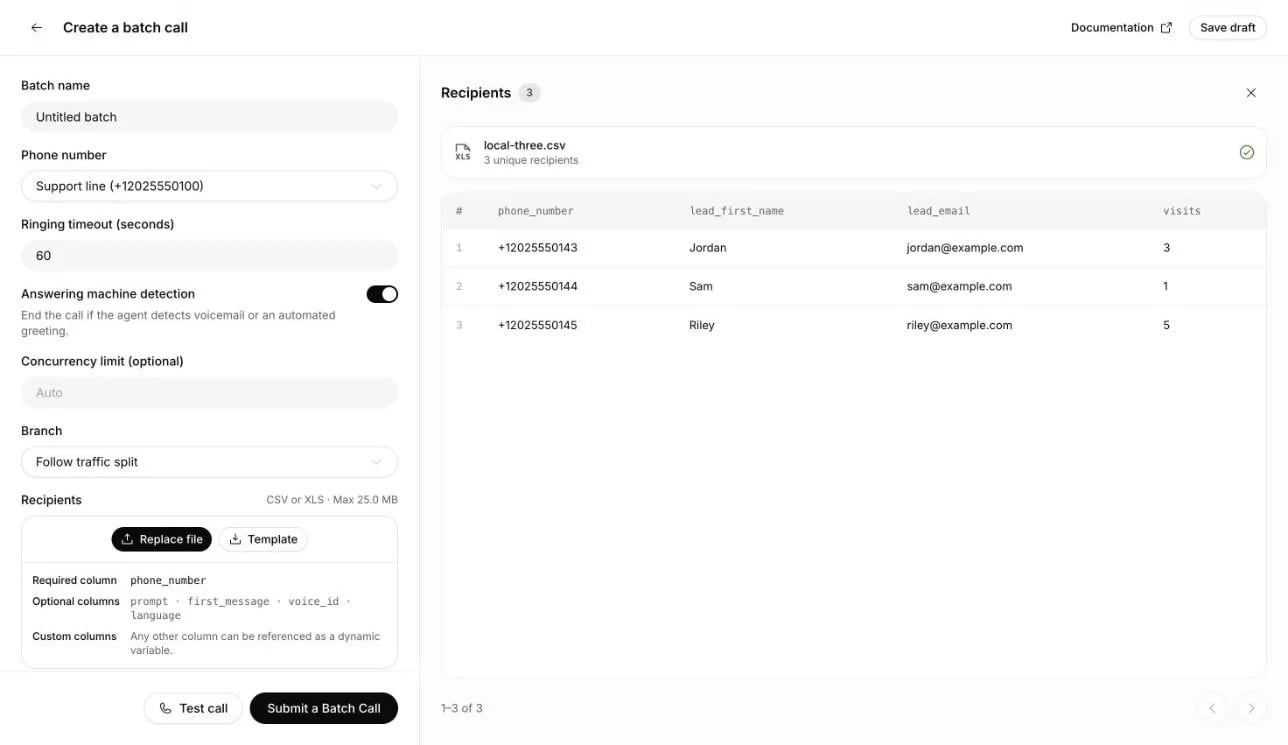
Open Outbound → Create a batch call → Telephony. Choose an agent,
calling number and published branch, or follow its traffic split. Upload
a CSV, XLS or XLSX file with a phone_number column. Other columns become
recipient variables, such as name for {{name}} in the agent’s prompt.
Review the preview and fix any invalid rows.Configure Tools → Voicemail detection → Customize on the agent before
publishing. Enable detection and leave Voicemail message blank to hang
up silently, or enter a brief callback message. The agent reads the saved
message after the greeting, then ends the call. Batch calls use the
selected agent version’s settings.Set the ringing timeout and concurrency, then choose an immediate start
or a scheduled time and timezone. A batch calls at any hour until its
list is done, so pick a time that fits the calling hours where your
recipients are. Test call calls a number you control, with a value
for each variable the agent uses. The first time you test or submit, you agree
to the outbound communications terms, below. Submit a Batch Call then
starts it. See batch calling
for file limits, recipient variables and calling limits.
Choose calling settings and a schedule beside the recipient preview before submitting the batch.
5
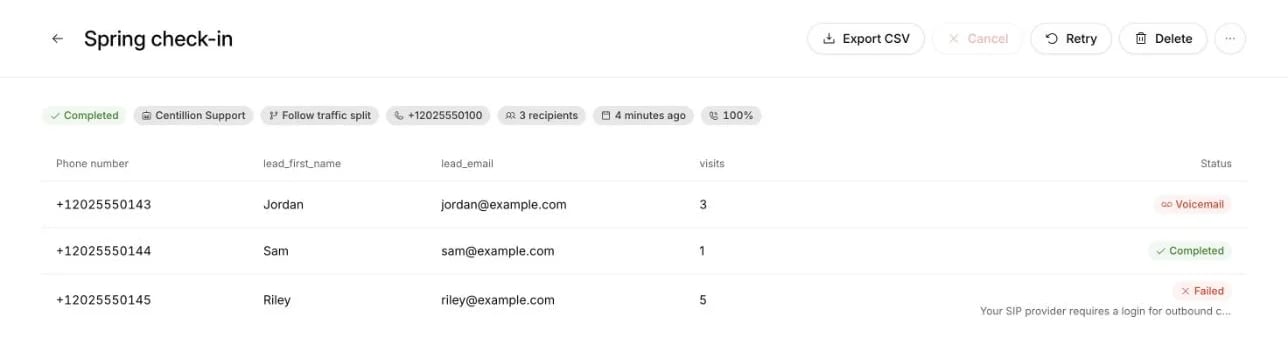
Read the outcomes
The batch’s results show each recipient’s status, attempts and call
duration. Open its conversation to read the transcript, or export the
results as CSV. Retry creates a new draft for failed and
unanswered recipients after the batch finishes. Retried calls still skip
numbers on your do-not-call list, and carrier permissions and call
capacity still apply.
Review answered, unanswered and skipped recipients, with links to their conversations.
A do-not-call list that only grows. A number goes on it when the person
asks not to be called again, texts STOP or sends STOP on WhatsApp, or when
someone in your workspace adds it. Numbers are never taken off it, and no
agent or campaign calls them.
The right person. On a voice campaign, the agent checks it is speaking to
the right person before saying why it is calling. If not, it ends the call.
If the number itself is wrong, that number is not called again for that
contact. A wrong person is not added to the do-not-call list unless they ask
not to be called.
Straight answers. If the person asks who is calling, whether it is an
AI or how to stop the calls, the agent answers plainly and truthfully.
Voicemail. With Voicemail detection enabled, the agent hangs up when
it recognizes voicemail. If a message is configured, it waits for the
greeting to finish, plays the message and ends the call.
Number health.Calling numbers shows each number’s calls in the
last 24 hours, the share answered over 7 days, and the share of answered
calls that ended in 12 seconds or less. An answer rate above 70% and no more
than 10% of calls that short show green.
Limits. Calls use the selected number’s carrier permissions and the
agent’s volume and duration limits. A number places at most 100 calls in any
24 hours unless the team set another limit.
Batch calls start on your selected schedule. Unanswered and failed recipients
are retried only when you choose Retry. Voice campaigns keep their
quiet hours and automatic retries.
Centillion does not check consent, disclosures, calling hours, do-not-call
registries or how often a number is called. The first time you place a test
call or launch a batch from the dashboard, Centillion shows the Outbound
communications terms and conditions. By agreeing, you confirm that you have
every consent the law requires for your calls and messages, that you give
every disclosure it requires, including those about automated or
AI-generated communications, and that you alone are responsible for the laws,
regulations and industry standards that apply, such as the TCPA. Each person
agrees once per workspace, and again if the terms change.Choose calling times and disclosures appropriate for your recipients. Carrier
access does not establish consent or legal permission to call.
This guide is not legal advice. Your workspace is responsible for the consent,
disclosures, calling hours and call frequency of its calls; have your counsel
review the rules for each country you call.
When you tell it to, and whenever someone asks: asked whether it is an AI, the
agent answers truthfully. Write the identification and AI disclosure in
Agent → First message → Call and the agent’s instructions. A batch uses
that opening, or a recipient’s first_message override. When the agent records
calls, a fixed sentence saying the call is recorded and transcribed plays
before it. A voice campaign opens without a fixed notice, so put the disclosure
in the agent’s instructions or the campaign’s playbook.
Any number with its country code, such as +52, that the connected phone
provider’s geographic permissions allow. Centillion does not limit calls by
country, so check the rules of each country you call: some require consent,
some keep do-not-call registries, and some require special number prefixes.
Enable Voicemail detection in Tools. In Customize, leave the
optional Voicemail message blank to hang up silently, or enter a callback
message. The agent waits for recording to begin, plays the message once, then
hangs up. New blank agents start with this tool off; existing agents keep
their settings. Publish the configuration before running a batch.Use a general message because a shared voicemail is not private. Part of the
fixed opening can still reach the recording, since it starts when the call
is answered. The result stays Voicemail, and it ends the contact’s calls
for that campaign. The conversation shows any message the agent spoke.
They ask not to be called again, text STOP, or send STOP on WhatsApp. The
number goes on the workspace’s do-not-call list, and no agent or campaign
calls it again.
Does Centillion check consent and calling hours for me?
No. Your workspace is responsible for consent, disclosures, calling hours and
how often a number is called, and agrees to that in the outbound
communications terms. Centillion keeps calls off your do-not-call list and away from numbers
that reached the wrong person.
Does the do-not-call list stop WhatsApp messages too?
No. The list is about calls. WhatsApp has its own opt-out: a customer who
replies STOP to your WhatsApp number stops getting campaign messages and
automatic replies.
Every setting, limit and saved outcome, in one reference.
AI phone answering
The other direction: your agent picks up when customers call you.
Outbound campaigns
Audiences, playbooks, sending rules and results.
Last modified on November 2, 2026
⌘I
{"docsConfig":{"theme":"maple","$schema":"https://mintlify.com/docs.json","name":"Centillion","description":"How to build a Centillion AI agent, give it your knowledge, and put it on your website, WhatsApp, Messenger, Instagram, Slack and email.","colors":{"primary":"#0a0a0a","light":"#f5f5f5","dark":"#0a0a0a"},"logo":{"light":"https://mintcdn.com/centillion/YMwlBbzdENjtfSuJ/logo/centillion-labs-logo-horizontal.svg?fit=max\u0026auto=format\u0026n=YMwlBbzdENjtfSuJ\u0026q=85\u0026s=a390a5bdca5c0720e1871afbf09b1f18","dark":"https://mintcdn.com/centillion/YMwlBbzdENjtfSuJ/logo/centillion-labs-logo-horizontal.svg?fit=max\u0026auto=format\u0026n=YMwlBbzdENjtfSuJ\u0026q=85\u0026s=a390a5bdca5c0720e1871afbf09b1f18","href":"https://cntillion.com"},"favicon":"https://mintcdn.com/centillion/OVR3XViKbG9zMitv/favicon.svg?fit=max\u0026auto=format\u0026n=OVR3XViKbG9zMitv\u0026q=85\u0026s=a6656501072b111f976d6229cbbd73ad","appearance":{"default":"light","strict":true},"background":{"color":{"light":"#ffffff","dark":"#0a0a0a"}},"navbar":{"links":[{"href":"https://cntillion.com/pricing","label":"Pricing"},{"href":"https://cntillion.com/support","label":"Contact"}],"primary":{"type":"button","label":"Open Centillion","href":"https://app.cntillion.com"}},"footer":{"links":[{"header":"Centillion","items":[{"label":"Home","href":"https://cntillion.com"},{"label":"Pricing","href":"https://cntillion.com/pricing"},{"label":"Contact","href":"https://cntillion.com/support"},{"label":"Sign in","href":"https://app.cntillion.com/sign-in"}]}]},"search":{"prompt":"Search the Centillion docs"},"seo":{"metatags":{"og:site_name":"Centillion Docs"},"organization":{"name":"Centillion","url":"https://cntillion.com"},"indexing":"navigable"},"fonts":{"family":"Inter"},"metadata":{"timestamp":true},"styling":{"latex":true},"navigation":{"pages":[]}},"deployment":{"deploymentMetadataValue":{"subdomain":"centillion","hasAudioNarration":false,"actualSubdomain":"centillion","customDomains":["cntillion.com"],"gitSource":{"type":"github","owner":"centillion-labs","repo":"conversational-agents-for-cx","deployBranch":"master","contentDirectory":"apps/docs","isPrivate":true,"mountPath":"","label":""},"chroma":{"latestBuiltDeploymentHistoryId":"6ae95d6935b55ff31612f7a7","collectionId":"27832044-5e72-44ea-8577-5c209cbfb879","liveDeploymentHistoryId":"6ae95d6935b55ff31612f7a7","schemaVersion":"v3"},"entitlements":{"AI_CHAT":{"status":"DISABLED"},"WEB_MCP":{"status":"DISABLED"},"NARRATION":{"status":"DISABLED"}},"buildId":"6ae96f717e64ded297ae851c","clientVersion":"0.0.4045","searchFilterCounts":[{"language":"default","tag":"Reach your customers","count":19},{"language":"default","tag":"Build your agent","count":14},{"language":"default","tag":"Guides","count":8},{"language":"default","tag":"Workspace","count":7},{"language":"default","tag":"API documentation","count":6},{"language":"default","tag":"Support","count":6},{"language":"default","tag":"Customer data","count":5},{"language":"default","tag":"Website development","count":2},{"language":"default","tag":"Get started","count":2},{"language":"default","tag":"Helpdesk API","count":1}]},"assistantConfig":{"enableAskAiButton":false,"enableStarterQuestions":false,"enableContextualStarterQuestions":false,"enableAskAiSearchBar":true},"basePath":"/docs","hasChatPermissions":false,"hasWebMcpPermissions":false,"toggles":[{"name":"kill-isr","enabled":true,"variant":{"name":"disabled","enabled":false,"feature_enabled":true},"impressionData":false},{"name":"agent-mintlify-slack","enabled":true,"variant":{"name":"disabled","enabled":false,"feature_enabled":true},"impressionData":false},{"name":"agent-integrations-settings","enabled":true,"variant":{"name":"disabled","enabled":false,"feature_enabled":true},"impressionData":false},{"name":"automations-pr-grouping","enabled":true,"variant":{"name":"disabled","enabled":false,"feature_enabled":true},"impressionData":false},{"name":"custom-prefix","enabled":true,"variant":{"name":"disabled","enabled":false,"feature_enabled":true},"impressionData":false},{"name":"analytics-v7","enabled":true,"variant":{"name":"disabled","enabled":false,"feature_enabled":true},"impressionData":false},{"name":"user-flows-analytics","enabled":true,"variant":{"name":"disabled","enabled":false,"feature_enabled":true},"impressionData":false},{"name":"no-publish-flow","enabled":true,"variant":{"name":"disabled","enabled":false,"feature_enabled":true},"impressionData":false},{"name":"workos-onboarding","enabled":true,"variant":{"name":"disabled","enabled":false,"feature_enabled":true},"impressionData":false},{"name":"llms-txt-v2","enabled":true,"variant":{"name":"disabled","enabled":false,"feature_enabled":true},"impressionData":false},{"name":"snapshot-serving-live","enabled":true,"variant":{"name":"disabled","enabled":false,"feature_enabled":true},"impressionData":false},{"name":"stripTemperatureMiddleware","enabled":true,"variant":{"name":"disabled","enabled":false,"feature_enabled":true},"impressionData":false},{"name":"support-platform-pylon-zendesk","enabled":true,"variant":{"name":"disabled","enabled":false,"feature_enabled":true},"impressionData":false},{"name":"snapshot-serving","enabled":true,"variant":{"name":"disabled","enabled":false,"feature_enabled":true},"impressionData":false},{"name":"instant-rollback","enabled":true,"variant":{"name":"disabled","enabled":false,"feature_enabled":true},"impressionData":false},{"name":"granular-notifications-server","enabled":true,"variant":{"name":"disabled","enabled":false,"feature_enabled":true},"impressionData":false},{"name":"granular-notifications","enabled":true,"variant":{"name":"disabled","enabled":false,"feature_enabled":true},"impressionData":false},{"name":"automations-fable","enabled":true,"variant":{"name":"disabled","enabled":false,"feature_enabled":true},"impressionData":false},{"name":"fixed-ai-action-pricing","enabled":true,"variant":{"name":"disabled","enabled":false,"feature_enabled":true},"impressionData":false},{"name":"automation-resolve-merge-conflict","enabled":true,"variant":{"name":"disabled","enabled":false,"feature_enabled":true},"impressionData":false},{"name":"scoped-publishing","enabled":true,"variant":{"name":"disabled","enabled":false,"feature_enabled":true},"impressionData":false},{"name":"mintql","enabled":true,"variant":{"name":"disabled","enabled":false,"feature_enabled":true},"impressionData":false},{"name":"page-level-analytics","enabled":true,"variant":{"name":"disabled","enabled":false,"feature_enabled":true},"impressionData":false},{"name":"editor-version-history-v2","enabled":true,"variant":{"name":"disabled","enabled":false,"feature_enabled":true},"impressionData":false},{"name":"billing-page-v2","enabled":true,"variant":{"name":"disabled","enabled":false,"feature_enabled":true},"impressionData":false},{"name":"full-page-search","enabled":true,"variant":{"name":"disabled","enabled":false,"feature_enabled":true},"impressionData":false},{"name":"workspace-projects","enabled":true,"variant":{"name":"disabled","enabled":false,"feature_enabled":true},"impressionData":false},{"name":"assistant-v5","enabled":true,"variant":{"name":"disabled","enabled":false,"feature_enabled":true},"impressionData":false},{"name":"byok-sep-25","enabled":true,"variant":{"name":"disabled","enabled":false,"feature_enabled":true},"impressionData":false},{"name":"fork-pr-previews","enabled":true,"variant":{"name":"disabled","enabled":false,"feature_enabled":true},"impressionData":false},{"name":"revalidation-jwt","enabled":true,"variant":{"name":"disabled","enabled":false,"feature_enabled":true},"impressionData":false},{"name":"vite-origin","enabled":true,"variant":{"name":"disabled","enabled":false,"feature_enabled":true},"impressionData":false},{"name":"billing-updated-9-15","enabled":true,"variant":{"name":"disabled","enabled":false,"feature_enabled":true},"impressionData":false},{"name":"workos-sso-scim","enabled":true,"variant":{"name":"disabled","enabled":false,"feature_enabled":true},"impressionData":false},{"name":"hobby-abuse-scan","enabled":true,"variant":{"name":"disabled","enabled":false,"feature_enabled":true},"impressionData":false},{"name":"dashboard-inbox","enabled":true,"variant":{"name":"disabled","enabled":false,"feature_enabled":true},"impressionData":false},{"name":"workos-signup","enabled":true,"variant":{"name":"disabled","enabled":false,"feature_enabled":true},"impressionData":false},{"name":"turbopuffer-dual-write","enabled":true,"variant":{"name":"disabled","enabled":false,"feature_enabled":true},"impressionData":false},{"name":"workos-enabled","enabled":true,"variant":{"name":"disabled","enabled":false,"feature_enabled":true},"impressionData":false},{"name":"approve-review-flow","enabled":true,"variant":{"name":"disabled","enabled":false,"feature_enabled":true},"impressionData":false},{"name":"sso-setup-deadline-banner","enabled":true,"variant":{"name":"disabled","enabled":false,"feature_enabled":true},"impressionData":false}],"googleFontsInlined":false},"customCss":[{"filePath":"style.css","content":":root{--bg-subtle:#f6f6f6;--ink:#0a0a0a;--ink-2:#353535;--ink-3:#626262;--ink-4:#a1a1a1;--ink-5:#c7c7c7;--amber:#db8831;--amber-text:#9f5f1c;--amber-tint:#fbf4ec;--radius-lg:16px;--radius-xl:24px;--radius-pill:9999px;--glow-lavender:#ebeaf7;--glow-pink:#f2e4e2;--glow-peach:#f5e6dd;--glow-sky:#e6ecf4;--glow-mint:#e9f4ef}#page-title{font-size:40px;font-weight:500;line-height:46px;color:var(--ink);letter-spacing:-.02em}#content>h2,#content>h3,#content>h4{font-size:20px;font-weight:500;line-height:26px;color:var(--ink);letter-spacing:-.01em}#content>h3,#content>h4{font-size:18px;line-height:24px}#content>h4{font-size:16px;line-height:22px;letter-spacing:0}#header .eyebrow,#search-bar-entry,#search-bar-entry-mobile{font-size:14px;font-weight:400;line-height:20px;color:var(--ink-3)}#search-bar-entry,#search-bar-entry-mobile{height:36px;padding:0 16px;color:var(--ink-4);background-color:var(--bg-subtle);border-radius:var(--radius-pill);box-shadow:none}#search-bar-entry svg,#search-bar-entry-mobile svg{color:var(--ink-4)}#search-bar-entry>span{font-size:12px;font-weight:400;line-height:16px;color:var(--ink-4)}#search-bar-entry-mobile:focus-visible,#search-bar-entry:focus-visible{outline:2px solid var(--ink);outline-offset:2px}#content .card{background-color:var(--bg-subtle);border:0;border-radius:var(--radius-lg);box-shadow:none}#content .card [data-component-part=card-content-container]{padding:20px}#content .card [data-component-part=card-icon] svg{background-color:var(--ink-3)}#content .card [data-component-part=card-content-container]>a>div.absolute{color:var(--ink-5)}#content .card [data-component-part=card-title]{font-size:16px;font-weight:500;line-height:22px;color:var(--ink)}#content .card [data-component-part=card-content]{font-size:14px;font-weight:400;line-height:20px;color:var(--ink-3)}#content .card [data-component-part=card-content]>span{color:inherit}#content-area:has(.centillion-hero)>#header{display:none}.centillion-hero{display:flex;flex-direction:column;gap:20px;padding:28px;margin-bottom:24px;background-color:var(--bg-subtle);background-image:radial-gradient(38% 80% at 96% 0%,var(--glow-lavender) 0%,transparent 100%),radial-gradient(30% 70% at 84% 48%,var(--glow-pink) 0%,transparent 100%),radial-gradient(34% 70% at 90% 100%,var(--glow-peach) 0%,transparent 100%),radial-gradient(28% 64% at 66% 58%,var(--glow-sky) 0%,transparent 100%),radial-gradient(26% 56% at 62% 0%,var(--glow-mint) 0%,transparent 100%);border-radius:var(--radius-xl)}.centillion-hero .centillion-hero-eyebrow{margin:0;font-size:14px;font-weight:400;line-height:20px;color:var(--ink-3)}.centillion-hero .centillion-hero-title{max-width:720px;margin:0;font-size:40px;font-weight:500;line-height:46px;color:var(--ink);letter-spacing:-.02em;text-wrap:balance}.centillion-hero .centillion-muted{color:var(--ink-3)}#content .callout{padding:16px 20px;font-size:14px;line-height:20px;border:0;border-radius:var(--radius-lg)}#content .callout[data-callout-type=warning]{background-color:var(--amber-tint)}#content .callout[data-callout-type=warning] [data-component-part=callout-icon] svg{color:var(--amber)}#content .callout[data-callout-type=warning] [data-component-part=callout-content]{color:var(--amber-text)}#content .callout[data-callout-type=note]{background-color:var(--bg-subtle)}#content .callout[data-callout-type=note] [data-component-part=callout-icon] svg{color:var(--ink-3)}#content .callout[data-callout-type=note] [data-component-part=callout-content]{color:var(--ink-2)}"}],"page":{"pagePath":"guides/ai-outbound-calling","slug":"/guides/ai-outbound-calling","pageMetadata":{"title":"AI outbound calling: consent, hours and disclosure","description":"What the law asks of AI outbound calls: consent, saying who is calling, calling hours and opt-outs. Learn the rules you are responsible for, then set up your calls.","sidebarTitle":"AI outbound calling","keywords":["AI outbound calling","AI voice calls consent","TCPA AI voice","outbound call compliance"],"href":"/guides/ai-outbound-calling"},"description":{"compiledSource":"\"use strict\";\nconst {jsx: _jsx} = arguments[0];\nconst {useMDXComponents: _provideComponents} = arguments[0];\nfunction _createMdxContent(props) {\n const _components = {\n p: \"p\",\n ..._provideComponents(),\n ...props.components\n };\n return _jsx(_components.p, {\n children: \"What the law asks of AI outbound calls: consent, saying who is calling, calling hours and opt-outs. Learn the rules you are responsible for, then set up your calls.\"\n });\n}\nfunction MDXContent(props = {}) {\n const {wrapper: MDXLayout} = {\n ..._provideComponents(),\n ...props.components\n };\n return MDXLayout ? _jsx(MDXLayout, {\n ...props,\n children: _jsx(_createMdxContent, {\n ...props\n })\n }) : _createMdxContent(props);\n}\nreturn {\n default: MDXContent\n};\n","frontmatter":{},"scope":{}},"pageType":"default","mdx":{"mdxSource":{"compiledSource":"\"use strict\";const{Fragment:_Fragment,jsx:_jsx,jsxs:_jsxs}=arguments[0];const{useMDXComponents:_provideComponents}=arguments[0];function _createMdxContent(props){const _components={a:`a`,code:`code`,em:`em`,li:`li`,ol:`ol`,p:`p`,strong:`strong`,ul:`ul`,..._provideComponents(),...props.components},{Card,CardGroup,Frame,Heading,OptimizedImage,Step,Steps,Warning}=_components;if(!Card)_missingMdxReference(`Card`,true);if(!CardGroup)_missingMdxReference(`CardGroup`,true);if(!Frame)_missingMdxReference(`Frame`,true);if(!Heading)_missingMdxReference(`Heading`,true);if(!OptimizedImage)_missingMdxReference(`OptimizedImage`,true);if(!Step)_missingMdxReference(`Step`,true);if(!Steps)_missingMdxReference(`Steps`,true);if(!Warning)_missingMdxReference(`Warning`,true);return _jsxs(_Fragment,{children:[_jsxs(`div`,{className:`centillion-hero`,children:[_jsx(`p`,{className:`centillion-hero-eyebrow`,children:`Guide`}),_jsxs(`div`,{className:`centillion-hero-title`,role:`heading`,\"aria-level\":`1`,children:[_jsx(`span`,{className:`centillion-muted`,children:`AI outbound calling with`}),` consent`,_jsx(`span`,{className:`centillion-muted`,children:`, an`}),` honest opening `,_jsx(`span`,{className:`centillion-muted`,children:`and the`}),` right hours.`]})]}),`\n`,_jsx(_components.p,{children:`AI outbound calling means an AI agent phones people on your behalf: a customer\nwho stopped ordering, a lead who filled in a form, someone you promised to call\nback. The calls sound like a conversation, but the law treats the voice as\nartificial, and that decides almost everything about how you may place them.`}),`\n`,_jsx(_components.p,{children:`This guide covers the rules first, then how Centillion places these calls.\nFollowing the rules is your responsibility: Centillion places the calls you\nset up, and does not check consent, calling hours or how often you call.`}),`\n`,_jsx(Heading,{level:`2`,id:`what-an-ai-outbound-call-is`,children:`What an AI outbound call is`}),`\n`,_jsx(_components.p,{children:`A traditional robocall plays a recording. An AI call listens and answers: the\nagent introduces your business, says why it is calling, responds to what the\nperson says, and records what came of it. That makes it useful for work a\nrecording cannot do, like asking a former customer why they left and listening\nto the answer.`}),`\n`,_jsx(_components.p,{children:`It also makes it easy to get wrong at scale. One badly written rule repeated\nacross a thousand calls is a thousand complaints. So the useful way to think\nabout an outbound agent is as a representative of your business on the phone:\neverything it is allowed to say, and everything it must say, is written down\nbefore the first call and checkable after the last one.`}),`\n`,_jsx(Heading,{level:`2`,id:`consent-comes-first`,children:`Consent comes first`}),`\n`,_jsxs(_components.p,{children:[`In the United States, the Federal Communications Commission settled the main\nquestion in February 2024. Its declaratory ruling (FCC 24-17) confirms “that\nthe TCPA’s restrictions on the use of ‘artificial or prerecorded voice’\nencompass current AI technologies that generate human voices.” As a result,\nsuch calls “require the prior express consent of the called party to initiate\nsuch calls absent an emergency purpose or exemption.”\n(`,_jsx(_components.a,{href:`https://docs.fcc.gov/public/attachments/FCC-24-17A1.pdf`,children:`FCC 24-17`}),`)`]}),`\n`,_jsx(_components.p,{children:`Two things follow:`}),`\n`,_jsxs(_components.ul,{children:[`\n`,_jsxs(_components.li,{children:[_jsx(_components.strong,{children:`You need consent before the call, not during it.`}),` A call made with an\nAI voice to someone who never agreed to it is the problem the ruling\ndescribes, however polite the agent is.`]}),`\n`,_jsxs(_components.li,{children:[_jsx(_components.strong,{children:`Selling raises the bar.`}),` The FCC’s rules ask for prior express `,_jsx(_components.em,{children:`written`}),`\nconsent for calls that advertise or telemarket\n(`,_jsx(_components.a,{href:`https://www.law.cornell.edu/cfr/text/47/64.1200`,children:`47 CFR 64.1200`}),`).`]}),`\n`]}),`\n`,_jsx(_components.p,{children:`Keep a record you could show someone: the number, when the person agreed, how\n(a web form, a signed document, a recorded call), the exact words they agreed\nto, and where the proof is kept. If you cannot answer those five questions for\na number, do not call it.`}),`\n`,_jsx(_components.p,{children:`Other countries have their own rules. Some require consent, some keep\ndo-not-call registries, some require special number prefixes. The rules change,\nand this guide is not legal advice: have your counsel review each country you\nplan to call.`}),`\n`,_jsx(Heading,{level:`2`,id:`say-who-is-calling-and-how-to-stop-it`,children:`Say who is calling, and how to stop it`}),`\n`,_jsxs(_components.p,{children:[`The same ruling reminds callers that “all artificial or prerecorded voice\nmessages must provide certain identification and disclosure information for the\nentity responsible for initiating the call,” and that a message that is\ntelemarketing “must also offer specified opt-out methods.”\n(`,_jsx(_components.a,{href:`https://docs.fcc.gov/public/attachments/FCC-24-17A1.pdf`,children:`FCC 24-17`}),`)`]}),`\n`,_jsxs(_components.p,{children:[`The FCC’s rules spell out the basics: “At the beginning of the message, state\nclearly the identity of the business,” and during or after it, “state clearly\nthe telephone number” the person can call\n(`,_jsx(_components.a,{href:`https://www.law.cornell.edu/cfr/text/47/64.1200`,children:`47 CFR 64.1200(b)`}),`).`]}),`\n`,_jsx(_components.p,{children:`A good opening does four things in a few seconds:`}),`\n`,_jsxs(_components.ol,{children:[`\n`,_jsx(_components.li,{children:`Names your business.`}),`\n`,_jsx(_components.li,{children:`Says that the caller is an AI.`}),`\n`,_jsx(_components.li,{children:`Says how to stop the calls.`}),`\n`,_jsx(_components.li,{children:`Gives a number to call back.`}),`\n`]}),`\n`,_jsx(_components.p,{children:`Saying it is an AI is also the honest thing to do. People who find out halfway\nthrough a call that they were talking to software stop trusting everything\nelse the call said.`}),`\n`,_jsx(Heading,{level:`2`,id:`calling-hours-and-do-not-call-lists`,children:`Calling hours and do-not-call lists`}),`\n`,_jsxs(_components.p,{children:[`US federal rules bar telephone solicitations to a residential subscriber\n“before the hour of 8 a.m. or after 9 p.m.” local time, and protect numbers on\nthe national do-not-call registry\n(`,_jsx(_components.a,{href:`https://www.law.cornell.edu/cfr/text/47/64.1200`,children:`47 CFR 64.1200(c)`}),`).\nSeveral states are stricter, with shorter hours, no calls on some days, or\nlimits on how often one number can be called.`]}),`\n`,_jsx(_components.p,{children:`Two practical consequences:`}),`\n`,_jsxs(_components.ul,{children:[`\n`,_jsxs(_components.li,{children:[_jsx(_components.strong,{children:`Local time is the customer’s, not yours.`}),` In the US, an area code is the\nusual estimate of the time zone, but people keep their numbers when they\nmove, and a few area codes span two zones. Call only at an hour that fits\nevery zone the number could be in.`]}),`\n`,_jsxs(_components.li,{children:[_jsx(_components.strong,{children:`Your own do-not-call list matters as much as the national one.`}),` When\nsomeone says “don’t call me again,” that request has to reach every agent and\nevery campaign you run, permanently.`]}),`\n`]}),`\n`,_jsx(Heading,{level:`2`,id:`what-else-to-watch-for`,children:`What else to watch for`}),`\n`,_jsxs(_components.ul,{children:[`\n`,_jsxs(_components.li,{children:[_jsx(_components.strong,{children:`Voicemail.`}),` A message about someone’s account left on a shared voicemail\nis not private. The safest default is to hang up without leaving one.`]}),`\n`,_jsxs(_components.li,{children:[_jsx(_components.strong,{children:`The wrong person.`}),` Before an agent says why it is calling, it should check\nthat it is speaking to the account holder: the reason alone can tell a\nstranger something about the customer. A number that reached someone else\nshould not be called again for that customer.`]}),`\n`,_jsxs(_components.li,{children:[_jsx(_components.strong,{children:`Number reputation.`}),` Phone carriers and your calling provider watch how\nyour numbers behave, such as how many calls are answered and how many end\nwithin seconds. Calls people do not want show up in both.`]}),`\n`,_jsxs(_components.li,{children:[_jsx(_components.strong,{children:`Pushing too hard.`}),` A representative makes the case once and accepts a no.\nAn agent that argues loses the customer and the number’s reputation together.`]}),`\n`]}),`\n`,_jsx(Heading,{level:`2`,id:`set-up-outbound-calls-in-centillion`,children:`Set up outbound calls in Centillion`}),`\n`,_jsxs(_components.p,{children:[`Your agent can phone a contact, introduce itself, follow its published\ninstructions and workflow, and save the outcome. Start a batch from an\nuploaded call list on the workspace or agent’s `,_jsx(_components.strong,{children:`Outbound`}),` page. Existing\n`,_jsx(_components.a,{href:`/campaigns`,children:`voice campaigns`}),` can also use a contact audience and playbook. The\nfull reference is `,_jsx(_components.a,{href:`/channels/outbound-calls`,children:`Outbound AI calls`}),`. Campaigns require\nStandard or above, and connected calls use six credits per commenced minute,\non top of model requests.`]}),`\n`,_jsxs(Steps,{children:[_jsx(Step,{title:`Get a calling number`,children:_jsxs(_components.p,{children:[`Your agent calls from one of its assigned phone numbers. To add a new\nnumber, `,_jsx(_components.a,{href:`/channels/phone`,children:`import it from your Twilio account or SIP provider`}),`.\nAn `,_jsx(_components.a,{href:`/channels/phone-numbers-from-centillion`,children:`existing Centillion Labs number`}),`\nplaces calls once business verification is approved. Contact the Centillion\nLabs team for help with verification.\nManage connected numbers under `,_jsx(_components.strong,{children:`Channels → Phone`}),`.`]})}),_jsx(Step,{title:`Configure the agent`,children:_jsxs(_components.p,{children:[`Choose the voice and language on `,_jsx(_components.strong,{children:`Agent`}),`. Write the opening under\n`,_jsx(_components.strong,{children:`First message → Call`}),`, including the identification and disclosures\nyour calls require. Publish the branch. Conversation behavior, privacy,\nrecording retention and call limits are under `,_jsx(_components.strong,{children:`Settings → Advanced`}),`.`]})}),_jsx(Step,{title:`Keep your consent records`,children:_jsxs(_components.p,{children:[`Under `,_jsx(_components.strong,{children:`Contacts → Call permissions`}),`, an owner can record each consent:\nthe number, when and how the person agreed, the exact words, what the\nconsent covers and where the proof is kept. Calls don’t check these\nrecords. They are your evidence of the consent you need before you call.`]})}),_jsxs(Step,{title:`Create a batch call`,children:[_jsxs(_components.p,{children:[`Open `,_jsx(_components.strong,{children:`Outbound → Create a batch call → Telephony`}),`. Choose an agent,\ncalling number and published branch, or follow its traffic split. Upload\na CSV, XLS or XLSX file with a `,_jsx(_components.code,{children:`phone_number`}),` column. Other columns become\nrecipient variables, such as `,_jsx(_components.code,{children:`name`}),` for `,_jsx(_components.code,{children:`{{name}}`}),` in the agent’s prompt.\nReview the preview and fix any invalid rows.`]}),_jsxs(_components.p,{children:[`Configure `,_jsx(_components.strong,{children:`Tools → Voicemail detection → Customize`}),` on the agent before\npublishing. Enable detection and leave `,_jsx(_components.strong,{children:`Voicemail message`}),` blank to hang\nup silently, or enter a brief callback message. The agent reads the saved\nmessage after the greeting, then ends the call. Batch calls use the\nselected agent version’s settings.`]}),_jsxs(_components.p,{children:[`Set the ringing timeout and concurrency, then choose an immediate start\nor a scheduled time and timezone. A batch calls at any hour until its\nlist is done, so pick a time that fits the calling hours where your\nrecipients are. `,_jsx(_components.strong,{children:`Test call`}),` calls a number you control, with a value\nfor each variable the agent uses. The first time you test or submit, you agree\nto the outbound communications terms, below. `,_jsx(_components.strong,{children:`Submit a Batch Call`}),` then\nstarts it. See `,_jsx(_components.a,{href:`/campaigns#create-a-batch-call`,children:`batch calling`}),`\nfor file limits, recipient variables and calling limits.`]}),_jsx(Frame,{caption:`Choose calling settings and a schedule beside the recipient preview before submitting the batch.`,children:_jsx(OptimizedImage,{src:`https://mintcdn.com/centillion/1m_-bXBRb9Y5-6eZ/images/campaigns/campaigns-02-batch-builder.webp?fit=max\u0026auto=format\u0026n=1m_-bXBRb9Y5-6eZ\u0026q=85\u0026s=a8ecf9e41fe141b446167e405beb3349`,alt:`Batch call builder with phone number, ringing timeout, answering machine detection, concurrency, branch, recipient file and recipient preview`,\"data-og-width\":`1288`,width:`1288`,\"data-og-height\":`745`,height:`745`,\"data-path\":`images/campaigns/campaigns-02-batch-builder.webp`,\"data-optimize\":`true`,\"data-opv\":`3`,srcset:`https://mintcdn.com/centillion/1m_-bXBRb9Y5-6eZ/images/campaigns/campaigns-02-batch-builder.webp?w=280\u0026fit=max\u0026auto=format\u0026n=1m_-bXBRb9Y5-6eZ\u0026q=85\u0026s=b31f00344216017fe60bef2d9cbd82a5 280w, https://mintcdn.com/centillion/1m_-bXBRb9Y5-6eZ/images/campaigns/campaigns-02-batch-builder.webp?w=560\u0026fit=max\u0026auto=format\u0026n=1m_-bXBRb9Y5-6eZ\u0026q=85\u0026s=b51d95c6e185fc56e0b1e42ec246efdd 560w, https://mintcdn.com/centillion/1m_-bXBRb9Y5-6eZ/images/campaigns/campaigns-02-batch-builder.webp?w=840\u0026fit=max\u0026auto=format\u0026n=1m_-bXBRb9Y5-6eZ\u0026q=85\u0026s=9815a8a7782b9173a96b7adc4eb14ed3 840w, https://mintcdn.com/centillion/1m_-bXBRb9Y5-6eZ/images/campaigns/campaigns-02-batch-builder.webp?w=1100\u0026fit=max\u0026auto=format\u0026n=1m_-bXBRb9Y5-6eZ\u0026q=85\u0026s=fe23461ec3ffce82a3b58837f13a715e 1100w, https://mintcdn.com/centillion/1m_-bXBRb9Y5-6eZ/images/campaigns/campaigns-02-batch-builder.webp?w=1650\u0026fit=max\u0026auto=format\u0026n=1m_-bXBRb9Y5-6eZ\u0026q=85\u0026s=3244e557989270468fdd86fa1801fb18 1650w, https://mintcdn.com/centillion/1m_-bXBRb9Y5-6eZ/images/campaigns/campaigns-02-batch-builder.webp?w=2500\u0026fit=max\u0026auto=format\u0026n=1m_-bXBRb9Y5-6eZ\u0026q=85\u0026s=6abd7d88217fd5033d13fca89d91bc43 2500w`})})]}),_jsxs(Step,{title:`Read the outcomes`,children:[_jsxs(_components.p,{children:[`The batch’s results show each recipient’s status, attempts and call\nduration. Open its conversation to read the transcript, or export the\nresults as CSV. `,_jsx(_components.strong,{children:`Retry`}),` creates a new draft for failed and\nunanswered recipients after the batch finishes. Retried calls still skip\nnumbers on your do-not-call list, and carrier permissions and call\ncapacity still apply.`]}),_jsx(Frame,{caption:`Review answered, unanswered and skipped recipients, with links to their conversations.`,children:_jsx(OptimizedImage,{src:`https://mintcdn.com/centillion/1m_-bXBRb9Y5-6eZ/images/campaigns/campaigns-03-batch-results.webp?fit=max\u0026auto=format\u0026n=1m_-bXBRb9Y5-6eZ\u0026q=85\u0026s=4fe46b3d042e776a7952b7ef68a02589`,alt:`Completed outbound batch with status and progress chips, recipient variables and results, and export and retry controls`,\"data-og-width\":`1288`,width:`1288`,\"data-og-height\":`351`,height:`351`,\"data-path\":`images/campaigns/campaigns-03-batch-results.webp`,\"data-optimize\":`true`,\"data-opv\":`3`,srcset:`https://mintcdn.com/centillion/1m_-bXBRb9Y5-6eZ/images/campaigns/campaigns-03-batch-results.webp?w=280\u0026fit=max\u0026auto=format\u0026n=1m_-bXBRb9Y5-6eZ\u0026q=85\u0026s=dad22541be744a0fd2e661f5a15d6b8f 280w, https://mintcdn.com/centillion/1m_-bXBRb9Y5-6eZ/images/campaigns/campaigns-03-batch-results.webp?w=560\u0026fit=max\u0026auto=format\u0026n=1m_-bXBRb9Y5-6eZ\u0026q=85\u0026s=2bce1dd816d9f9b7d5ab0b8cce3393dd 560w, https://mintcdn.com/centillion/1m_-bXBRb9Y5-6eZ/images/campaigns/campaigns-03-batch-results.webp?w=840\u0026fit=max\u0026auto=format\u0026n=1m_-bXBRb9Y5-6eZ\u0026q=85\u0026s=28ec6c4f9374b39fc944f9fc616f6fd0 840w, https://mintcdn.com/centillion/1m_-bXBRb9Y5-6eZ/images/campaigns/campaigns-03-batch-results.webp?w=1100\u0026fit=max\u0026auto=format\u0026n=1m_-bXBRb9Y5-6eZ\u0026q=85\u0026s=57fb93e05897fbbbe16e3bad48ecd2f8 1100w, https://mintcdn.com/centillion/1m_-bXBRb9Y5-6eZ/images/campaigns/campaigns-03-batch-results.webp?w=1650\u0026fit=max\u0026auto=format\u0026n=1m_-bXBRb9Y5-6eZ\u0026q=85\u0026s=bc67dc0df2dd8243110804699ff38a8c 1650w, https://mintcdn.com/centillion/1m_-bXBRb9Y5-6eZ/images/campaigns/campaigns-03-batch-results.webp?w=2500\u0026fit=max\u0026auto=format\u0026n=1m_-bXBRb9Y5-6eZ\u0026q=85\u0026s=d5cea2716270c5cc37e4c19c1a244752 2500w`})})]})]}),`\n`,_jsx(Heading,{level:`3`,id:`what-centillion-does-on-every-call`,children:`What Centillion does on every call`}),`\n`,_jsxs(_components.ul,{children:[`\n`,_jsxs(_components.li,{children:[_jsx(_components.strong,{children:`A do-not-call list that only grows.`}),` A number goes on it when the person\nasks not to be called again, texts STOP or sends STOP on WhatsApp, or when\nsomeone in your workspace adds it. Numbers are never taken off it, and no\nagent or campaign calls them.`]}),`\n`,_jsxs(_components.li,{children:[_jsx(_components.strong,{children:`The right person.`}),` On a voice campaign, the agent checks it is speaking to\nthe right person before saying why it is calling. If not, it ends the call.\nIf the number itself is wrong, that number is not called again for that\ncontact. A wrong person is not added to the do-not-call list unless they ask\nnot to be called.`]}),`\n`,_jsxs(_components.li,{children:[_jsx(_components.strong,{children:`Straight answers.`}),` If the person asks who is calling, whether it is an\nAI or how to stop the calls, the agent answers plainly and truthfully.`]}),`\n`,_jsxs(_components.li,{children:[_jsx(_components.strong,{children:`Voicemail.`}),` With `,_jsx(_components.strong,{children:`Voicemail detection`}),` enabled, the agent hangs up when\nit recognizes voicemail. If a message is configured, it waits for the\ngreeting to finish, plays the message and ends the call.`]}),`\n`,_jsxs(_components.li,{children:[_jsx(_components.strong,{children:`Number health.`}),` `,_jsx(_components.strong,{children:`Calling numbers`}),` shows each number’s calls in the\nlast 24 hours, the share answered over 7 days, and the share of answered\ncalls that ended in 12 seconds or less. An answer rate above 70% and no more\nthan 10% of calls that short show green.`]}),`\n`,_jsxs(_components.li,{children:[_jsx(_components.strong,{children:`Limits.`}),` Calls use the selected number’s carrier permissions and the\nagent’s volume and duration limits. A number places at most 100 calls in any\n24 hours unless the team set another limit.`]}),`\n`]}),`\n`,_jsxs(_components.p,{children:[`Batch calls start on your selected schedule. Unanswered and failed recipients\nare retried only when you choose `,_jsx(_components.strong,{children:`Retry`}),`. Voice campaigns keep their\nquiet hours and automatic retries.`]}),`\n`,_jsx(Heading,{level:`3`,id:`what-stays-with-you`,children:`What stays with you`}),`\n`,_jsxs(_components.p,{children:[`Centillion does not check consent, disclosures, calling hours, do-not-call\nregistries or how often a number is called. The first time you place a test\ncall or launch a batch from the dashboard, Centillion shows the `,_jsx(_components.strong,{children:`Outbound\ncommunications terms and conditions`}),`. By agreeing, you confirm that you have\nevery consent the law requires for your calls and messages, that you give\nevery disclosure it requires, including those about automated or\nAI-generated communications, and that you alone are responsible for the laws,\nregulations and industry standards that apply, such as the TCPA. Each person\nagrees once per workspace, and again if the terms change.`]}),`\n`,_jsx(_components.p,{children:`Choose calling times and disclosures appropriate for your recipients. Carrier\naccess does not establish consent or legal permission to call.`}),`\n`,_jsx(Warning,{children:_jsx(_components.p,{children:`This guide is not legal advice. Your workspace is responsible for the consent,\ndisclosures, calling hours and call frequency of its calls; have your counsel\nreview the rules for each country you call.`})}),`\n`,_jsx(Heading,{level:`2`,id:`questions`,children:`Questions`}),`\n`,_jsx(Heading,{level:`3`,id:`does-the-agent-say-that-it-is-an-ai`,children:`Does the agent say that it is an AI?`}),`\n`,_jsxs(_components.p,{children:[`When you tell it to, and whenever someone asks: asked whether it is an AI, the\nagent answers truthfully. Write the identification and AI disclosure in\n`,_jsx(_components.strong,{children:`Agent → First message → Call`}),` and the agent’s instructions. A batch uses\nthat opening, or a recipient’s `,_jsx(_components.code,{children:`first_message`}),` override. When the agent records\ncalls, a fixed sentence saying the call is recorded and transcribed plays\nbefore it. A voice campaign opens without a fixed notice, so put the disclosure\nin the agent’s instructions or the campaign’s playbook.`]}),`\n`,_jsx(Heading,{level:`3`,id:`which-countries-can-my-agent-call`,children:`Which countries can my agent call?`}),`\n`,_jsx(_components.p,{children:`Any number with its country code, such as +52, that the connected phone\nprovider’s geographic permissions allow. Centillion does not limit calls by\ncountry, so check the rules of each country you call: some require consent,\nsome keep do-not-call registries, and some require special number prefixes.`}),`\n`,_jsx(Heading,{level:`3`,id:`what-happens-when-a-call-reaches-voicemail`,children:`What happens when a call reaches voicemail?`}),`\n`,_jsxs(_components.p,{children:[`Enable `,_jsx(_components.strong,{children:`Voicemail detection`}),` in `,_jsx(_components.strong,{children:`Tools`}),`. In `,_jsx(_components.strong,{children:`Customize`}),`, leave the\noptional `,_jsx(_components.strong,{children:`Voicemail message`}),` blank to hang up silently, or enter a callback\nmessage. The agent waits for recording to begin, plays the message once, then\nhangs up. New blank agents start with this tool off; existing agents keep\ntheir settings. Publish the configuration before running a batch.`]}),`\n`,_jsxs(_components.p,{children:[`Use a general message because a shared voicemail is not private. Part of the\nfixed opening can still reach the recording, since it starts when the call\nis answered. The result stays `,_jsx(_components.strong,{children:`Voicemail`}),`, and it ends the contact’s calls\nfor that campaign. The conversation shows any message the agent spoke.`]}),`\n`,_jsx(Heading,{level:`3`,id:`how-does-someone-stop-the-calls`,children:`How does someone stop the calls?`}),`\n`,_jsx(_components.p,{children:`They ask not to be called again, text STOP, or send STOP on WhatsApp. The\nnumber goes on the workspace’s do-not-call list, and no agent or campaign\ncalls it again.`}),`\n`,_jsx(Heading,{level:`3`,id:`does-centillion-check-consent-and-calling-hours-for-me`,children:`Does Centillion check consent and calling hours for me?`}),`\n`,_jsx(_components.p,{children:`No. Your workspace is responsible for consent, disclosures, calling hours and\nhow often a number is called, and agrees to that in the outbound\ncommunications terms. Centillion keeps calls off your do-not-call list and away from numbers\nthat reached the wrong person.`}),`\n`,_jsx(Heading,{level:`3`,id:`does-the-do-not-call-list-stop-whatsapp-messages-too`,children:`Does the do-not-call list stop WhatsApp messages too?`}),`\n`,_jsx(_components.p,{children:`No. The list is about calls. WhatsApp has its own opt-out: a customer who\nreplies STOP to your WhatsApp number stops getting campaign messages and\nautomatic replies.`}),`\n`,_jsx(Heading,{level:`2`,id:`try-it`,children:`Try it`}),`\n`,_jsx(_components.p,{children:`Write your opening once, start with a few customers who asked to hear from\nyou, and run a small batch. Every outcome lands on the contact.`}),`\n`,_jsxs(CardGroup,{cols:2,children:[_jsx(Card,{title:`Start free`,icon:`rocket`,href:`https://app.cntillion.com/sign-up?utm_source=docs\u0026utm_medium=article\u0026utm_campaign=guides-ai-outbound-calling`,children:_jsx(_components.p,{children:`Start on the Free plan, or take a seven-day trial of a paid plan. Your agent is live on your site in an afternoon.`})}),_jsx(Card,{title:`Book a demo`,icon:`calendar`,href:`https://cal.com/patrick-turricelli-smgfks/15min?utm_source=docs\u0026utm_medium=article\u0026utm_campaign=guides-ai-outbound-calling`,children:_jsx(_components.p,{children:`Fifteen minutes with the team, on your own use case.`})})]}),`\n`,_jsx(_components.p,{children:`Or ask the assistant on this page.`}),`\n`,_jsx(Heading,{level:`2`,id:`related`,children:`Related`}),`\n`,_jsxs(CardGroup,{cols:3,children:[_jsx(Card,{title:`Outbound AI calls`,icon:`phone-arrow-up-right`,href:`/channels/outbound-calls`,children:_jsx(_components.p,{children:`Every setting, limit and saved outcome, in one reference.`})}),_jsx(Card,{title:`AI phone answering`,icon:`phone`,href:`/guides/ai-phone-answering`,children:_jsx(_components.p,{children:`The other direction: your agent picks up when customers call you.`})}),_jsx(Card,{title:`Outbound campaigns`,icon:`paper-plane`,href:`/campaigns`,children:_jsx(_components.p,{children:`Audiences, playbooks, sending rules and results.`})})]})]})}function MDXContent(props={}){const{wrapper:MDXLayout}={..._provideComponents(),...props.components};return MDXLayout?_jsx(MDXLayout,{...props,children:_jsx(_createMdxContent,{...props})}):_createMdxContent(props)}return{default:MDXContent};function _missingMdxReference(id,component){throw new Error(`Expected `+(component?`component`:`object`)+\" `\"+id+\"` to be defined: you likely forgot to import, pass, or provide it.\")}","frontmatter":{},"scope":{"config":{},"pageMetadata":{"title":"AI outbound calling: consent, hours and disclosure","description":"What the law asks of AI outbound calls: consent, saying who is calling, calling hours and opt-outs. Learn the rules you are responsible for, then set up your calls.","sidebarTitle":"AI outbound calling","keywords":["AI outbound calling","AI voice calls consent","TCPA AI voice","outbound call compliance"],"href":"/guides/ai-outbound-calling"}}},"mdxSourceWithNoJs":null},"mdxExtracts":{"tableOfContents":[{"title":"What an AI outbound call is","slug":"what-an-ai-outbound-call-is","depth":2,"children":[]},{"title":"Consent comes first","slug":"consent-comes-first","depth":2,"children":[]},{"title":"Say who is calling, and how to stop it","slug":"say-who-is-calling-and-how-to-stop-it","depth":2,"children":[]},{"title":"Calling hours and do-not-call lists","slug":"calling-hours-and-do-not-call-lists","depth":2,"children":[]},{"title":"What else to watch for","slug":"what-else-to-watch-for","depth":2,"children":[]},{"title":"Set up outbound calls in Centillion","slug":"set-up-outbound-calls-in-centillion","depth":2,"children":[{"title":"What Centillion does on every call","slug":"what-centillion-does-on-every-call","depth":3,"children":[]},{"title":"What stays with you","slug":"what-stays-with-you","depth":3,"children":[]}]},{"title":"Questions","slug":"questions","depth":2,"children":[{"title":"Does the agent say that it is an AI?","slug":"does-the-agent-say-that-it-is-an-ai","depth":3,"children":[]},{"title":"Which countries can my agent call?","slug":"which-countries-can-my-agent-call","depth":3,"children":[]},{"title":"What happens when a call reaches voicemail?","slug":"what-happens-when-a-call-reaches-voicemail","depth":3,"children":[]},{"title":"How does someone stop the calls?","slug":"how-does-someone-stop-the-calls","depth":3,"children":[]},{"title":"Does Centillion check consent and calling hours for me?","slug":"does-centillion-check-consent-and-calling-hours-for-me","depth":3,"children":[]},{"title":"Does the do-not-call list stop WhatsApp messages too?","slug":"does-the-do-not-call-list-stop-whatsapp-messages-too","depth":3,"children":[]}]},{"title":"Try it","slug":"try-it","depth":2,"children":[]},{"title":"Related","slug":"related","depth":2,"children":[]}],"codeExamples":{}},"jsLinks":[],"subdomain":"centillion","siteName":"Centillion","title":"AI outbound calling: consent, hours and disclosure - Centillion","navMaps":{"firstHrefInVersion":{},"firstHrefInLanguage":{}},"lastModified":"2026-11-02T07:26:18.564Z","gitLastModified":"2026-11-02T07:26:08.000Z","originalFileLocation":"guides/ai-outbound-calling.mdx"},"headHtml":"\u003cscript data-mint-head>(function(){var d=document.documentElement,p=\"light\";if(!p){try{p=localStorage.getItem(\"isDarkMode\")}catch(e){}if(p==='true')p='dark';else if(p==='false')p='light';if(p!=='light'\u0026\u0026p!=='dark'\u0026\u0026p!=='system')p=\"light\"}var r=p==='system'?(matchMedia(\"(prefers-color-scheme: dark)\").matches?'dark':'light'):p;d.classList.remove(r==='dark'?'light':'dark');d.classList.add(r);d.setAttribute(\"data-theme-preference\",p)})();\u003c/script>\u003cmeta data-mint-head name=\"description\" content=\"What the law asks of AI outbound calls: consent, saying who is calling, calling hours and opt-outs. Learn the rules you are responsible for, then set up your calls.\">\u003cmeta data-mint-head name=\"application-name\" content=\"Centillion\">\u003cmeta data-mint-head name=\"generator\" content=\"Mintlify\">\u003clink data-mint-head rel=\"icon\" type=\"image/png\" sizes=\"192x192\" href=\"/docs/mintlify-assets/_mintlify/favicons/centillion/BF_fLDJvZi3ny4fj/_generated/favicon/android-chrome-192x192.png\" media=\"(prefers-color-scheme: light)\">\u003clink data-mint-head rel=\"apple-touch-icon\" type=\"image/png\" sizes=\"180x180\" href=\"/docs/mintlify-assets/_mintlify/favicons/centillion/BF_fLDJvZi3ny4fj/_generated/favicon/apple-touch-icon.png\">\u003clink data-mint-head rel=\"icon\" type=\"image/png\" sizes=\"16x16\" href=\"/docs/mintlify-assets/_mintlify/favicons/centillion/BF_fLDJvZi3ny4fj/_generated/favicon/favicon-16x16.png\" media=\"(prefers-color-scheme: light)\">\u003clink data-mint-head rel=\"icon\" type=\"image/png\" sizes=\"32x32\" href=\"/docs/mintlify-assets/_mintlify/favicons/centillion/BF_fLDJvZi3ny4fj/_generated/favicon/favicon-32x32.png\" media=\"(prefers-color-scheme: light)\">\u003clink data-mint-head rel=\"shortcut icon\" type=\"image/x-icon\" href=\"/docs/mintlify-assets/_mintlify/favicons/centillion/BF_fLDJvZi3ny4fj/_generated/favicon/favicon.ico\" media=\"(prefers-color-scheme: light)\">\u003clink data-mint-head rel=\"icon\" type=\"image/png\" sizes=\"192x192\" href=\"/docs/mintlify-assets/_mintlify/favicons/centillion/BF_fLDJvZi3ny4fj/_generated/favicon-dark/android-chrome-192x192.png\" media=\"(prefers-color-scheme: dark)\">\u003clink data-mint-head rel=\"icon\" type=\"image/png\" sizes=\"16x16\" href=\"/docs/mintlify-assets/_mintlify/favicons/centillion/BF_fLDJvZi3ny4fj/_generated/favicon-dark/favicon-16x16.png\" media=\"(prefers-color-scheme: dark)\">\u003clink data-mint-head rel=\"icon\" type=\"image/png\" sizes=\"32x32\" href=\"/docs/mintlify-assets/_mintlify/favicons/centillion/BF_fLDJvZi3ny4fj/_generated/favicon-dark/favicon-32x32.png\" media=\"(prefers-color-scheme: dark)\">\u003clink data-mint-head rel=\"shortcut icon\" type=\"image/x-icon\" href=\"/docs/mintlify-assets/_mintlify/favicons/centillion/BF_fLDJvZi3ny4fj/_generated/favicon-dark/favicon.ico\" media=\"(prefers-color-scheme: dark)\">\u003cmeta data-mint-head property=\"og:title\" content=\"AI outbound calling: consent, hours and disclosure - Centillion\">\u003cmeta data-mint-head property=\"og:description\" content=\"What the law asks of AI outbound calls: consent, saying who is calling, calling hours and opt-outs. Learn the rules you are responsible for, then set up your calls.\">\u003cmeta data-mint-head property=\"og:site_name\" content=\"Centillion Docs\">\u003cmeta data-mint-head property=\"og:url\" content=\"https://cntillion.com/docs/guides/ai-outbound-calling\">\u003cmeta data-mint-head property=\"og:type\" content=\"website\">\u003cmeta data-mint-head property=\"og:image\" content=\"https://centillion.mintlify.app/_mintlify/api/og/v2?division=Guides\u0026amp;title=AI+outbound+calling%3A+consent%2C+hours+and+disclosure\u0026amp;description=What+the+law+asks+of+AI+outbound+calls%3A+consent%2C+saying+who+is+calling%2C+calling+hours+and+opt-outs.+Learn+the+rules+you+are+responsible+for%2C+then+set+up+your+ca\u0026amp;theme=a486c6eed2424799fd7a38ab\u0026amp;signature=064d2d84235adbb4a37eb8b4877bc2bf5c568417636f9e907d282a09b2632da8\">\u003cmeta data-mint-head property=\"og:image:width\" content=\"1200\">\u003cmeta data-mint-head property=\"og:image:height\" content=\"630\">\u003cmeta data-mint-head name=\"twitter:card\" content=\"summary_large_image\">\u003cmeta data-mint-head name=\"twitter:title\" content=\"AI outbound calling: consent, hours and disclosure - Centillion\">\u003cmeta data-mint-head name=\"twitter:description\" content=\"What the law asks of AI outbound calls: consent, saying who is calling, calling hours and opt-outs. Learn the rules you are responsible for, then set up your calls.\">\u003cmeta data-mint-head name=\"twitter:image\" content=\"https://centillion.mintlify.app/_mintlify/api/og/v2?division=Guides\u0026amp;title=AI+outbound+calling%3A+consent%2C+hours+and+disclosure\u0026amp;description=What+the+law+asks+of+AI+outbound+calls%3A+consent%2C+saying+who+is+calling%2C+calling+hours+and+opt-outs.+Learn+the+rules+you+are+responsible+for%2C+then+set+up+your+ca\u0026amp;theme=a486c6eed2424799fd7a38ab\u0026amp;signature=064d2d84235adbb4a37eb8b4877bc2bf5c568417636f9e907d282a09b2632da8\">\u003cmeta data-mint-head name=\"twitter:image:width\" content=\"1200\">\u003cmeta data-mint-head name=\"twitter:image:height\" content=\"630\">\u003cmeta data-mint-head name=\"msapplication-config\" content=\"/docs/mintlify-assets/_mintlify/favicons/centillion/BF_fLDJvZi3ny4fj/_generated/favicon/browserconfig.xml\">\u003cmeta data-mint-head name=\"apple-mobile-web-app-title\" content=\"Centillion\">\u003cmeta data-mint-head name=\"msapplication-TileColor\" content=\"#0a0a0a\">\u003clink data-mint-head rel=\"canonical\" href=\"https://cntillion.com/docs/guides/ai-outbound-calling\">\u003clink data-mint-head rel=\"alternate\" type=\"application/xml\" href=\"/docs/sitemap.xml\">\u003clink data-mint-head rel=\"alternate\" type=\"text/markdown\" href=\"/docs/guides/ai-outbound-calling.md\">\u003cscript data-mint-head type=\"application/ld+json\">{\"@context\":\"https://schema.org\",\"@graph\":[{\"@type\":\"Organization\",\"@id\":\"https://cntillion.com/#organization\",\"name\":\"Centillion\",\"url\":\"https://cntillion.com\",\"logo\":{\"@type\":\"ImageObject\",\"url\":\"https://mintcdn.com/centillion/YMwlBbzdENjtfSuJ/logo/centillion-labs-logo-horizontal.svg?fit=max\u0026auto=format\u0026n=YMwlBbzdENjtfSuJ\u0026q=85\u0026s=a390a5bdca5c0720e1871afbf09b1f18\"}},{\"@type\":\"WebSite\",\"@id\":\"https://cntillion.com/docs#website\",\"name\":\"Centillion\",\"url\":\"https://cntillion.com/docs\",\"publisher\":{\"@id\":\"https://cntillion.com/#organization\"}},{\"@type\":\"WebPage\",\"@id\":\"https://cntillion.com/docs/guides/ai-outbound-calling#webpage\",\"url\":\"https://cntillion.com/docs/guides/ai-outbound-calling\",\"name\":\"AI outbound calling: consent, hours and disclosure\",\"description\":\"What the law asks of AI outbound calls: consent, saying who is calling, calling hours and opt-outs. Learn the rules you are responsible for, then set up your calls.\",\"dateModified\":\"2026-11-02T07:26:08.000Z\",\"isPartOf\":{\"@id\":\"https://cntillion.com/docs#website\"},\"breadcrumb\":{\"@id\":\"https://cntillion.com/docs/guides/ai-outbound-calling#breadcrumb\"}},{\"@type\":\"BreadcrumbList\",\"@id\":\"https://cntillion.com/docs/guides/ai-outbound-calling#breadcrumb\",\"itemListElement\":[{\"@type\":\"ListItem\",\"position\":1,\"name\":\"Guides\",\"item\":\"https://cntillion.com/docs/guides/overview\"},{\"@type\":\"ListItem\",\"position\":2,\"name\":\"AI outbound calling: consent, hours and disclosure\",\"item\":\"https://cntillion.com/docs/guides/ai-outbound-calling\"}]},{\"@type\":[\"Article\",\"TechArticle\"],\"@id\":\"https://cntillion.com/docs/guides/ai-outbound-calling#article\",\"headline\":\"AI outbound calling: consent, hours and disclosure\",\"name\":\"AI outbound calling: consent, hours and disclosure\",\"description\":\"What the law asks of AI outbound calls: consent, saying who is calling, calling hours and opt-outs. Learn the rules you are responsible for, then set up your calls.\",\"url\":\"https://cntillion.com/docs/guides/ai-outbound-calling\",\"mainEntityOfPage\":{\"@id\":\"https://cntillion.com/docs/guides/ai-outbound-calling#webpage\"},\"dateModified\":\"2026-11-02T07:26:08.000Z\",\"keywords\":\"AI outbound calling, AI voice calls consent, TCPA AI voice, outbound call compliance\",\"publisher\":{\"@id\":\"https://cntillion.com/#organization\"},\"isPartOf\":{\"@id\":\"https://cntillion.com/docs#website\"}}]}\u003c/script>\u003cscript data-mint-head type=\"application/ld+json\">{\"@context\":\"https://schema.org\",\"@type\":\"WebSite\",\"name\":\"Centillion\",\"creator\":{\"@type\":\"Organization\",\"name\":\"Mintlify\",\"url\":\"https://mintlify.com\"}}\u003c/script>","siteName":"Centillion","nav":{"global":null,"groups":[{"group":"Get started","pages":[{"title":"What Centillion is","href":"/introduction"},{"title":"Quickstart","href":"/quickstart"}]},{"group":"Build your agent","pages":[{"title":"Build an AI customer support agent","sidebarTitle":"Creating an agent","href":"/agents/create-an-agent"},{"title":"Manage an AI agent in plain language","sidebarTitle":"Mastermind","href":"/agents/mastermind"},{"title":"Train an AI agent on your website and docs","sidebarTitle":"Adding knowledge","href":"/agents/knowledge"},{"title":"Training and publishing","href":"/agents/training-and-publishing"},{"title":"Releases, shared tools and workflows","href":"/agents/releases-and-workflows"},{"title":"Personalization","href":"/agents/personalization"},{"title":"Disclosure requirements","href":"/agents/disclosure-requirements"},{"title":"Procedures","href":"/agents/procedures"},{"title":"Signatures, texts and waiting in workflows","sidebarTitle":"Signatures and texts","href":"/agents/signatures-and-texts"},{"title":"Test an AI agent with simulated customers","sidebarTitle":"Tests","href":"/agents/tests"},{"title":"Agent dashboards, Pulse, topics and sentiment","sidebarTitle":"Dashboards","href":"/analytics"},{"title":"AI agent custom tools: call your API","sidebarTitle":"Custom tools","href":"/agents/custom-actions"},{"title":"System tools: end calls, transfer and more","sidebarTitle":"System tools","href":"/agents/system-tools"},{"title":"AI chatbot lead capture forms and data","sidebarTitle":"Collect data","href":"/agents/collect-data"}]},{"group":"Reach your customers","pages":[{"title":"AI chat widget for your website","sidebarTitle":"Installing the chat on your website","href":"/channels/website"},{"title":"UTM tracking","href":"/channels/utm-tracking"},{"title":"Shopify AI customer support chatbot","sidebarTitle":"Shopify","href":"/channels/shopify"},{"title":"iOS and Android SDKs","href":"/channels/mobile-sdk"},{"title":"Connecting a channel","href":"/channels/overview"},{"title":"WhatsApp AI agent for customer support","sidebarTitle":"WhatsApp","href":"/channels/whatsapp"},{"title":"AI text message support for US businesses","sidebarTitle":"Text messages (SMS)","href":"/channels/sms"},{"title":"Phone numbers for your AI agent","sidebarTitle":"Phone numbers","href":"/channels/phone"},{"title":"Existing Centillion Labs numbers","href":"/channels/phone-numbers-from-centillion"},{"title":"Outbound AI calls","href":"/channels/outbound-calls"},{"title":"Facebook Messenger AI chatbot for business","sidebarTitle":"Messenger","href":"/channels/messenger"},{"title":"Instagram DM automation with AI","sidebarTitle":"Instagram","href":"/channels/instagram"},{"title":"AI assistant in Slack for support teams","sidebarTitle":"Slack","href":"/channels/slack"},{"title":"Salesforce","href":"/channels/salesforce"},{"title":"Connect an AI agent to Zapier","sidebarTitle":"Zapier","href":"/channels/zapier"},{"title":"AI email support agent","sidebarTitle":"Email","href":"/channels/email"},{"title":"Email addresses and domains","href":"/channels/email-settings"},{"title":"Set up email forwarding","href":"/channels/email-forwarding"},{"title":"Authenticate an email domain","href":"/channels/email-dns"}]},{"group":"Website development","pages":[{"title":"Event listeners","href":"/developer-guides/event-listeners"},{"title":"Webhooks","href":"/developer-guides/webhooks"}]},{"group":"Customer data","pages":[{"title":"Import contacts CSV to your AI agent","sidebarTitle":"Contacts","href":"/customer-data/contacts"},{"title":"Sync AI agents with HubSpot or Salesforce","sidebarTitle":"Connecting HubSpot, Salesforce or Intercom","href":"/customer-data/crm-integrations"},{"title":"AI support agent with Stripe billing","sidebarTitle":"Stripe billing","href":"/customer-data/stripe"},{"title":"Verify logged-in users in AI chat widget","sidebarTitle":"Identity verification","href":"/customer-data/identity-verification"},{"title":"Churn reasons","href":"/customer-data/churn-reasons"}]},{"group":"Win customers back","pages":[{"title":"Outbound calls and campaigns","sidebarTitle":"Outbound campaigns","href":"/campaigns"}]},{"group":"Support","pages":[{"title":"AI helpdesk with human handoff","sidebarTitle":"Helpdesk","href":"/helpdesk"},{"title":"Helpdesk email settings","href":"/helpdesk/email-settings"},{"title":"Product issues in Notion","href":"/helpdesk/product-issues"},{"title":"Zendesk email handoff","href":"/helpdesk/zendesk-email"},{"title":"Centillion on your phone","href":"/mobile"},{"title":"My agent is not answering","href":"/troubleshooting"}]},{"group":"Workspace","pages":[{"title":"Workspaces","href":"/workspaces/overview"},{"title":"Conversations","href":"/workspaces/conversations"},{"title":"Voices","href":"/workspaces/voices"},{"title":"Workspace settings","href":"/workspaces/settings"},{"title":"Members and roles","href":"/workspaces/members"},{"title":"Workspace usage","href":"/workspaces/usage"},{"title":"Plans and billing","href":"/workspaces/billing"}]},{"group":"Guides","pages":[{"title":"Guides to AI customer conversations","description":"Practical guides to AI agents for customer conversations: phone, WhatsApp, outbound calls and more. Learn how each works, then try it in Centillion.","sidebarTitle":"All guides","href":"/guides/overview"},{"title":"AI outbound calling: consent, hours and disclosure","sidebarTitle":"AI outbound calling","href":"/guides/ai-outbound-calling"},{"title":"Answering WhatsApp customers with an AI agent","description":"How a WhatsApp AI agent works within Meta rules: the 24-hour window, templates, opt-in, AI policy and pricing. Learn them, then connect your number.","sidebarTitle":"WhatsApp AI agent","href":"/guides/whatsapp-ai-agent"},{"title":"AI phone answering on your own Twilio number","sidebarTitle":"AI phone answering","href":"/guides/ai-phone-answering"},{"title":"Chatbot vs AI agent: what changes for customer support","sidebarTitle":"Chatbot vs AI agent","href":"/guides/chatbot-vs-ai-agent"},{"title":"Shopify customer service automation: orders and returns","sidebarTitle":"Shopify support","href":"/guides/shopify-ai-support"},{"title":"How to train an AI chatbot on your own data","sidebarTitle":"Train on your data","href":"/guides/train-ai-agent-on-website"},{"title":"WhatsApp win-back campaigns: a practical guide","sidebarTitle":"WhatsApp win-back","href":"/guides/whatsapp-win-back-campaigns"}]},{"group":"API documentation","pages":[{"title":"API reference","href":"/api-reference/introduction"},{"title":"Developer API","href":"/api-reference/developer-api"},{"title":"Real-time monitoring","href":"/api-reference/realtime-monitoring"},{"title":"Contacts and campaign enrollment","href":"/api-reference/contacts-and-enrollments"},{"title":"Batch calling API","href":"/api-reference/batch-calls"},{"title":"Agent testing API","href":"/api-reference/agent-testing"}]},{"group":"Helpdesk API","pages":[{"title":"Create a Helpdesk ticket","openapi":"POST /api/v2/agents/{agentId}/helpdesk/tickets","href":"/api-reference/endpoint/create-helpdesk-ticket"}]},{"group":"Developer guides","pages":[{"title":"Chat bubble controls","href":"/developer-guides/chat-bubble-control"}]}]},"basePath":"","title":"AI outbound calling: consent, hours and disclosure - Centillion","buildId":"dpl_Acry4NrQAgjcikyFgVE2eJ7XQCAv","deploymentId":"dpl_Acry4NrQAgjcikyFgVE2eJ7XQCAv","dynamics":["07c022d89b","a74be98ba7"],"chunks":["Frame-D9VvKFqQ.js","DynamicMarkdown-BCpKo5ib.js","zoom-image-lightbox-DBRtNxbY.js","lightbox-handle-r17bVUz3.js"]}