
Guide
Win back customers on WhatsApp, with an agent that answers every reply.
What a win-back campaign is
A win-back targets a specific group: customers who were active and are not anymore. A subscriber who cancelled, a shop customer who has not ordered in six months, a member whose plan lapsed. The campaign has one of two goals:- Bring them back. Tell them what changed since they left, such as a feature they asked for, a lower price or a new product, and make the next step easy.
- Learn why they left. Ask, listen, and record the reason, so the next campaign and the product can address it.
How WhatsApp outbound messages work
WhatsApp separates conversations the customer started from messages the business starts. When a WhatsApp user messages a business, a 24-hour customer service window opens, and inside it the business can reply freely. Outside that window, Meta’s documentation says “you can only send pre-approved template messages” (Meta, sending messages). A win-back almost always starts outside the window, so it starts with a template. Templates have categories. Meta sorts templates into marketing, utility and authentication. Utility templates “must be non-promotional”, tied to something the user did or asked for. A message meant to bring a customer back is promotional, so it is a marketing template (Meta, template guidelines). Pricing is per message. Since July 1, 2025, Meta charges on a per-message basis, and “rates vary based on the template’s category and the recipient WhatsApp phone number’s country calling code”. Since October 1, 2026, replies inside the customer service window are charged too, past 1,000 free a month per number, as the WhatsApp channel page explains. Meta updates its rate card from time to time, so check the current rates on Meta’s pricing page before you plan a large send. Messaging limits. Meta caps how many different people a business can message outside a customer service window in a moving 24-hour period. Newly created business portfolios start at 250 (Meta, messaging limits). The limit belongs to the business portfolio, so every number in it shares it.Consent comes first
WhatsApp requires opt-in before a business messages someone. Meta’s policy asks that businesses “clearly state that a person is opting in to receive communication from the business”, name the business, and “provide clear instructions for how people can opt out of receiving specific categories of messages, and honor these requests” (Meta, getting opt-in). Users can also turn off marketing messages from a single business inside WhatsApp.What to watch for
Write to the right people. A win-back is for customers who left. Filter on what you know, such as the date of the last order or the reason they gave, and leave out anyone who opted out. A smaller, well-chosen audience beats a blast. One message, one reason. Say what changed and what you would like them to do. A template with three offers reads like an advertisement. Respect their time. Send in the customer’s daytime, in their timezone. Space campaigns out, and stop writing to people who do not answer. Personalise safely. A first name helps. A template that goes out with an empty variable looks broken. Every variable needs a fallback, or the contact should be skipped. Plan the reply. Decide before launch what the agent may offer, what it must never promise, and when a person takes over. Write it down as a playbook. A customer who answers “I left because of your fees” deserves a real answer. Measure what matters. Delivery and read rates tell you the message arrived. The result is how many came back and why the others left. Decide how you will count a customer as reactivated before you send.Run it with Centillion
In Centillion, a campaign starts conversations with customers you already have. You choose who to reach from what you know about them, write the playbook the agent follows, and pick the channel. On WhatsApp, Centillion sends an approved template, and when someone replies, your agent answers with that playbook and records what came of it. Campaigns require Standard or above. The full reference is Outbound campaigns.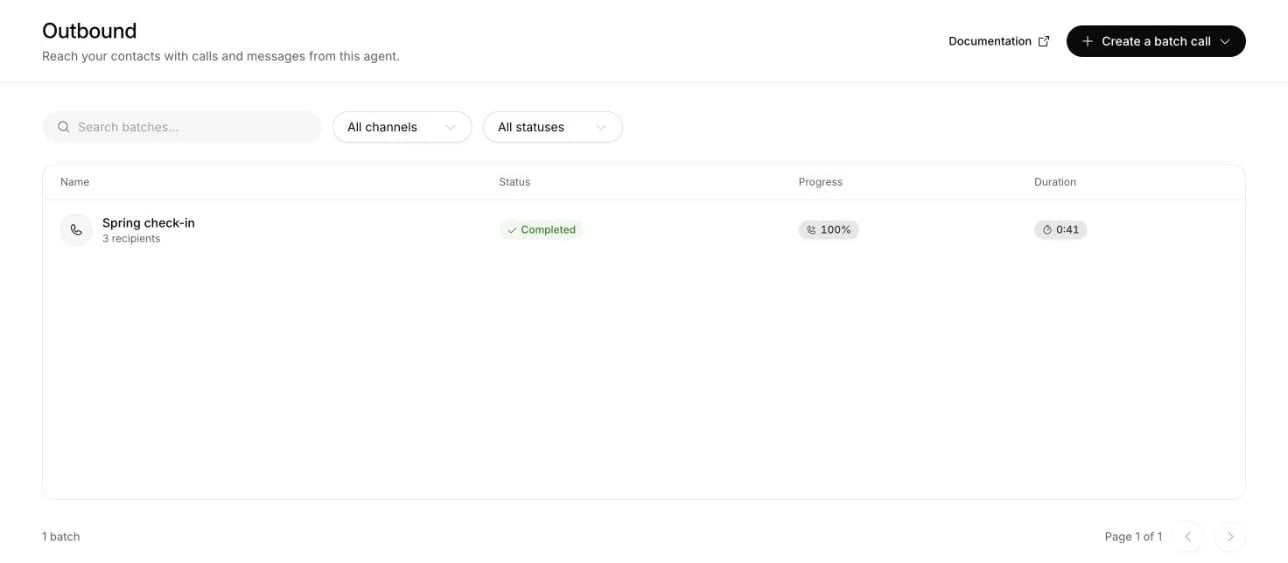
Outbound lists calls and campaigns across your agents. Create a batch call opens the Telephony, WhatsApp calling and WhatsApp messages choices.
1
Create the campaign
Open Outbound → Create a batch call → WhatsApp messages. At workspace
level, choose the agent that will handle the replies.
Pick the number to send from and an approved template; templates are
created and approved in WhatsApp Manager. Select from template opens
your template library.
2
Fill the variables
Click each variable in the message to map it to a contact field, such as
the first name or any contact attribute, or to fixed text. Give a fallback
for variables a contact might not have; a contact with an empty variable
and no fallback is skipped.
3
Choose who answers
AI replies lets your agent respond to every reply. Human takeover
creates a Helpdesk ticket when a recipient first replies, and needs
Helpdesk enabled.
4
Write the playbook
Under Playbook and guidelines, pick the goal, such as Win the
customer back or Learn why they left. Then write what to say, what
never to say, when to hand the conversation to a person, and compliance
notes such as how the agent introduces itself. This section appears only
with AI replies. The agent reads the playbook in every conversation
the campaign opened, for 30 days, and it never overrides the agent’s
guardrails.
5
Set the sending rules
Under Schedule and sending rules, set the start, the messages per
minute, your Meta messaging limit and quiet hours.
6
Pick the audience and launch
Choose Continue to audience and select contacts, or use Add
filter, for example
last_active_at more than 60 days ago, or
churn_reason is fees_pricing. Then confirm that these contacts agreed
to receive WhatsApp messages from you. Send now becomes available once
the required settings are complete, and opens a review before anything goes
out. With a later start, it reads Schedule campaign.- Opt-outs. A contact who replied STOP, asked the agent not to be contacted again, or turned off marketing messages from your business in WhatsApp is left out of every campaign. A WhatsApp opt-out ends when they reply START.
- Quiet hours. No message goes out during quiet hours in the contact’s own
timezone, read from a
timezoneattribute or the campaign’s default. - A fresh check per contact. The audience is fixed at launch, and each contact is checked again just before their message goes out. Someone whose attributes no longer match the audience by then is skipped, so keep the attributes that say a customer came back up to date.
- Outcomes. With the goal Win the customer back, a contact counts as reactivated when they say they will come back, or, if you set a Reactivation signal, when a date attribute your CRM keeps reads the day the message was sent or later. With Learn why they left, the reason is saved on the contact and appears on the Churn reasons page.
- Pauses with a reason. If WhatsApp rejects the template, the access token or billing, restricts your WhatsApp Business account, does not recognise the number, or does not confirm that it took a message, the campaign pauses and says why. Fix the cause and resume it.
Questions
Is a win-back message a marketing message on WhatsApp?
Yes. A message meant to bring a customer back is promotional, and Meta’s guidelines put promotional content in the marketing category. Meta bills template messages to your WhatsApp Business account.Can I message customers who never opted in?
No. WhatsApp requires opt-in, and Centillion asks you to confirm that the audience agreed to receive WhatsApp messages from you before you launch.What happens when a customer replies?
With AI replies, your agent answers using the campaign’s playbook and records the outcome. With Human takeover, the first reply opens a Helpdesk ticket for your team.How many customers can one campaign reach?
Up to 50,000 contacts. How many go out per day also depends on the messaging limit Meta set for your business portfolio, which every campaign on the same number shares.Can I run the same campaign by phone?
Yes, with the Voice call channel, once a workspace owner has set up outbound calls. See Outbound AI calls.Try it
Pick the customers who have not been active for 60 days, write one honest message about what changed, and let the agent answer the replies. Start with a small audience and read every conversation from the first day.Start free
Start on the Free plan, or take a seven-day trial of a paid plan. Your agent is live on your site in an afternoon.
Book a demo
Fifteen minutes with the team, on your own use case.
Related
Outbound campaigns
Audience, the WhatsApp message, the playbook and the results.
Chatbot vs AI agent
Why the agent answering replies needs a goal and written rules.
Churn reasons
Find out why customers leave and target each group.