
Choose a procedure or a workflow
Procedures are available from every workflow node. They have no edges into or
out of the workflow. A structured procedure holds the conversation at its
current workflow node while it runs, then returns control to that node.
Completing a procedure leaves the conversation open. Use System tool → End
conversation when the conversation should end.
A workflow’s verification phase does not restrict when a procedure can start.
Put required verification inside the procedure or a shared sub-procedure, and
have the tool check authorization before it changes customer data.
Free-form procedures
Give the procedure a name for your team. Write a Trigger that describes the customer’s intent, such as “The customer wants to return an order.” The agent chooses a procedure from its trigger. Write the instructions in Content. Use paragraphs, lists or Markdown. The agent can adapt the wording and order. Type/ at the cursor to open
formatting commands and grouped selectors for tools, system tools, knowledge
documents and procedures. Choose Header 1, Header 2, Header 3 or
Step to format the current paragraph. Use the arrow keys and Enter to
choose an item, or Escape to close the menu.
References appear as named pills and the Uses row lists the resources.
Used by links to procedures that reference this one.
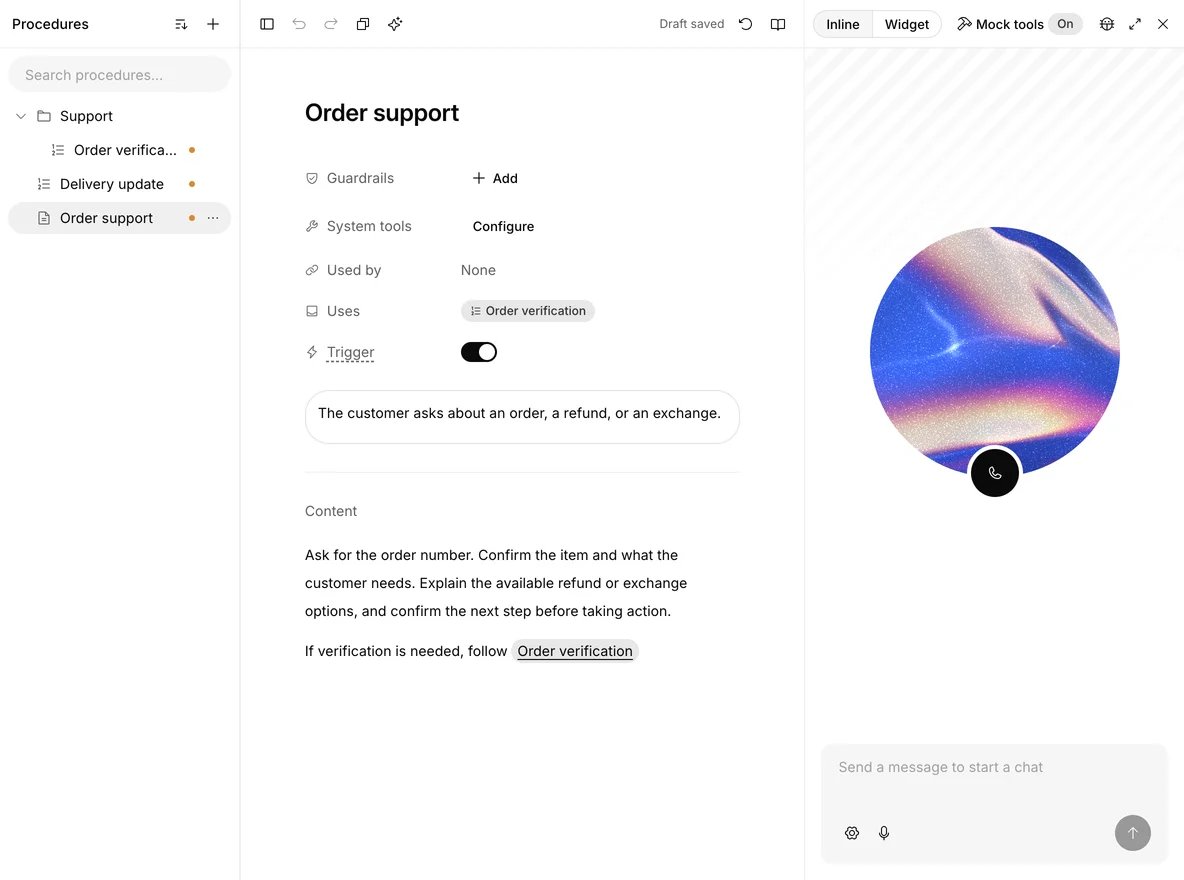
A free-form procedure has a trigger and editable instructions, with preview alongside.
System tools
Free-form procedures can reference these actions:
Configure transfer destinations in Workflow, then enable the relevant
steps under the procedure’s System tools → Configure. A reference does
not grant access to arbitrary agents, phone numbers or state variables.
Contact centers can use configured phone or SIP destinations.
Custom guardrails
Choose Guardrails → Add, then Add new guardrail. Give the rule a name, write the content it should block, and choose the evaluation model. Guardrails apply while this free-form procedure is active, including during a structured sub-procedure it starts. Streaming checks cumulative sentences from the generated response. Blocking can evaluate only the full text response. Both hold the response until the checks pass. They add model calls and latency. Custom voice checks spoken responses before playback and transcript updates. Guarded procedures cannot run in Realtime mode. Choose End conversation or Retry for a violation. Retry rewrites the reply up to twice without repeating tools. A further violation or an unavailable evaluator ends the conversation. Triggered rules also flag the conversation for review. Conversation history sets the number of recent messages included in each evaluation, from zero to 50. Zero checks the response alone.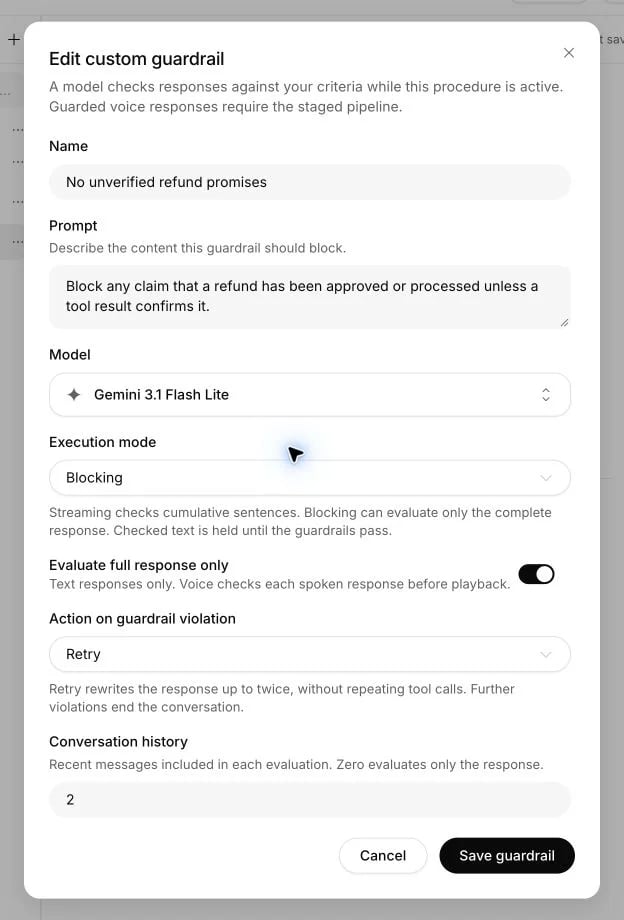
Each procedure can have its own response guardrails, model and violation action.
Structured procedures
Structured procedures require Custom voice or a compatible Realtime model. Phonic models do not support them in this connection. Publishing and call startup check compatibility. See voice mode. Use Add step to build a numbered sequence. Hover a step to delete it or to drag its handle. With the handle focused, the up and down arrow keys move the step. A new step lands before an End or Retry step, which must stay last. The agent receives the current step and executes steps in order.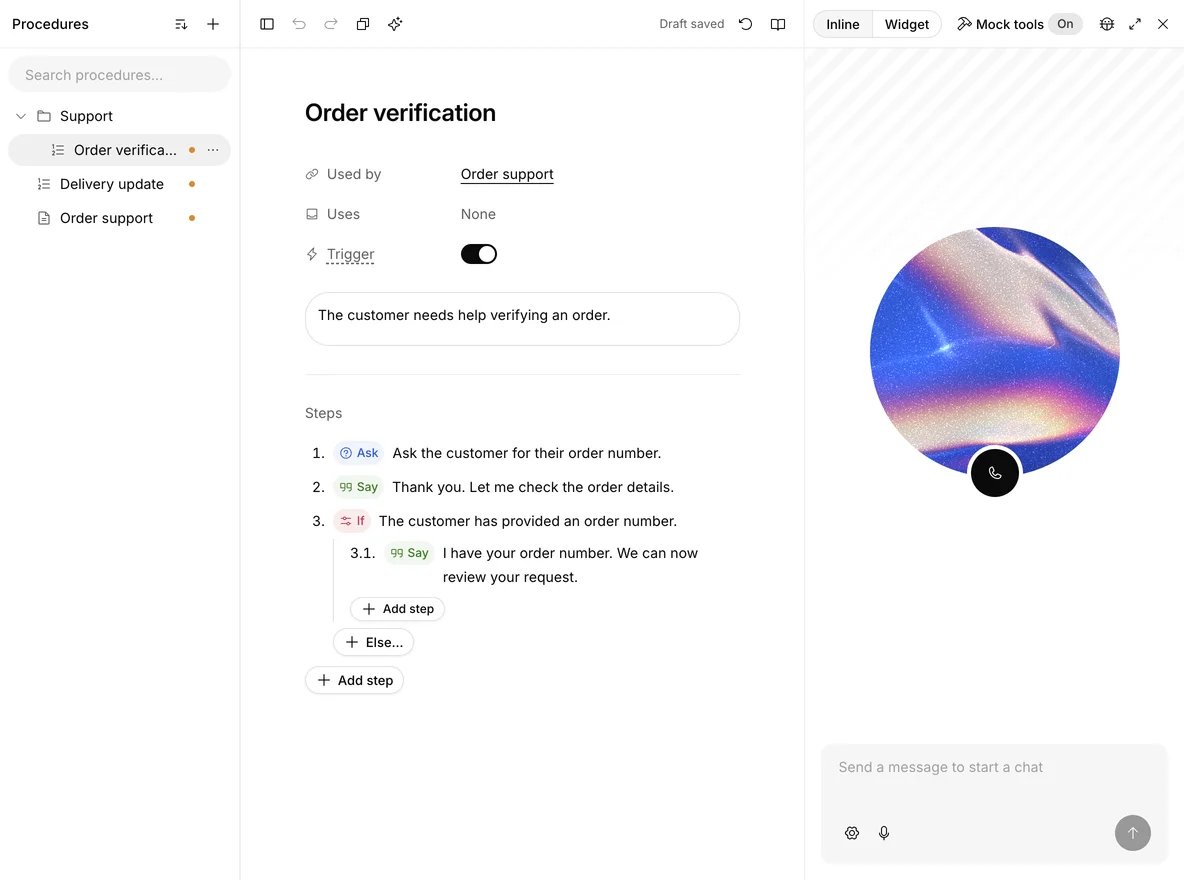
Structured steps include questions, exact responses and conditional branches.
Only Ask waits for customer input. Tell, Say, Tool and the other steps
continue immediately. Ask, Tell and Say cannot call tools.
Say, an If on variables, Sub-procedure, Retry and the End steps run without a
model call, as does a Tool whose parameters are all set. A chain of them
reaches the customer at once. Tell, Ask, a Text If and a Tool with parameters
for the agent to fill in each take one model call.
Variables
Steps read{{variable}} from the values supplied when the conversation
started, from tool output assignments, from a workflow’s state and from the
built-in system., call. and contact. values. Type {{ in a step to choose
one. A variable with no value stays as written, so a Say step shows the
placeholder. Check that a value exists with an If first when a step depends on
it. Variables named secret__… are never spoken or shown to the model: use
them as tool parameter values.
Conditions
A Text condition describes the situation in words and the model evaluates it from the conversation. Click its text to edit it. An Expression condition opens Edit expression beside the steps. Each value is a String, Number, True, False, Null, Dynamic variable or LLM evaluation, which asks the model a yes or no question. Choose an operator from Logical, Comparison or Arithmetic, use Wrap in to build on the expression, and Add branch to extend an And or Or. A variable with no value equals Null. Values are compared as they are, so the text"21" is not the number
21.
Click an If label to switch all of its conditions between Text and
Expression. All arms of one If use the same condition type. An If cannot
contain another If or immediately follow an If. Expression conditions cannot
immediately follow Ask, because they read variables rather than the customer’s
reply. Move another decision into a structured sub-procedure when needed.
Tool steps
Choose a tool from the search list. Workspace tools work without being attached to the agent. The settings button next to the tool opens Tool settings, where each parameter gets its value from LLM with optional instructions, Fixed, Variable, or Omit for an optional parameter. Fixed and omitted parameters are kept out of the model’s parameter schema. Turn on On failure steps to add a handler. Without one, a failed tool ends the conversation. A handler can contain Ask, Tell, Say, Sub-procedure, System tool and Retry. It cannot contain Tool or If. After a handler with no Retry, the procedure continues with the next step. A successful retry continues after the original Tool step. The handler runs after every failed attempt, and exhausting retries ends the conversation. Record values needed by later steps in dynamic variables through the tool’s output assignments. Structured procedures have no per-step model, voice or knowledge settings, and do not reference knowledge documents. Use a workflow for those controls.Drafts, navigation and publishing
Edits save automatically to the current branch. Saving… changes to Draft saved when the server confirms the save. Switching procedures, opening preview and publishing wait for pending edits. The URL carriesprocedureId and preserves the selected branch, so a copied link opens the
same procedure. Undo and Redo apply within the current editor session.
The toolbar’s Discard changes restores this procedure to the selected
branch’s latest published version and keeps other draft changes. If the
procedure has never been published on this branch, the confirmation explains
that discarding removes the new procedure. An amber dot beside a procedure
marks unpublished changes. Hover over a row to see its type, trigger and last
update. The row’s options button appears on hover or keyboard focus and stays
visible on touch devices.
Incomplete steps remain editable and saved as drafts. The red error count in
the toolbar lists what to fix before preview or publishing, by step, and
Publish turns red while a procedure has errors. If another editor changed the saved
version, Centillion preserves your local draft and asks you to reload the
saved version instead of overwriting it. Publish a new branch version to make
the changes available to new customer conversations.
Use Draft with Mastermind in the toolbar to work on the selected
procedure, or choose it from + to start a new one. Mastermind reads the
saved draft and proposes changes for review.
Use folders and search to organize procedures. Folders nest: create one from
+ or from a folder’s own menu, and drag a procedure or folder onto another
to move it, or choose Move to…. Deleting a folder moves what it holds up one
level. Search matches names and triggers, and opens the folders around a match.
The procedure menu also supports renaming, duplication, discarding changes and
deletion. History lists published versions that changed this procedure. Expand a version to review it
or use Restore as draft to bring it back without publishing. The toolbar copies
free-form content as Markdown or a structured procedure as JSON. + → Import
accepts procedure JSON or Markdown instructions, including documents whose
steps carry their own id values and whose logical operators list children. + → From SOP turns a document into editable drafts
and uses workspace message credits. Review imported instructions before publishing.
Choose procedures when a conversation starts
Enable Procedure selection in the agent’s Settings before sendingprocedure_ids or start_procedure_ids in a supported conversation request.
The option is off by default.
procedure_ids limits the available procedures. An empty array disables them
all. Include every sub-procedure referenced by a selected procedure.
start_procedure_ids loads up to five selected free-form procedures from the
first turn. Structured procedures cannot be preloaded. Selection is fixed for
the conversation and cannot be changed on later messages.
An agent transfer releases that selection. The receiving agent uses its own
procedures, and previously loaded procedure instructions leave the active context.