What an AI receptionist should do on a call, what callers expect, and when to pass the call to a person. Learn the basics, then put an agent on your number.
Guide
AI phone answering on your own number, with your knowledge and your rules.
Many of the calls that matter most arrive when nobody can pick up: during
lunch, after closing, while the one person at the front desk is with a
customer. AI phone answering puts an agent on the line for those calls. It
answers in a natural voice, from what your business knows, and passes the call
on when a person should take it.This guide covers what a good phone agent does, then how to put one on your
number with Centillion.
An AI phone agent is closer to a receptionist than to a phone menu. A menu asks
the caller to press 2 for billing and hopes the question fits a box. An agent
listens to the question in the caller’s own words, answers it, and asks a
follow-up when it needs one.On a typical call it:
Picks up at once, with a greeting that names your business.
Answers questions about hours, prices, policies and services from your own
material.
Takes an action when it is allowed to, such as looking up a record or
sending a text with a link.
Moves the call to a person, or tells the caller who to call, when the
question is outside its job.
The useful way to think about it is as a representative of your business who
happens to be on the phone: it knows your products and your rules, and it acts
inside them.
Phone is less forgiving than chat. A caller cannot scroll back, skim, or wait
while a page loads. A few habits make the difference:
Short answers. One or two sentences, then stop. A list of six options
read aloud is lost by the fourth.
Let them interrupt. People cut in on the phone. The agent should stop
talking and listen. Two workflow lines are the exception: the message
before a phone transfer and an End step’s closing message. The agent
finishes both, so the caller always hears who they are being put through
to, or how the call ends.
Their language. If the caller answers in another language, answer in
that one.
No dead air. When the agent needs a moment to look something up, it
should say so.
A straight answer about who is on the line. If a caller asks whether they
are talking to a person, tell the truth.
Write these into the agent’s instructions and test them on real calls before
customers hear them.
Some calls should not stay with an agent. Decide in advance which ones, and
write it down:
A caller who asks for a person, twice.
Anything urgent or safety-related.
A complaint where the caller is upset and the facts are unclear.
A decision that costs money and sits outside your written policy, such as a
refund exception.
After hours, anything that cannot wait until morning.
For each, decide where the call goes: a colleague’s number, an on-call line, or
a callback the next working day. Then decide what the agent says while it hands
over. The worst version of a handoff makes the caller repeat everything; the
best version starts where the agent stopped.
Your number stays yours. Customers already know your number. Putting an
agent on it should not mean changing it.
Cost per minute. Phone calls cost more than chat messages because voice
is billed by the minute. Keep calls focused and let the agent end a call once
the question is answered.
Calls at once. A busy hour can bring several calls together. Check how
many your setup can take at the same time.
Read the calls. Every week, read a sample of transcripts. They show what
callers ask that your material does not answer yet.
Calling out is different. Answering calls is one thing; phoning
customers is regulated separately. See
AI outbound calling.
Centillion’s phone agent picks up inbound calls on your numbers with the voice
and greeting you chose, and answers with the same instructions and knowledge
as in chat. It needs the Standard plan or above and the Owner or Member
role. Import a number from your own Twilio account or connect your provider’s
SIP trunk. The number stays with your provider; Centillion routes its calls to
the agent. The phone numbers guide covers both options.Your workspace’s Phone Numbers page holds the inventory. You can import a
number there before choosing its agent, or import directly from an agent’s
Channels → Phone page and assign it in the same step.
1
Choose the voice and greeting
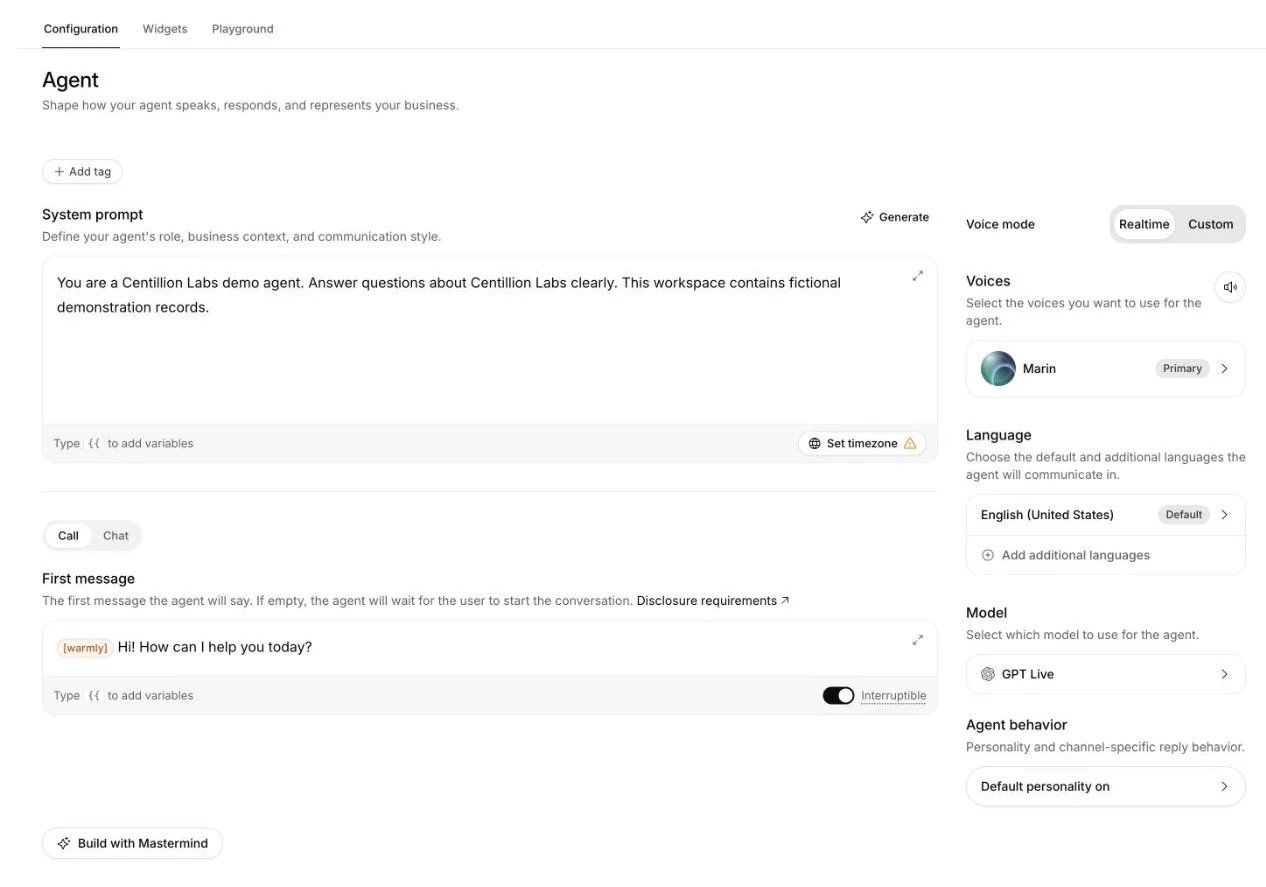
Open your agent’s Agent. Pick the voice and the language
the call opens in, and write the First message → Call the agent greets
callers with. Save.
Choose the voice and language on Agent.
2
Open the Phone channel
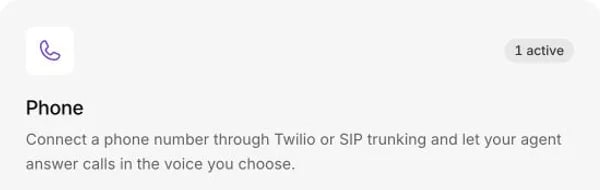
Open the agent’s Channels page and choose Phone. Click Add number.
If the workspace already has a number available, select it to assign it to
the agent.
The Phone card shows how many numbers are active for the agent.
3
Import a number if needed
Choose From Twilio in the same menu. Enter a label, the phone number in
international format, and your Twilio Account SID and Auth Token.
Centillion checks that you own the number and that it can take voice calls,
then imports it and assigns it to this agent.For another phone provider, choose From SIP Trunk and enter its inbound
or outbound settings. The phone numbers guide explains
what you need from your provider.
4
Call it
Call the assigned number from your own phone. The agent answers with your
greeting, and the call shows up under Conversations with Phone as
its source.
Assigning a number also turns on voice for the agent. To move it later, open
Phone Numbers at workspace level and choose its new agent. Each number has
one assigned agent at a time.To connect a new number, import it from your Twilio account or SIP
provider. For help with an existing Centillion Labs
rental, including release or business
verification, contact the Centillion Labs team.
The live chat handoff from the helpdesk does not run on phone calls. To move a
caller to a person, turn on Transfer to number
under the agent’s Tools and add a rule, or add a Phone number transfer
node to the agent’s workflow. Either one moves
the call to a phone number or SIP address. Enter a fixed destination, or choose a conversation
variable when a business system decides who should answer. For example, map
an HTTP tool’s transfer_number response into a variable and select it as the
destination. Post-dial digits, such as an extension, can come from a
variable the same way. The value is checked before the call moves. A missing,
invalid or sensitive value leaves the caller in the conversation.With SIP REFER, you can pass custom X- headers and User-to-User data
to the receiving phone system. Header values can be fixed or read from a
variable. User-to-User data supports {{variable}} placeholders and an
optional protocol discriminator. Your provider and receiving system must
support the fields you use. Sensitive variables cannot be sent.
Caller ID follows your trunk settings.A number bought through Centillion transfers only to numbers in its
own country that are not premium-rate; a number from your own Twilio account
can also transfer to a SIP address. Conditions on the
workflow decide when it is taken, for example an LLM condition such as “the
caller asks for a person,” or an expression on system.hour, which holds the
current hour in UTC, for after-hours routing.When the agent cannot answer, it can offer the caller a callback or the
information by message, and record the request as a Helpdesk ticket. This
needs Helpdesk on and the Escalations tool under Tools turned on with
Phone among its channels and no required fields. Phone is off there by
default.Every call is also saved under Conversations, so your team can read what
was said and follow up.
No. Import an existing Twilio number or connect a SIP trunk from your phone
provider. The number stays with your provider and Centillion routes its calls
to the assigned agent.
A workflow opening takes precedence. Otherwise, a permitted initiation override
can replace the usual First message → Call from Agent. Leave that field
blank and the agent waits for the caller to speak. You can use one agent for both
call directions and fetch caller context before it speaks. See
Personalization for setup and the order of precedence.Calls open without a fixed notice. Include any required AI, transcription or
recording disclosure in every opening you use,
and turn off Interruptible if it must play in full.
Yes, through a Phone number transfer node in the agent’s workflow, which
moves the caller to a fixed number or SIP address, or one returned by a tool
and saved in a conversation variable. The live chat handoff in Helpdesk does
not run on calls, but the agent can take a callback request as a ticket when
the Escalations tool has Phone turned on.
Does the agent know the same things as my website chat?
Yes. It follows the same instructions and knowledge as in chat. Chat-only
tools, such as Twilio texting, do not run on calls. One
agent answers every channel you connect; What Centillion is
gives the overview.
Import Twilio or SIP trunk numbers and choose which agent answers.
WhatsApp AI agent
The same agent on WhatsApp, inside Meta’s rules.
Workflows
Transfer nodes, conditions and per-step voices for calls.
Last modified on November 2, 2026
⌘I
{"docsConfig":{"theme":"maple","$schema":"https://mintlify.com/docs.json","name":"Centillion","description":"How to build a Centillion AI agent, give it your knowledge, and put it on your website, WhatsApp, Messenger, Instagram, Slack and email.","colors":{"primary":"#0a0a0a","light":"#f5f5f5","dark":"#0a0a0a"},"logo":{"light":"https://mintcdn.com/centillion/YMwlBbzdENjtfSuJ/logo/centillion-labs-logo-horizontal.svg?fit=max\u0026auto=format\u0026n=YMwlBbzdENjtfSuJ\u0026q=85\u0026s=a390a5bdca5c0720e1871afbf09b1f18","dark":"https://mintcdn.com/centillion/YMwlBbzdENjtfSuJ/logo/centillion-labs-logo-horizontal.svg?fit=max\u0026auto=format\u0026n=YMwlBbzdENjtfSuJ\u0026q=85\u0026s=a390a5bdca5c0720e1871afbf09b1f18","href":"https://cntillion.com"},"favicon":"https://mintcdn.com/centillion/OVR3XViKbG9zMitv/favicon.svg?fit=max\u0026auto=format\u0026n=OVR3XViKbG9zMitv\u0026q=85\u0026s=a6656501072b111f976d6229cbbd73ad","appearance":{"default":"light","strict":true},"background":{"color":{"light":"#ffffff","dark":"#0a0a0a"}},"navbar":{"links":[{"href":"https://cntillion.com/pricing","label":"Pricing"},{"href":"https://cntillion.com/support","label":"Contact"}],"primary":{"type":"button","label":"Open Centillion","href":"https://app.cntillion.com"}},"footer":{"links":[{"header":"Centillion","items":[{"label":"Home","href":"https://cntillion.com"},{"label":"Pricing","href":"https://cntillion.com/pricing"},{"label":"Contact","href":"https://cntillion.com/support"},{"label":"Sign in","href":"https://app.cntillion.com/sign-in"}]}]},"search":{"prompt":"Search the Centillion docs"},"seo":{"metatags":{"og:site_name":"Centillion Docs"},"organization":{"name":"Centillion","url":"https://cntillion.com"},"indexing":"navigable"},"fonts":{"family":"Inter"},"metadata":{"timestamp":true},"styling":{"latex":true},"navigation":{"pages":[]}},"deployment":{"deploymentMetadataValue":{"subdomain":"centillion","hasAudioNarration":false,"actualSubdomain":"centillion","customDomains":["cntillion.com"],"gitSource":{"type":"github","owner":"centillion-labs","repo":"conversational-agents-for-cx","deployBranch":"master","contentDirectory":"apps/docs","isPrivate":true,"mountPath":"","label":""},"chroma":{"latestBuiltDeploymentHistoryId":"6ae96f717e64ded297ae851c","collectionId":"39baacc1-716e-46d4-86af-2c44453ec0b3","liveDeploymentHistoryId":"6ae96f717e64ded297ae851c","schemaVersion":"v3"},"entitlements":{"AI_CHAT":{"status":"DISABLED"},"WEB_MCP":{"status":"DISABLED"},"NARRATION":{"status":"DISABLED"}},"buildId":"6ae96f717e64ded297ae851c","clientVersion":"0.0.4045","searchFilterCounts":[{"language":"default","tag":"Reach your customers","count":19},{"language":"default","tag":"Build your agent","count":14},{"language":"default","tag":"Guides","count":8},{"language":"default","tag":"Workspace","count":7},{"language":"default","tag":"API documentation","count":6},{"language":"default","tag":"Support","count":6},{"language":"default","tag":"Customer data","count":5},{"language":"default","tag":"Website development","count":2},{"language":"default","tag":"Get started","count":2},{"language":"default","tag":"Helpdesk API","count":1}]},"assistantConfig":{"enableAskAiButton":false,"enableStarterQuestions":false,"enableContextualStarterQuestions":false,"enableAskAiSearchBar":true},"basePath":"/docs","hasChatPermissions":false,"hasWebMcpPermissions":false,"toggles":[{"name":"kill-isr","enabled":true,"variant":{"name":"disabled","enabled":false,"feature_enabled":true},"impressionData":false},{"name":"agent-mintlify-slack","enabled":true,"variant":{"name":"disabled","enabled":false,"feature_enabled":true},"impressionData":false},{"name":"agent-integrations-settings","enabled":true,"variant":{"name":"disabled","enabled":false,"feature_enabled":true},"impressionData":false},{"name":"rbac-expansion","enabled":true,"variant":{"name":"disabled","enabled":false,"feature_enabled":true},"impressionData":false},{"name":"automations-pr-grouping","enabled":true,"variant":{"name":"disabled","enabled":false,"feature_enabled":true},"impressionData":false},{"name":"custom-prefix","enabled":true,"variant":{"name":"disabled","enabled":false,"feature_enabled":true},"impressionData":false},{"name":"analytics-v7","enabled":true,"variant":{"name":"disabled","enabled":false,"feature_enabled":true},"impressionData":false},{"name":"user-flows-analytics","enabled":true,"variant":{"name":"disabled","enabled":false,"feature_enabled":true},"impressionData":false},{"name":"no-publish-flow","enabled":true,"variant":{"name":"disabled","enabled":false,"feature_enabled":true},"impressionData":false},{"name":"workos-onboarding","enabled":true,"variant":{"name":"disabled","enabled":false,"feature_enabled":true},"impressionData":false},{"name":"llms-txt-v2","enabled":true,"variant":{"name":"disabled","enabled":false,"feature_enabled":true},"impressionData":false},{"name":"snapshot-serving-live","enabled":true,"variant":{"name":"disabled","enabled":false,"feature_enabled":true},"impressionData":false},{"name":"stripTemperatureMiddleware","enabled":true,"variant":{"name":"disabled","enabled":false,"feature_enabled":true},"impressionData":false},{"name":"support-platform-pylon-zendesk","enabled":true,"variant":{"name":"disabled","enabled":false,"feature_enabled":true},"impressionData":false},{"name":"snapshot-serving","enabled":true,"variant":{"name":"disabled","enabled":false,"feature_enabled":true},"impressionData":false},{"name":"instant-rollback","enabled":true,"variant":{"name":"disabled","enabled":false,"feature_enabled":true},"impressionData":false},{"name":"granular-notifications-server","enabled":true,"variant":{"name":"disabled","enabled":false,"feature_enabled":true},"impressionData":false},{"name":"granular-notifications","enabled":true,"variant":{"name":"disabled","enabled":false,"feature_enabled":true},"impressionData":false},{"name":"automations-fable","enabled":true,"variant":{"name":"disabled","enabled":false,"feature_enabled":true},"impressionData":false},{"name":"fixed-ai-action-pricing","enabled":true,"variant":{"name":"disabled","enabled":false,"feature_enabled":true},"impressionData":false},{"name":"automation-resolve-merge-conflict","enabled":true,"variant":{"name":"disabled","enabled":false,"feature_enabled":true},"impressionData":false},{"name":"scoped-publishing","enabled":true,"variant":{"name":"disabled","enabled":false,"feature_enabled":true},"impressionData":false},{"name":"mintql","enabled":true,"variant":{"name":"disabled","enabled":false,"feature_enabled":true},"impressionData":false},{"name":"page-level-analytics","enabled":true,"variant":{"name":"disabled","enabled":false,"feature_enabled":true},"impressionData":false},{"name":"editor-version-history-v2","enabled":true,"variant":{"name":"disabled","enabled":false,"feature_enabled":true},"impressionData":false},{"name":"billing-page-v2","enabled":true,"variant":{"name":"disabled","enabled":false,"feature_enabled":true},"impressionData":false},{"name":"full-page-search","enabled":true,"variant":{"name":"disabled","enabled":false,"feature_enabled":true},"impressionData":false},{"name":"workspace-projects","enabled":true,"variant":{"name":"disabled","enabled":false,"feature_enabled":true},"impressionData":false},{"name":"assistant-v5","enabled":true,"variant":{"name":"disabled","enabled":false,"feature_enabled":true},"impressionData":false},{"name":"byok-sep-25","enabled":true,"variant":{"name":"disabled","enabled":false,"feature_enabled":true},"impressionData":false},{"name":"fork-pr-previews","enabled":true,"variant":{"name":"disabled","enabled":false,"feature_enabled":true},"impressionData":false},{"name":"revalidation-jwt","enabled":true,"variant":{"name":"disabled","enabled":false,"feature_enabled":true},"impressionData":false},{"name":"vite-origin","enabled":true,"variant":{"name":"disabled","enabled":false,"feature_enabled":true},"impressionData":false},{"name":"billing-updated-9-15","enabled":true,"variant":{"name":"disabled","enabled":false,"feature_enabled":true},"impressionData":false},{"name":"workos-sso-scim","enabled":true,"variant":{"name":"disabled","enabled":false,"feature_enabled":true},"impressionData":false},{"name":"hobby-abuse-scan","enabled":true,"variant":{"name":"disabled","enabled":false,"feature_enabled":true},"impressionData":false},{"name":"dashboard-inbox","enabled":true,"variant":{"name":"disabled","enabled":false,"feature_enabled":true},"impressionData":false},{"name":"workos-signup","enabled":true,"variant":{"name":"disabled","enabled":false,"feature_enabled":true},"impressionData":false},{"name":"turbopuffer-dual-write","enabled":true,"variant":{"name":"disabled","enabled":false,"feature_enabled":true},"impressionData":false},{"name":"workos-enabled","enabled":true,"variant":{"name":"disabled","enabled":false,"feature_enabled":true},"impressionData":false},{"name":"approve-review-flow","enabled":true,"variant":{"name":"disabled","enabled":false,"feature_enabled":true},"impressionData":false},{"name":"sso-setup-deadline-banner","enabled":true,"variant":{"name":"disabled","enabled":false,"feature_enabled":true},"impressionData":false},{"name":"turbopuffer-serve","enabled":true,"variant":{"name":"disabled","enabled":false,"feature_enabled":true},"impressionData":false}],"googleFontsInlined":false},"customCss":[{"filePath":"style.css","content":":root{--bg-subtle:#f6f6f6;--ink:#0a0a0a;--ink-2:#353535;--ink-3:#626262;--ink-4:#a1a1a1;--ink-5:#c7c7c7;--amber:#db8831;--amber-text:#9f5f1c;--amber-tint:#fbf4ec;--radius-lg:16px;--radius-xl:24px;--radius-pill:9999px;--glow-lavender:#ebeaf7;--glow-pink:#f2e4e2;--glow-peach:#f5e6dd;--glow-sky:#e6ecf4;--glow-mint:#e9f4ef}#page-title{font-size:40px;font-weight:500;line-height:46px;color:var(--ink);letter-spacing:-.02em}#content>h2,#content>h3,#content>h4{font-size:20px;font-weight:500;line-height:26px;color:var(--ink);letter-spacing:-.01em}#content>h3,#content>h4{font-size:18px;line-height:24px}#content>h4{font-size:16px;line-height:22px;letter-spacing:0}#header .eyebrow,#search-bar-entry,#search-bar-entry-mobile{font-size:14px;font-weight:400;line-height:20px;color:var(--ink-3)}#search-bar-entry,#search-bar-entry-mobile{height:36px;padding:0 16px;color:var(--ink-4);background-color:var(--bg-subtle);border-radius:var(--radius-pill);box-shadow:none}#search-bar-entry svg,#search-bar-entry-mobile svg{color:var(--ink-4)}#search-bar-entry>span{font-size:12px;font-weight:400;line-height:16px;color:var(--ink-4)}#search-bar-entry-mobile:focus-visible,#search-bar-entry:focus-visible{outline:2px solid var(--ink);outline-offset:2px}#content .card{background-color:var(--bg-subtle);border:0;border-radius:var(--radius-lg);box-shadow:none}#content .card [data-component-part=card-content-container]{padding:20px}#content .card [data-component-part=card-icon] svg{background-color:var(--ink-3)}#content .card [data-component-part=card-content-container]>a>div.absolute{color:var(--ink-5)}#content .card [data-component-part=card-title]{font-size:16px;font-weight:500;line-height:22px;color:var(--ink)}#content .card [data-component-part=card-content]{font-size:14px;font-weight:400;line-height:20px;color:var(--ink-3)}#content .card [data-component-part=card-content]>span{color:inherit}#content-area:has(.centillion-hero)>#header{display:none}.centillion-hero{display:flex;flex-direction:column;gap:20px;padding:28px;margin-bottom:24px;background-color:var(--bg-subtle);background-image:radial-gradient(38% 80% at 96% 0%,var(--glow-lavender) 0%,transparent 100%),radial-gradient(30% 70% at 84% 48%,var(--glow-pink) 0%,transparent 100%),radial-gradient(34% 70% at 90% 100%,var(--glow-peach) 0%,transparent 100%),radial-gradient(28% 64% at 66% 58%,var(--glow-sky) 0%,transparent 100%),radial-gradient(26% 56% at 62% 0%,var(--glow-mint) 0%,transparent 100%);border-radius:var(--radius-xl)}.centillion-hero .centillion-hero-eyebrow{margin:0;font-size:14px;font-weight:400;line-height:20px;color:var(--ink-3)}.centillion-hero .centillion-hero-title{max-width:720px;margin:0;font-size:40px;font-weight:500;line-height:46px;color:var(--ink);letter-spacing:-.02em;text-wrap:balance}.centillion-hero .centillion-muted{color:var(--ink-3)}#content .callout{padding:16px 20px;font-size:14px;line-height:20px;border:0;border-radius:var(--radius-lg)}#content .callout[data-callout-type=warning]{background-color:var(--amber-tint)}#content .callout[data-callout-type=warning] [data-component-part=callout-icon] svg{color:var(--amber)}#content .callout[data-callout-type=warning] [data-component-part=callout-content]{color:var(--amber-text)}#content .callout[data-callout-type=note]{background-color:var(--bg-subtle)}#content .callout[data-callout-type=note] [data-component-part=callout-icon] svg{color:var(--ink-3)}#content .callout[data-callout-type=note] [data-component-part=callout-content]{color:var(--ink-2)}"}],"page":{"pagePath":"guides/ai-phone-answering","slug":"/guides/ai-phone-answering","pageMetadata":{"title":"AI phone answering on your own Twilio number","description":"What an AI receptionist should do on a call, what callers expect, and when to pass the call to a person. Learn the basics, then put an agent on your number.","sidebarTitle":"AI phone answering","keywords":["AI phone answering","AI receptionist","AI answering service with Twilio","AI voice agent for inbound calls"],"href":"/guides/ai-phone-answering"},"description":{"compiledSource":"\"use strict\";\nconst {jsx: _jsx} = arguments[0];\nconst {useMDXComponents: _provideComponents} = arguments[0];\nfunction _createMdxContent(props) {\n const _components = {\n p: \"p\",\n ..._provideComponents(),\n ...props.components\n };\n return _jsx(_components.p, {\n children: \"What an AI receptionist should do on a call, what callers expect, and when to pass the call to a person. Learn the basics, then put an agent on your number.\"\n });\n}\nfunction MDXContent(props = {}) {\n const {wrapper: MDXLayout} = {\n ..._provideComponents(),\n ...props.components\n };\n return MDXLayout ? _jsx(MDXLayout, {\n ...props,\n children: _jsx(_createMdxContent, {\n ...props\n })\n }) : _createMdxContent(props);\n}\nreturn {\n default: MDXContent\n};\n","frontmatter":{},"scope":{}},"pageType":"default","mdx":{"mdxSource":{"compiledSource":"\"use strict\";const{Fragment:_Fragment,jsx:_jsx,jsxs:_jsxs}=arguments[0];const{useMDXComponents:_provideComponents}=arguments[0];function _createMdxContent(props){const _components={a:`a`,code:`code`,li:`li`,p:`p`,strong:`strong`,ul:`ul`,..._provideComponents(),...props.components},{Card,CardGroup,Frame,Heading,OptimizedImage,Step,Steps}=_components;if(!Card)_missingMdxReference(`Card`,true);if(!CardGroup)_missingMdxReference(`CardGroup`,true);if(!Frame)_missingMdxReference(`Frame`,true);if(!Heading)_missingMdxReference(`Heading`,true);if(!OptimizedImage)_missingMdxReference(`OptimizedImage`,true);if(!Step)_missingMdxReference(`Step`,true);if(!Steps)_missingMdxReference(`Steps`,true);return _jsxs(_Fragment,{children:[_jsxs(`div`,{className:`centillion-hero`,children:[_jsx(`p`,{className:`centillion-hero-eyebrow`,children:`Guide`}),_jsxs(`div`,{className:`centillion-hero-title`,role:`heading`,\"aria-level\":`1`,children:[_jsx(`span`,{className:`centillion-muted`,children:`AI phone answering on`}),` your own number`,_jsx(`span`,{className:`centillion-muted`,children:`, with`}),` your knowledge `,_jsx(`span`,{className:`centillion-muted`,children:`and`}),` your rules.`]})]}),`\n`,_jsx(_components.p,{children:`Many of the calls that matter most arrive when nobody can pick up: during\nlunch, after closing, while the one person at the front desk is with a\ncustomer. AI phone answering puts an agent on the line for those calls. It\nanswers in a natural voice, from what your business knows, and passes the call\non when a person should take it.`}),`\n`,_jsx(_components.p,{children:`This guide covers what a good phone agent does, then how to put one on your\nnumber with Centillion.`}),`\n`,_jsx(Heading,{level:`2`,id:`what-an-ai-phone-agent-does`,children:`What an AI phone agent does`}),`\n`,_jsx(_components.p,{children:`An AI phone agent is closer to a receptionist than to a phone menu. A menu asks\nthe caller to press 2 for billing and hopes the question fits a box. An agent\nlistens to the question in the caller’s own words, answers it, and asks a\nfollow-up when it needs one.`}),`\n`,_jsx(_components.p,{children:`On a typical call it:`}),`\n`,_jsxs(_components.ul,{children:[`\n`,_jsx(_components.li,{children:`Picks up at once, with a greeting that names your business.`}),`\n`,_jsx(_components.li,{children:`Answers questions about hours, prices, policies and services from your own\nmaterial.`}),`\n`,_jsx(_components.li,{children:`Takes an action when it is allowed to, such as looking up a record or\nsending a text with a link.`}),`\n`,_jsx(_components.li,{children:`Moves the call to a person, or tells the caller who to call, when the\nquestion is outside its job.`}),`\n`]}),`\n`,_jsx(_components.p,{children:`The useful way to think about it is as a representative of your business who\nhappens to be on the phone: it knows your products and your rules, and it acts\ninside them.`}),`\n`,_jsx(Heading,{level:`2`,id:`what-callers-expect`,children:`What callers expect`}),`\n`,_jsx(_components.p,{children:`Phone is less forgiving than chat. A caller cannot scroll back, skim, or wait\nwhile a page loads. A few habits make the difference:`}),`\n`,_jsxs(_components.ul,{children:[`\n`,_jsxs(_components.li,{children:[_jsx(_components.strong,{children:`Short answers.`}),` One or two sentences, then stop. A list of six options\nread aloud is lost by the fourth.`]}),`\n`,_jsxs(_components.li,{children:[_jsx(_components.strong,{children:`Let them interrupt.`}),` People cut in on the phone. The agent should stop\ntalking and listen. Two workflow lines are the exception: the message\nbefore a phone transfer and an End step’s closing message. The agent\nfinishes both, so the caller always hears who they are being put through\nto, or how the call ends.`]}),`\n`,_jsxs(_components.li,{children:[_jsx(_components.strong,{children:`Their language.`}),` If the caller answers in another language, answer in\nthat one.`]}),`\n`,_jsxs(_components.li,{children:[_jsx(_components.strong,{children:`No dead air.`}),` When the agent needs a moment to look something up, it\nshould say so.`]}),`\n`,_jsxs(_components.li,{children:[_jsx(_components.strong,{children:`A straight answer about who is on the line.`}),` If a caller asks whether they\nare talking to a person, tell the truth.`]}),`\n`]}),`\n`,_jsx(_components.p,{children:`Write these into the agent’s instructions and test them on real calls before\ncustomers hear them.`}),`\n`,_jsx(Heading,{level:`2`,id:`when-a-person-should-take-the-call`,children:`When a person should take the call`}),`\n`,_jsx(_components.p,{children:`Some calls should not stay with an agent. Decide in advance which ones, and\nwrite it down:`}),`\n`,_jsxs(_components.ul,{children:[`\n`,_jsx(_components.li,{children:`A caller who asks for a person, twice.`}),`\n`,_jsx(_components.li,{children:`Anything urgent or safety-related.`}),`\n`,_jsx(_components.li,{children:`A complaint where the caller is upset and the facts are unclear.`}),`\n`,_jsx(_components.li,{children:`A decision that costs money and sits outside your written policy, such as a\nrefund exception.`}),`\n`,_jsx(_components.li,{children:`After hours, anything that cannot wait until morning.`}),`\n`]}),`\n`,_jsx(_components.p,{children:`For each, decide where the call goes: a colleague’s number, an on-call line, or\na callback the next working day. Then decide what the agent says while it hands\nover. The worst version of a handoff makes the caller repeat everything; the\nbest version starts where the agent stopped.`}),`\n`,_jsx(Heading,{level:`2`,id:`what-to-watch-for`,children:`What to watch for`}),`\n`,_jsxs(_components.ul,{children:[`\n`,_jsxs(_components.li,{children:[_jsx(_components.strong,{children:`Your number stays yours.`}),` Customers already know your number. Putting an\nagent on it should not mean changing it.`]}),`\n`,_jsxs(_components.li,{children:[_jsx(_components.strong,{children:`Cost per minute.`}),` Phone calls cost more than chat messages because voice\nis billed by the minute. Keep calls focused and let the agent end a call once\nthe question is answered.`]}),`\n`,_jsxs(_components.li,{children:[_jsx(_components.strong,{children:`Calls at once.`}),` A busy hour can bring several calls together. Check how\nmany your setup can take at the same time.`]}),`\n`,_jsxs(_components.li,{children:[_jsx(_components.strong,{children:`Read the calls.`}),` Every week, read a sample of transcripts. They show what\ncallers ask that your material does not answer yet.`]}),`\n`,_jsxs(_components.li,{children:[_jsx(_components.strong,{children:`Calling out is different.`}),` Answering calls is one thing; phoning\ncustomers is regulated separately. See\n`,_jsx(_components.a,{href:`/guides/ai-outbound-calling`,children:`AI outbound calling`}),`.`]}),`\n`]}),`\n`,_jsx(Heading,{level:`2`,id:`set-it-up-in-centillion`,children:`Set it up in Centillion`}),`\n`,_jsxs(_components.p,{children:[`Centillion’s phone agent picks up inbound calls on your numbers with the voice\nand greeting you chose, and answers with the same instructions and knowledge\nas in chat. It needs the Standard plan or above and the Owner or Member\nrole. Import a number from your own Twilio account or connect your provider’s\nSIP trunk. The number stays with your provider; Centillion routes its calls to\nthe agent. The `,_jsx(_components.a,{href:`/channels/phone`,children:`phone numbers guide`}),` covers both options.`]}),`\n`,_jsxs(_components.p,{children:[`Your workspace’s `,_jsx(_components.strong,{children:`Phone Numbers`}),` page holds the inventory. You can import a\nnumber there before choosing its agent, or import directly from an agent’s\n`,_jsx(_components.strong,{children:`Channels → Phone`}),` page and assign it in the same step.`]}),`\n`,_jsxs(Steps,{children:[_jsxs(Step,{title:`Choose the voice and greeting`,children:[_jsxs(_components.p,{children:[`Open your agent’s `,_jsx(_components.strong,{children:`Agent`}),`. Pick the voice and the language\nthe call opens in, and write the `,_jsx(_components.strong,{children:`First message → Call`}),` the agent greets\ncallers with. Save.`]}),_jsx(Frame,{caption:`Choose the voice and language on Agent.`,children:_jsx(OptimizedImage,{src:`https://mintcdn.com/centillion/n9koGqutqlVBNAYF/images/channels/phone-02-voice-settings.webp?fit=max\u0026auto=format\u0026n=n9koGqutqlVBNAYF\u0026q=85\u0026s=af9b619b76c162db51a5f1db5c1414f5`,alt:`Agent configuration with the selected voice, language and First message`,\"data-og-width\":`1440`,width:`1440`,\"data-og-height\":`1240`,height:`1240`,\"data-path\":`images/channels/phone-02-voice-settings.webp`,\"data-optimize\":`true`,\"data-opv\":`3`,srcset:`https://mintcdn.com/centillion/n9koGqutqlVBNAYF/images/channels/phone-02-voice-settings.webp?w=280\u0026fit=max\u0026auto=format\u0026n=n9koGqutqlVBNAYF\u0026q=85\u0026s=54db3a61d26db6f22d6554270adfc845 280w, https://mintcdn.com/centillion/n9koGqutqlVBNAYF/images/channels/phone-02-voice-settings.webp?w=560\u0026fit=max\u0026auto=format\u0026n=n9koGqutqlVBNAYF\u0026q=85\u0026s=dc55c1ae7d18d3397be12cef0cec2441 560w, https://mintcdn.com/centillion/n9koGqutqlVBNAYF/images/channels/phone-02-voice-settings.webp?w=840\u0026fit=max\u0026auto=format\u0026n=n9koGqutqlVBNAYF\u0026q=85\u0026s=220571d6286f8b6dc771c6267c744975 840w, https://mintcdn.com/centillion/n9koGqutqlVBNAYF/images/channels/phone-02-voice-settings.webp?w=1100\u0026fit=max\u0026auto=format\u0026n=n9koGqutqlVBNAYF\u0026q=85\u0026s=0ac2920eda8d1d48c6b1ed189ec2a7f1 1100w, https://mintcdn.com/centillion/n9koGqutqlVBNAYF/images/channels/phone-02-voice-settings.webp?w=1650\u0026fit=max\u0026auto=format\u0026n=n9koGqutqlVBNAYF\u0026q=85\u0026s=28e5c1ccfb19ca74d3a7a1ae3543b2dc 1650w, https://mintcdn.com/centillion/n9koGqutqlVBNAYF/images/channels/phone-02-voice-settings.webp?w=2500\u0026fit=max\u0026auto=format\u0026n=n9koGqutqlVBNAYF\u0026q=85\u0026s=5364d891c44db7c91e286886dad88814 2500w`})})]}),_jsxs(Step,{title:`Open the Phone channel`,children:[_jsxs(_components.p,{children:[`Open the agent’s `,_jsx(_components.strong,{children:`Channels`}),` page and choose `,_jsx(_components.strong,{children:`Phone`}),`. Click `,_jsx(_components.strong,{children:`Add number`}),`.\nIf the workspace already has a number available, select it to assign it to\nthe agent.`]}),_jsx(Frame,{caption:`The Phone card shows how many numbers are active for the agent.`,children:_jsx(OptimizedImage,{src:`https://mintcdn.com/centillion/NWIZsx75A68vBwc-/images/channels/phone-01-channel-card.webp?fit=max\u0026auto=format\u0026n=NWIZsx75A68vBwc-\u0026q=85\u0026s=a6bcad57c1592d94ec132f19fbc8a29b`,alt:`Phone channel card with one active number and Twilio or SIP trunking support`,\"data-og-width\":`600`,width:`600`,\"data-og-height\":`190`,height:`190`,\"data-path\":`images/channels/phone-01-channel-card.webp`,\"data-optimize\":`true`,\"data-opv\":`3`,srcset:`https://mintcdn.com/centillion/NWIZsx75A68vBwc-/images/channels/phone-01-channel-card.webp?w=280\u0026fit=max\u0026auto=format\u0026n=NWIZsx75A68vBwc-\u0026q=85\u0026s=900df2a4aec4b2984f325cc736660945 280w, https://mintcdn.com/centillion/NWIZsx75A68vBwc-/images/channels/phone-01-channel-card.webp?w=560\u0026fit=max\u0026auto=format\u0026n=NWIZsx75A68vBwc-\u0026q=85\u0026s=3a723b735fe6a5dd0d36dccf31521246 560w, https://mintcdn.com/centillion/NWIZsx75A68vBwc-/images/channels/phone-01-channel-card.webp?w=840\u0026fit=max\u0026auto=format\u0026n=NWIZsx75A68vBwc-\u0026q=85\u0026s=8d25c2c9adad842340d7dc95141d8cb1 840w, https://mintcdn.com/centillion/NWIZsx75A68vBwc-/images/channels/phone-01-channel-card.webp?w=1100\u0026fit=max\u0026auto=format\u0026n=NWIZsx75A68vBwc-\u0026q=85\u0026s=df02c26e0c559fefa501c25554264e90 1100w, https://mintcdn.com/centillion/NWIZsx75A68vBwc-/images/channels/phone-01-channel-card.webp?w=1650\u0026fit=max\u0026auto=format\u0026n=NWIZsx75A68vBwc-\u0026q=85\u0026s=3c008e2578d7237a5f9b4f8c21677c62 1650w, https://mintcdn.com/centillion/NWIZsx75A68vBwc-/images/channels/phone-01-channel-card.webp?w=2500\u0026fit=max\u0026auto=format\u0026n=NWIZsx75A68vBwc-\u0026q=85\u0026s=ba283606bc1b23995ddd22b056e8e65a 2500w`})})]}),_jsxs(Step,{title:`Import a number if needed`,children:[_jsxs(_components.p,{children:[`Choose `,_jsx(_components.strong,{children:`From Twilio`}),` in the same menu. Enter a label, the phone number in\ninternational format, and your Twilio `,_jsx(_components.strong,{children:`Account SID`}),` and `,_jsx(_components.strong,{children:`Auth Token`}),`.\nCentillion checks that you own the number and that it can take voice calls,\nthen imports it and assigns it to this agent.`]}),_jsxs(_components.p,{children:[`For another phone provider, choose `,_jsx(_components.strong,{children:`From SIP Trunk`}),` and enter its inbound\nor outbound settings. The `,_jsx(_components.a,{href:`/channels/phone`,children:`phone numbers guide`}),` explains\nwhat you need from your provider.`]})]}),_jsx(Step,{title:`Call it`,children:_jsxs(_components.p,{children:[`Call the assigned number from your own phone. The agent answers with your\ngreeting, and the call shows up under `,_jsx(_components.strong,{children:`Conversations`}),` with `,_jsx(_components.strong,{children:`Phone`}),` as\nits source.`]})})]}),`\n`,_jsxs(_components.p,{children:[`Assigning a number also turns on voice for the agent. To move it later, open\n`,_jsx(_components.strong,{children:`Phone Numbers`}),` at workspace level and choose its new agent. Each number has\none assigned agent at a time.`]}),`\n`,_jsxs(_components.p,{children:[`To connect a new number, `,_jsx(_components.a,{href:`/channels/phone`,children:`import it from your Twilio account or SIP\nprovider`}),`. For help with an `,_jsx(_components.a,{href:`/channels/phone-numbers-from-centillion`,children:`existing Centillion Labs\nrental`}),`, including release or business\nverification, contact the Centillion Labs team.`]}),`\n`,_jsx(Heading,{level:`3`,id:`passing-calls-to-a-person`,children:`Passing calls to a person`}),`\n`,_jsxs(_components.p,{children:[`The live chat handoff from the helpdesk does not run on phone calls. To move a\ncaller to a person, turn on `,_jsx(_components.a,{href:`/agents/system-tools#transfer-to-number`,children:`Transfer to number`}),`\nunder the agent’s `,_jsx(_components.strong,{children:`Tools`}),` and add a rule, or add a `,_jsx(_components.strong,{children:`Phone number transfer`}),`\nnode to the agent’s `,_jsx(_components.a,{href:`/agents/releases-and-workflows`,children:`workflow`}),`. Either one moves\nthe call to a phone number or SIP address. Enter a fixed destination, or choose a conversation\nvariable when a business system decides who should answer. For example, map\nan HTTP tool’s `,_jsx(_components.code,{children:`transfer_number`}),` response into a variable and select it as the\ndestination. Post-dial digits, such as an extension, can come from a\nvariable the same way. The value is checked before the call moves. A missing,\ninvalid or sensitive value leaves the caller in the conversation.`]}),`\n`,_jsxs(_components.p,{children:[`With `,_jsx(_components.strong,{children:`SIP REFER`}),`, you can pass custom `,_jsx(_components.code,{children:`X-`}),` headers and `,_jsx(_components.strong,{children:`User-to-User`}),` data\nto the receiving phone system. Header values can be fixed or read from a\nvariable. User-to-User data supports `,_jsx(_components.code,{children:`{{variable}}`}),` placeholders and an\noptional protocol discriminator. Your provider and receiving system must\nsupport the fields you use. Sensitive variables cannot be sent.\nCaller ID follows your trunk settings.`]}),`\n`,_jsxs(_components.p,{children:[`A number bought through Centillion transfers only to numbers in its\nown country that are not premium-rate; a number from your own Twilio account\ncan also transfer to a SIP address. Conditions on the\nworkflow decide when it is taken, for example an LLM condition such as “the\ncaller asks for a person,” or an expression on `,_jsx(_components.code,{children:`system.hour`}),`, which holds the\ncurrent hour in UTC, for after-hours routing.`]}),`\n`,_jsxs(_components.p,{children:[`When the agent cannot answer, it can offer the caller a callback or the\ninformation by message, and record the request as a Helpdesk ticket. This\nneeds Helpdesk on and the `,_jsx(_components.strong,{children:`Escalations`}),` tool under `,_jsx(_components.strong,{children:`Tools`}),` turned on with\n`,_jsx(_components.strong,{children:`Phone`}),` among its channels and no required fields. Phone is off there by\ndefault.`]}),`\n`,_jsxs(_components.p,{children:[`Every call is also saved under `,_jsx(_components.strong,{children:`Conversations`}),`, so your team can read what\nwas said and follow up.`]}),`\n`,_jsx(Heading,{level:`3`,id:`good-to-know`,children:`Good to know`}),`\n`,_jsxs(_components.ul,{children:[`\n`,_jsxs(_components.li,{children:[_jsx(_components.strong,{children:`Calls at once.`}),` Standard allows ten concurrent voice calls, Pro twenty,\nacross the workspace.`]}),`\n`,_jsxs(_components.li,{children:[_jsx(_components.strong,{children:`Credits.`}),` Voice uses six credits per commenced connected minute, plus the\nmodel requests.`]}),`\n`,_jsxs(_components.li,{children:[_jsx(_components.strong,{children:`One agent per number.`}),` A number belongs to one agent at a time.`]}),`\n`,_jsxs(_components.li,{children:[_jsx(_components.strong,{children:`Languages.`}),` The agent opens in the language you saved, and answers in the\ncaller’s language if they speak another one.`]}),`\n`,_jsxs(_components.li,{children:[_jsx(_components.strong,{children:`Texting customers.`}),` With Twilio connected, the `,_jsx(_components.strong,{children:`Twilio`}),` tool under\n`,_jsx(_components.strong,{children:`Tools`}),` lets the agent send an SMS in chat. It does not run during a\ncall.`]}),`\n`]}),`\n`,_jsx(Heading,{level:`2`,id:`questions`,children:`Questions`}),`\n`,_jsx(Heading,{level:`3`,id:`do-i-have-to-change-my-phone-number`,children:`Do I have to change my phone number?`}),`\n`,_jsx(_components.p,{children:`No. Import an existing Twilio number or connect a SIP trunk from your phone\nprovider. The number stays with your provider and Centillion routes its calls\nto the assigned agent.`}),`\n`,_jsx(Heading,{level:`3`,id:`what-does-the-caller-hear-first`,children:`What does the caller hear first?`}),`\n`,_jsxs(_components.p,{children:[`A workflow opening takes precedence. Otherwise, a permitted initiation override\ncan replace the usual `,_jsx(_components.strong,{children:`First message → Call`}),` from `,_jsx(_components.strong,{children:`Agent`}),`. Leave that field\nblank and the agent waits for the caller to speak. You can use one agent for both\ncall directions and fetch caller context before it speaks. See\n`,_jsx(_components.a,{href:`/agents/personalization`,children:`Personalization`}),` for setup and the order of precedence.`]}),`\n`,_jsxs(_components.p,{children:[`Calls open without a fixed notice. Include any required AI, transcription or\nrecording `,_jsx(_components.a,{href:`/agents/disclosure-requirements`,children:`disclosure`}),` in every opening you use,\nand turn off `,_jsx(_components.strong,{children:`Interruptible`}),` if it must play in full.`]}),`\n`,_jsx(Heading,{level:`3`,id:`can-the-agent-transfer-a-call-to-my-team`,children:`Can the agent transfer a call to my team?`}),`\n`,_jsxs(_components.p,{children:[`Yes, through a `,_jsx(_components.strong,{children:`Phone number transfer`}),` node in the agent’s workflow, which\nmoves the caller to a fixed number or SIP address, or one returned by a tool\nand saved in a conversation variable. The live chat handoff in Helpdesk does\nnot run on calls, but the agent can take a callback request as a ticket when\nthe `,_jsx(_components.strong,{children:`Escalations`}),` tool has `,_jsx(_components.strong,{children:`Phone`}),` turned on.`]}),`\n`,_jsx(Heading,{level:`3`,id:`does-the-agent-know-the-same-things-as-my-website-chat`,children:`Does the agent know the same things as my website chat?`}),`\n`,_jsxs(_components.p,{children:[`Yes. It follows the same instructions and knowledge as in chat. Chat-only\ntools, such as Twilio texting, do not run on calls. One\nagent answers every channel you connect; `,_jsx(_components.a,{href:`/introduction`,children:`What Centillion is`}),`\ngives the overview.`]}),`\n`,_jsx(Heading,{level:`3`,id:`which-plan-do-i-need`,children:`Which plan do I need?`}),`\n`,_jsx(_components.p,{children:`Standard or above, which includes telephony and voice. Each connected minute\nalso uses credits from the workspace balance.`}),`\n`,_jsx(Heading,{level:`2`,id:`try-it`,children:`Try it`}),`\n`,_jsxs(_components.p,{children:[`Import one number, assign it, and call it from your own phone. The transcript\nis under `,_jsx(_components.strong,{children:`Conversations`}),` when you hang up.`]}),`\n`,_jsxs(CardGroup,{cols:2,children:[_jsx(Card,{title:`Start free`,icon:`rocket`,href:`https://app.cntillion.com/sign-up?utm_source=docs\u0026utm_medium=article\u0026utm_campaign=guides-ai-phone-answering`,children:_jsx(_components.p,{children:`Start on the Free plan, or take a seven-day trial of a paid plan. Your agent is live on your site in an afternoon.`})}),_jsx(Card,{title:`Book a demo`,icon:`calendar`,href:`https://cal.com/patrick-turricelli-smgfks/15min?utm_source=docs\u0026utm_medium=article\u0026utm_campaign=guides-ai-phone-answering`,children:_jsx(_components.p,{children:`Fifteen minutes with the team, on your own use case.`})})]}),`\n`,_jsx(_components.p,{children:`Or ask the assistant on this page.`}),`\n`,_jsx(Heading,{level:`2`,id:`related`,children:`Related`}),`\n`,_jsxs(CardGroup,{cols:3,children:[_jsx(Card,{title:`Phone numbers`,icon:`phone`,href:`/channels/phone`,children:_jsx(_components.p,{children:`Import Twilio or SIP trunk numbers and choose which agent answers.`})}),_jsx(Card,{title:`WhatsApp AI agent`,icon:`whatsapp`,href:`/guides/whatsapp-ai-agent`,children:_jsx(_components.p,{children:`The same agent on WhatsApp, inside Meta’s rules.`})}),_jsx(Card,{title:`Workflows`,icon:`diagram-project`,href:`/agents/releases-and-workflows`,children:_jsx(_components.p,{children:`Transfer nodes, conditions and per-step voices for calls.`})})]})]})}function MDXContent(props={}){const{wrapper:MDXLayout}={..._provideComponents(),...props.components};return MDXLayout?_jsx(MDXLayout,{...props,children:_jsx(_createMdxContent,{...props})}):_createMdxContent(props)}return{default:MDXContent};function _missingMdxReference(id,component){throw new Error(`Expected `+(component?`component`:`object`)+\" `\"+id+\"` to be defined: you likely forgot to import, pass, or provide it.\")}","frontmatter":{},"scope":{"config":{},"pageMetadata":{"title":"AI phone answering on your own Twilio number","description":"What an AI receptionist should do on a call, what callers expect, and when to pass the call to a person. Learn the basics, then put an agent on your number.","sidebarTitle":"AI phone answering","keywords":["AI phone answering","AI receptionist","AI answering service with Twilio","AI voice agent for inbound calls"],"href":"/guides/ai-phone-answering"}}},"mdxSourceWithNoJs":null},"mdxExtracts":{"tableOfContents":[{"title":"What an AI phone agent does","slug":"what-an-ai-phone-agent-does","depth":2,"children":[]},{"title":"What callers expect","slug":"what-callers-expect","depth":2,"children":[]},{"title":"When a person should take the call","slug":"when-a-person-should-take-the-call","depth":2,"children":[]},{"title":"What to watch for","slug":"what-to-watch-for","depth":2,"children":[]},{"title":"Set it up in Centillion","slug":"set-it-up-in-centillion","depth":2,"children":[{"title":"Passing calls to a person","slug":"passing-calls-to-a-person","depth":3,"children":[]},{"title":"Good to know","slug":"good-to-know","depth":3,"children":[]}]},{"title":"Questions","slug":"questions","depth":2,"children":[{"title":"Do I have to change my phone number?","slug":"do-i-have-to-change-my-phone-number","depth":3,"children":[]},{"title":"What does the caller hear first?","slug":"what-does-the-caller-hear-first","depth":3,"children":[]},{"title":"Can the agent transfer a call to my team?","slug":"can-the-agent-transfer-a-call-to-my-team","depth":3,"children":[]},{"title":"Does the agent know the same things as my website chat?","slug":"does-the-agent-know-the-same-things-as-my-website-chat","depth":3,"children":[]},{"title":"Which plan do I need?","slug":"which-plan-do-i-need","depth":3,"children":[]}]},{"title":"Try it","slug":"try-it","depth":2,"children":[]},{"title":"Related","slug":"related","depth":2,"children":[]}],"codeExamples":{}},"jsLinks":[],"subdomain":"centillion","siteName":"Centillion","title":"AI phone answering on your own Twilio number - Centillion","navMaps":{"firstHrefInVersion":{},"firstHrefInLanguage":{}},"lastModified":"2026-11-02T00:08:46.493Z","gitLastModified":"2026-11-02T00:08:36.000Z","originalFileLocation":"guides/ai-phone-answering.mdx"},"headHtml":"\u003cscript data-mint-head>(function(){var d=document.documentElement,p=\"light\";if(!p){try{p=localStorage.getItem(\"isDarkMode\")}catch(e){}if(p==='true')p='dark';else if(p==='false')p='light';if(p!=='light'\u0026\u0026p!=='dark'\u0026\u0026p!=='system')p=\"light\"}var r=p==='system'?(matchMedia(\"(prefers-color-scheme: dark)\").matches?'dark':'light'):p;d.classList.remove(r==='dark'?'light':'dark');d.classList.add(r);d.setAttribute(\"data-theme-preference\",p)})();\u003c/script>\u003cmeta data-mint-head name=\"description\" content=\"What an AI receptionist should do on a call, what callers expect, and when to pass the call to a person. Learn the basics, then put an agent on your number.\">\u003cmeta data-mint-head name=\"application-name\" content=\"Centillion\">\u003cmeta data-mint-head name=\"generator\" content=\"Mintlify\">\u003clink data-mint-head rel=\"icon\" type=\"image/png\" sizes=\"192x192\" href=\"/docs/mintlify-assets/_mintlify/favicons/centillion/BF_fLDJvZi3ny4fj/_generated/favicon/android-chrome-192x192.png\" media=\"(prefers-color-scheme: light)\">\u003clink data-mint-head rel=\"apple-touch-icon\" type=\"image/png\" sizes=\"180x180\" href=\"/docs/mintlify-assets/_mintlify/favicons/centillion/BF_fLDJvZi3ny4fj/_generated/favicon/apple-touch-icon.png\">\u003clink data-mint-head rel=\"icon\" type=\"image/png\" sizes=\"16x16\" href=\"/docs/mintlify-assets/_mintlify/favicons/centillion/BF_fLDJvZi3ny4fj/_generated/favicon/favicon-16x16.png\" media=\"(prefers-color-scheme: light)\">\u003clink data-mint-head rel=\"icon\" type=\"image/png\" sizes=\"32x32\" href=\"/docs/mintlify-assets/_mintlify/favicons/centillion/BF_fLDJvZi3ny4fj/_generated/favicon/favicon-32x32.png\" media=\"(prefers-color-scheme: light)\">\u003clink data-mint-head rel=\"shortcut icon\" type=\"image/x-icon\" href=\"/docs/mintlify-assets/_mintlify/favicons/centillion/BF_fLDJvZi3ny4fj/_generated/favicon/favicon.ico\" media=\"(prefers-color-scheme: light)\">\u003clink data-mint-head rel=\"icon\" type=\"image/png\" sizes=\"192x192\" href=\"/docs/mintlify-assets/_mintlify/favicons/centillion/BF_fLDJvZi3ny4fj/_generated/favicon-dark/android-chrome-192x192.png\" media=\"(prefers-color-scheme: dark)\">\u003clink data-mint-head rel=\"icon\" type=\"image/png\" sizes=\"16x16\" href=\"/docs/mintlify-assets/_mintlify/favicons/centillion/BF_fLDJvZi3ny4fj/_generated/favicon-dark/favicon-16x16.png\" media=\"(prefers-color-scheme: dark)\">\u003clink data-mint-head rel=\"icon\" type=\"image/png\" sizes=\"32x32\" href=\"/docs/mintlify-assets/_mintlify/favicons/centillion/BF_fLDJvZi3ny4fj/_generated/favicon-dark/favicon-32x32.png\" media=\"(prefers-color-scheme: dark)\">\u003clink data-mint-head rel=\"shortcut icon\" type=\"image/x-icon\" href=\"/docs/mintlify-assets/_mintlify/favicons/centillion/BF_fLDJvZi3ny4fj/_generated/favicon-dark/favicon.ico\" media=\"(prefers-color-scheme: dark)\">\u003cmeta data-mint-head property=\"og:title\" content=\"AI phone answering on your own Twilio number - Centillion\">\u003cmeta data-mint-head property=\"og:description\" content=\"What an AI receptionist should do on a call, what callers expect, and when to pass the call to a person. Learn the basics, then put an agent on your number.\">\u003cmeta data-mint-head property=\"og:site_name\" content=\"Centillion Docs\">\u003cmeta data-mint-head property=\"og:url\" content=\"https://cntillion.com/docs/guides/ai-phone-answering\">\u003cmeta data-mint-head property=\"og:type\" content=\"website\">\u003cmeta data-mint-head property=\"og:image\" content=\"https://centillion.mintlify.app/_mintlify/api/og/v2?division=Guides\u0026amp;title=AI+phone+answering+on+your+own+Twilio+number\u0026amp;description=What+an+AI+receptionist+should+do+on+a+call%2C+what+callers+expect%2C+and+when+to+pass+the+call+to+a+person.+Learn+the+basics%2C+then+put+an+agent+on+your+number.\u0026amp;theme=a486c6eed2424799fd7a38ab\u0026amp;signature=5151e31a448c686d534770deaf3b496a960fc661f1f295ab938299dd7b6f5fd5\">\u003cmeta data-mint-head property=\"og:image:width\" content=\"1200\">\u003cmeta data-mint-head property=\"og:image:height\" content=\"630\">\u003cmeta data-mint-head name=\"twitter:card\" content=\"summary_large_image\">\u003cmeta data-mint-head name=\"twitter:title\" content=\"AI phone answering on your own Twilio number - Centillion\">\u003cmeta data-mint-head name=\"twitter:description\" content=\"What an AI receptionist should do on a call, what callers expect, and when to pass the call to a person. Learn the basics, then put an agent on your number.\">\u003cmeta data-mint-head name=\"twitter:image\" content=\"https://centillion.mintlify.app/_mintlify/api/og/v2?division=Guides\u0026amp;title=AI+phone+answering+on+your+own+Twilio+number\u0026amp;description=What+an+AI+receptionist+should+do+on+a+call%2C+what+callers+expect%2C+and+when+to+pass+the+call+to+a+person.+Learn+the+basics%2C+then+put+an+agent+on+your+number.\u0026amp;theme=a486c6eed2424799fd7a38ab\u0026amp;signature=5151e31a448c686d534770deaf3b496a960fc661f1f295ab938299dd7b6f5fd5\">\u003cmeta data-mint-head name=\"twitter:image:width\" content=\"1200\">\u003cmeta data-mint-head name=\"twitter:image:height\" content=\"630\">\u003cmeta data-mint-head name=\"msapplication-config\" content=\"/docs/mintlify-assets/_mintlify/favicons/centillion/BF_fLDJvZi3ny4fj/_generated/favicon/browserconfig.xml\">\u003cmeta data-mint-head name=\"apple-mobile-web-app-title\" content=\"Centillion\">\u003cmeta data-mint-head name=\"msapplication-TileColor\" content=\"#0a0a0a\">\u003clink data-mint-head rel=\"canonical\" href=\"https://cntillion.com/docs/guides/ai-phone-answering\">\u003clink data-mint-head rel=\"alternate\" type=\"application/xml\" href=\"/docs/sitemap.xml\">\u003clink data-mint-head rel=\"alternate\" type=\"text/markdown\" href=\"/docs/guides/ai-phone-answering.md\">\u003cscript data-mint-head type=\"application/ld+json\">{\"@context\":\"https://schema.org\",\"@graph\":[{\"@type\":\"Organization\",\"@id\":\"https://cntillion.com/#organization\",\"name\":\"Centillion\",\"url\":\"https://cntillion.com\",\"logo\":{\"@type\":\"ImageObject\",\"url\":\"https://mintcdn.com/centillion/YMwlBbzdENjtfSuJ/logo/centillion-labs-logo-horizontal.svg?fit=max\u0026auto=format\u0026n=YMwlBbzdENjtfSuJ\u0026q=85\u0026s=a390a5bdca5c0720e1871afbf09b1f18\"}},{\"@type\":\"WebSite\",\"@id\":\"https://cntillion.com/docs#website\",\"name\":\"Centillion\",\"url\":\"https://cntillion.com/docs\",\"publisher\":{\"@id\":\"https://cntillion.com/#organization\"}},{\"@type\":\"WebPage\",\"@id\":\"https://cntillion.com/docs/guides/ai-phone-answering#webpage\",\"url\":\"https://cntillion.com/docs/guides/ai-phone-answering\",\"name\":\"AI phone answering on your own Twilio number\",\"description\":\"What an AI receptionist should do on a call, what callers expect, and when to pass the call to a person. Learn the basics, then put an agent on your number.\",\"dateModified\":\"2026-11-02T00:08:36.000Z\",\"isPartOf\":{\"@id\":\"https://cntillion.com/docs#website\"},\"breadcrumb\":{\"@id\":\"https://cntillion.com/docs/guides/ai-phone-answering#breadcrumb\"}},{\"@type\":\"BreadcrumbList\",\"@id\":\"https://cntillion.com/docs/guides/ai-phone-answering#breadcrumb\",\"itemListElement\":[{\"@type\":\"ListItem\",\"position\":1,\"name\":\"Guides\",\"item\":\"https://cntillion.com/docs/guides/overview\"},{\"@type\":\"ListItem\",\"position\":2,\"name\":\"AI phone answering on your own Twilio number\",\"item\":\"https://cntillion.com/docs/guides/ai-phone-answering\"}]},{\"@type\":[\"Article\",\"TechArticle\"],\"@id\":\"https://cntillion.com/docs/guides/ai-phone-answering#article\",\"headline\":\"AI phone answering on your own Twilio number\",\"name\":\"AI phone answering on your own Twilio number\",\"description\":\"What an AI receptionist should do on a call, what callers expect, and when to pass the call to a person. Learn the basics, then put an agent on your number.\",\"url\":\"https://cntillion.com/docs/guides/ai-phone-answering\",\"mainEntityOfPage\":{\"@id\":\"https://cntillion.com/docs/guides/ai-phone-answering#webpage\"},\"dateModified\":\"2026-11-02T00:08:36.000Z\",\"keywords\":\"AI phone answering, AI receptionist, AI answering service with Twilio, AI voice agent for inbound calls\",\"publisher\":{\"@id\":\"https://cntillion.com/#organization\"},\"isPartOf\":{\"@id\":\"https://cntillion.com/docs#website\"}}]}\u003c/script>\u003cscript data-mint-head type=\"application/ld+json\">{\"@context\":\"https://schema.org\",\"@type\":\"WebSite\",\"name\":\"Centillion\",\"creator\":{\"@type\":\"Organization\",\"name\":\"Mintlify\",\"url\":\"https://mintlify.com\"}}\u003c/script>","siteName":"Centillion","nav":{"global":null,"groups":[{"group":"Get started","pages":[{"title":"What Centillion is","href":"/introduction"},{"title":"Quickstart","href":"/quickstart"}]},{"group":"Build your agent","pages":[{"title":"Build an AI customer support agent","sidebarTitle":"Creating an agent","href":"/agents/create-an-agent"},{"title":"Manage an AI agent in plain language","sidebarTitle":"Mastermind","href":"/agents/mastermind"},{"title":"Train an AI agent on your website and docs","sidebarTitle":"Adding knowledge","href":"/agents/knowledge"},{"title":"Training and publishing","href":"/agents/training-and-publishing"},{"title":"Releases, shared tools and workflows","href":"/agents/releases-and-workflows"},{"title":"Personalization","href":"/agents/personalization"},{"title":"Disclosure requirements","href":"/agents/disclosure-requirements"},{"title":"Procedures","href":"/agents/procedures"},{"title":"Signatures, texts and waiting in workflows","sidebarTitle":"Signatures and texts","href":"/agents/signatures-and-texts"},{"title":"Test an AI agent with simulated customers","sidebarTitle":"Tests","href":"/agents/tests"},{"title":"Agent dashboards, Pulse, topics and sentiment","sidebarTitle":"Dashboards","href":"/analytics"},{"title":"AI agent custom tools: call your API","sidebarTitle":"Custom tools","href":"/agents/custom-actions"},{"title":"System tools: end calls, transfer and more","sidebarTitle":"System tools","href":"/agents/system-tools"},{"title":"AI chatbot lead capture forms and data","sidebarTitle":"Collect data","href":"/agents/collect-data"}]},{"group":"Reach your customers","pages":[{"title":"AI chat widget for your website","sidebarTitle":"Installing the chat on your website","href":"/channels/website"},{"title":"UTM tracking","href":"/channels/utm-tracking"},{"title":"Shopify AI customer support chatbot","sidebarTitle":"Shopify","href":"/channels/shopify"},{"title":"iOS and Android SDKs","href":"/channels/mobile-sdk"},{"title":"Connecting a channel","href":"/channels/overview"},{"title":"WhatsApp AI agent for customer support","sidebarTitle":"WhatsApp","href":"/channels/whatsapp"},{"title":"AI text message support for US businesses","sidebarTitle":"Text messages (SMS)","href":"/channels/sms"},{"title":"Phone numbers for your AI agent","sidebarTitle":"Phone numbers","href":"/channels/phone"},{"title":"Existing Centillion Labs numbers","href":"/channels/phone-numbers-from-centillion"},{"title":"Outbound AI calls","href":"/channels/outbound-calls"},{"title":"Facebook Messenger AI chatbot for business","sidebarTitle":"Messenger","href":"/channels/messenger"},{"title":"Instagram DM automation with AI","sidebarTitle":"Instagram","href":"/channels/instagram"},{"title":"AI assistant in Slack for support teams","sidebarTitle":"Slack","href":"/channels/slack"},{"title":"Salesforce","href":"/channels/salesforce"},{"title":"Connect an AI agent to Zapier","sidebarTitle":"Zapier","href":"/channels/zapier"},{"title":"AI email support agent","sidebarTitle":"Email","href":"/channels/email"},{"title":"Email addresses and domains","href":"/channels/email-settings"},{"title":"Set up email forwarding","href":"/channels/email-forwarding"},{"title":"Authenticate an email domain","href":"/channels/email-dns"}]},{"group":"Website development","pages":[{"title":"Event listeners","href":"/developer-guides/event-listeners"},{"title":"Webhooks","href":"/developer-guides/webhooks"}]},{"group":"Customer data","pages":[{"title":"Import contacts CSV to your AI agent","sidebarTitle":"Contacts","href":"/customer-data/contacts"},{"title":"Sync AI agents with HubSpot or Salesforce","sidebarTitle":"Connecting HubSpot, Salesforce or Intercom","href":"/customer-data/crm-integrations"},{"title":"AI support agent with Stripe billing","sidebarTitle":"Stripe billing","href":"/customer-data/stripe"},{"title":"Verify logged-in users in AI chat widget","sidebarTitle":"Identity verification","href":"/customer-data/identity-verification"},{"title":"Churn reasons","href":"/customer-data/churn-reasons"}]},{"group":"Win customers back","pages":[{"title":"Outbound calls and campaigns","sidebarTitle":"Outbound campaigns","href":"/campaigns"}]},{"group":"Support","pages":[{"title":"AI helpdesk with human handoff","sidebarTitle":"Helpdesk","href":"/helpdesk"},{"title":"Helpdesk email settings","href":"/helpdesk/email-settings"},{"title":"Product issues in Notion","href":"/helpdesk/product-issues"},{"title":"Zendesk email handoff","href":"/helpdesk/zendesk-email"},{"title":"Centillion on your phone","href":"/mobile"},{"title":"My agent is not answering","href":"/troubleshooting"}]},{"group":"Workspace","pages":[{"title":"Workspaces","href":"/workspaces/overview"},{"title":"Conversations","href":"/workspaces/conversations"},{"title":"Voices","href":"/workspaces/voices"},{"title":"Workspace settings","href":"/workspaces/settings"},{"title":"Members and roles","href":"/workspaces/members"},{"title":"Workspace usage","href":"/workspaces/usage"},{"title":"Plans and billing","href":"/workspaces/billing"}]},{"group":"Guides","pages":[{"title":"Guides to AI customer conversations","sidebarTitle":"All guides","href":"/guides/overview"},{"title":"AI outbound calling: consent, hours and disclosure","sidebarTitle":"AI outbound calling","href":"/guides/ai-outbound-calling"},{"title":"Answering WhatsApp customers with an AI agent","description":"How a WhatsApp AI agent works within Meta rules: the 24-hour window, templates, opt-in, AI policy and pricing. Learn them, then connect your number.","sidebarTitle":"WhatsApp AI agent","href":"/guides/whatsapp-ai-agent"},{"title":"AI phone answering on your own Twilio number","sidebarTitle":"AI phone answering","href":"/guides/ai-phone-answering"},{"title":"Chatbot vs AI agent: what changes for customer support","description":"A chatbot answers from a script and ends the chat. An AI agent works for your business inside its rules. Learn the difference and build an agent.","sidebarTitle":"Chatbot vs AI agent","href":"/guides/chatbot-vs-ai-agent"},{"title":"Shopify customer service automation: orders and returns","sidebarTitle":"Shopify support","href":"/guides/shopify-ai-support"},{"title":"How to train an AI chatbot on your own data","sidebarTitle":"Train on your data","href":"/guides/train-ai-agent-on-website"},{"title":"WhatsApp win-back campaigns: a practical guide","sidebarTitle":"WhatsApp win-back","href":"/guides/whatsapp-win-back-campaigns"}]},{"group":"API documentation","pages":[{"title":"API reference","href":"/api-reference/introduction"},{"title":"Developer API","href":"/api-reference/developer-api"},{"title":"Real-time monitoring","href":"/api-reference/realtime-monitoring"},{"title":"Contacts and campaign enrollment","href":"/api-reference/contacts-and-enrollments"},{"title":"Batch calling API","href":"/api-reference/batch-calls"},{"title":"Agent testing API","href":"/api-reference/agent-testing"}]},{"group":"Helpdesk API","pages":[{"title":"Create a Helpdesk ticket","openapi":"POST /api/v2/agents/{agentId}/helpdesk/tickets","href":"/api-reference/endpoint/create-helpdesk-ticket"}]},{"group":"Developer guides","pages":[{"title":"Chat bubble controls","href":"/developer-guides/chat-bubble-control"}]}]},"basePath":"","title":"AI phone answering on your own Twilio number - Centillion","buildId":"dpl_Acry4NrQAgjcikyFgVE2eJ7XQCAv","deploymentId":"dpl_Acry4NrQAgjcikyFgVE2eJ7XQCAv","dynamics":["07c022d89b","a74be98ba7"],"chunks":["Frame-D9VvKFqQ.js","DynamicMarkdown-BCpKo5ib.js","zoom-image-lightbox-DBRtNxbY.js","lightbox-handle-r17bVUz3.js"]}