
Monitoring shows customers’ words to whoever holds the key. Tell your customers
where the law requires it, the same way you would for call recording or quality
review.
Turn it on
- Open the agent, then Settings → Advanced.
- In the Monitoring card, turn on Monitoring.
- Under Events, choose what a monitor receives.
- Choose Save.
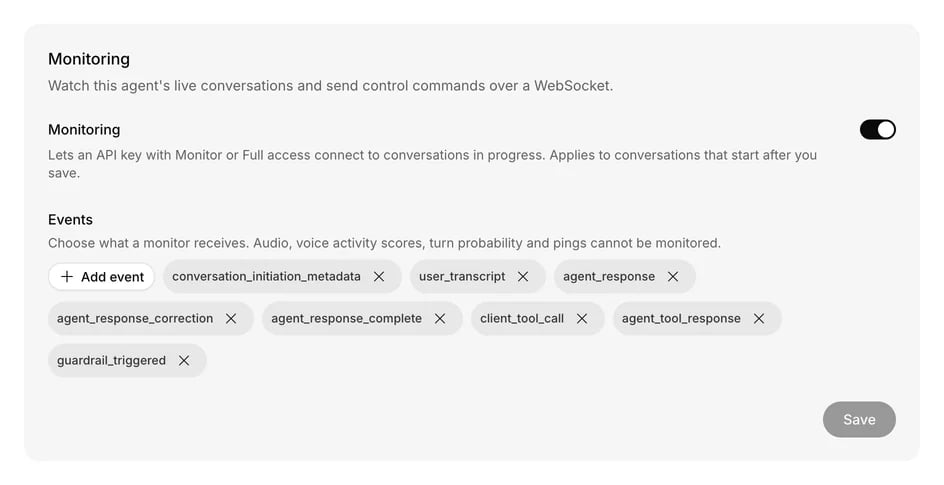
The Monitoring card with its selected events.
Connect
Browsers cannot set headers on a WebSocket, so connect from your server. Keep API
keys out of browser code.
curl
over https://. If nothing stands in the way, it answers 426.
Find a conversation
A conversation must be in progress before you can connect. List the ones you can monitor with the conversations endpoint:id is the conversation_id. A call counts until it ends. A text
conversation counts until it ends, or for a day after its last message.
Events
When you connect you receive the conversation’s last 100 or so events, then new ones as they happen. Every event has these fields, plus the body shown below:event_id counts up within a conversation. It is how you tell events apart after
a reconnect. Events reach you about a second after they happen, and a call’s
final words can take a few seconds to arrive on a Realtime voice.
You choose among these on the agent:
New monitors start with everything except
agent_tool_response_full_payload and
agent_chat_response_part. A tool’s result can hold anything the tool returned,
so select it only when your client can be trusted with it.
A workflow can only mask a sensitive value once it has read and stored it, so a
conversation with sensitive variables or a keypad step works in two ways:
- On a step that can take a sensitive value, you get the events but not the words:
user_transcript,agent_response, corrections and full tool results read•••, and tool arguments are empty. This covers every Collect step, a keypad step, and a step whose way out stores a sensitive value, for as long as the conversation is on that step. The conversation’s stored transcript keeps its usual text. - Every other step is sent as usual, with stored values masked wherever they
appear. In a chat, the customer’s message reaches you with the agent’s reply,
and a turn that stores a value shows
•••for that turn.
agent_chat_response_part is not sent for a conversation that can hold a
sensitive value, because a value could fall across two parts.
Masking finds a value in its digits or its exact text. If a customer gives a value
on a step that does not take it, or says it in another form such as a date in
words, it can reach you unmasked. Replays mask what the workflow has stored by
then.
Audio, voice activity scores, turn probability and pings cannot be monitored.
These always arrive, whatever you select:
Control commands
Send one JSON message per command. Add an optionalcommand_id of your own, and
it comes back on the result.
End the conversation
Transfer to a phone number
transfer_failed.
Add context
context_full.
Take over a chat
transfer_to_number.
While you hold the conversation, the customer’s messages keep arriving as
user_transcript.
Send a message as a person
Support. Up to 4,000 characters.
Give the chat back to the AI
Results
A command that ran is reported to every monitor of the conversation:status is applied or failed. A failed command has a code:
transfer_failed, room_not_closed, agent_unavailable, call_ended,
context_full, not_a_phone_call, timed_out or internal_error.
A command that never ran is answered only to the monitor that sent it, with
status: "refused" and no event_id:
Staying connected
A connection lasts about 13 minutes, then closes with code1012. Reconnect with
the last event_id you saw, and you receive only what came after it:
Limits
- About the last 100 events of a conversation are available. Earlier ones are gone for a monitor, though the stored conversation keeps its messages.
- Each conversation takes 10 connections, and each key 50.
- Each connection takes 20 commands in 10 seconds, and connecting counts toward the key’s rate limit.
- A conversation must already be in progress on an agent with monitoring on. You cannot connect before it starts or after it ends.
- Events carry text and metadata, never audio.